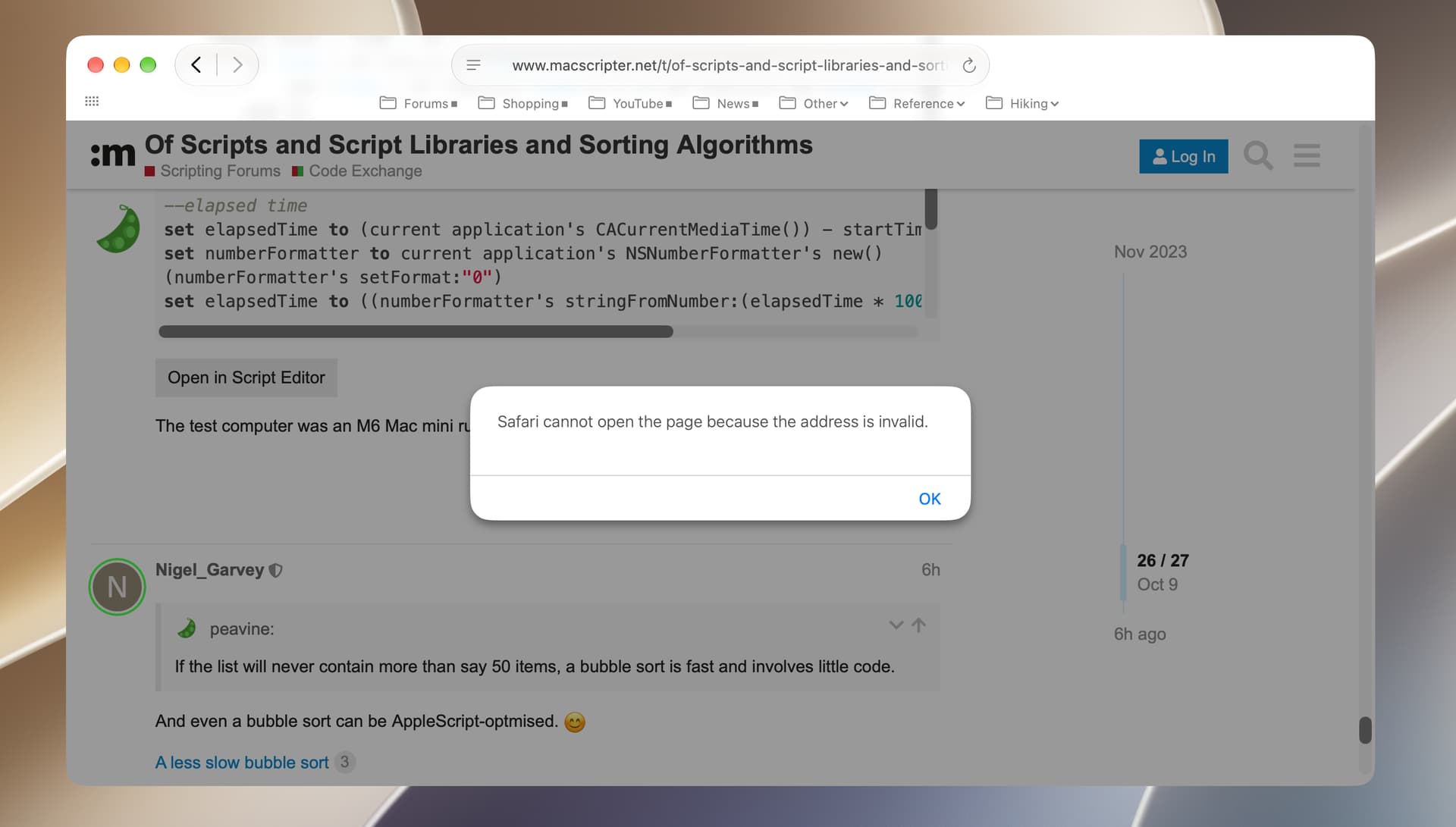
I’ve noticed that MacScripter’s “Open in Script Editor” buttons aren’t working on my M3 MBP since the update to macOS 27.0.1. Script Editor opens, but not with the script texts. Similar buttons on the LNS fora for opening scripts in Script Debugger do still work and the MacScripter ones still work on my older machine.
Is anyone else seeing this? I read yesterday that a potential exploit has been identified involving the “applescript://” URL protocol. It would be handy to get an idea of whether Apple’s now disabled this as a security measure or whether it’s simply a fault on my computer!
Nigel. I recently got a new Mac mini, and I’ve encountered that issue on both my old and new computer. I began experiencing this issue about 6 months ago, and it happens 100 percent of the time. I can’t recall the exact error message, but the current one is included below. The copy-to-clipboard button works reliably.
BTW, I’ve noticed new Privacy & Security restrictions have been placed on opening AppleScripts in macOS Golden Gate. I don’t know if the above issue is part of that.
The only difference between the two versions of the Open In buttons is the URL scheme used (applescript:// for MacScripter and sdapplescript:// on the LNS Forum). I suspect that macOS 27’s handling of the applescript:// URL has changed.
Here’s the source to the Discourse plug-in that implements the Open In button:
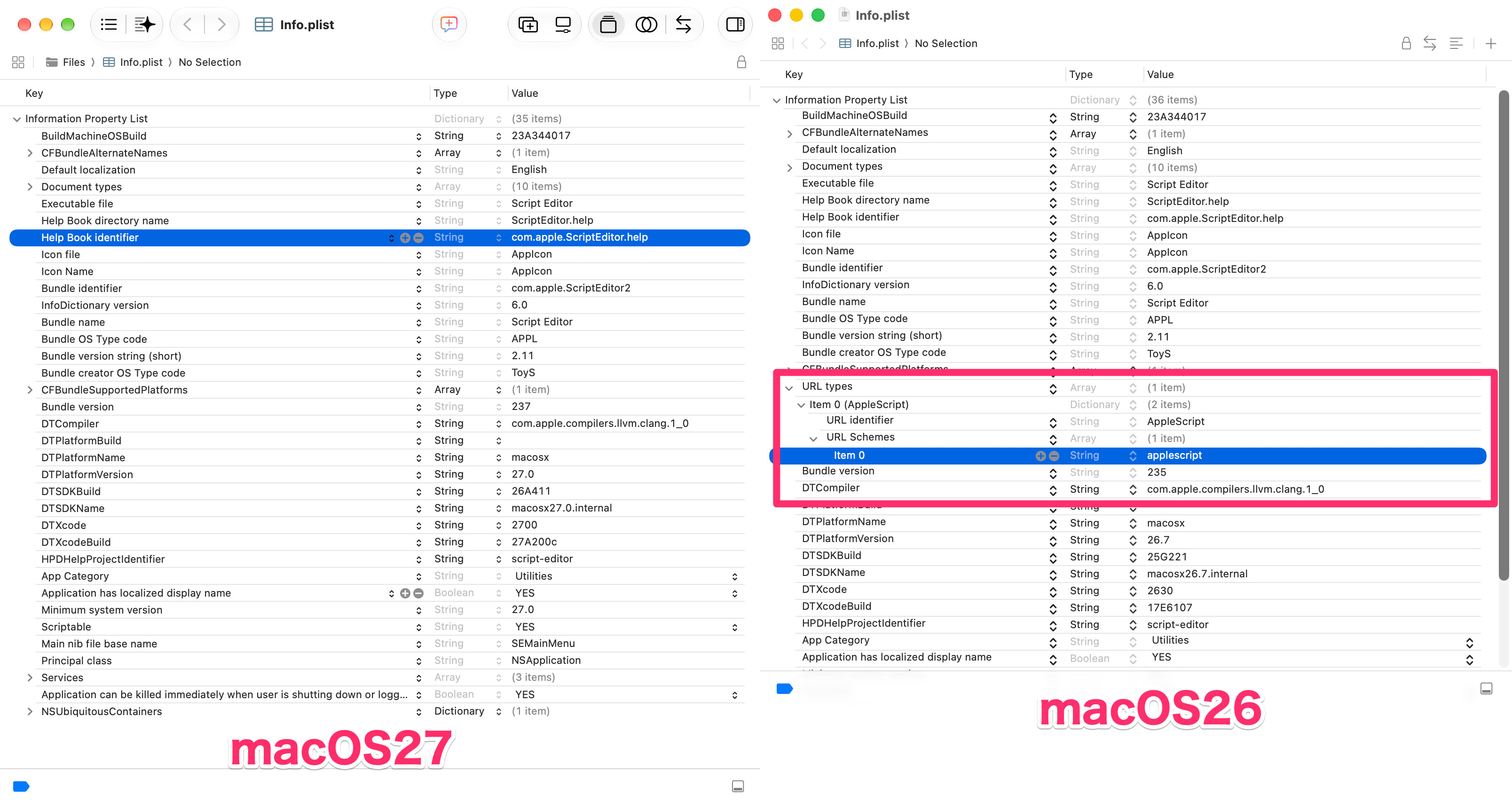
It seems CFBundleURLTypes has been removed from Script Editor’s bundle Info.
macOS 27: CFBundleURLTypes Removed from Script Editor
In macOS 27.0.1, CFBundleURLTypes has been removed from Script Editor’s bundle Info. As a result, Script Editor can no longer receive URLs using the applescript: scheme.
Sending URLs
Around browser version 148, Chromium-based browsers can no longer send applescript: scheme URLs.
Some Chromium-based browsers, such as Arc, can still send applescript: scheme URLs.
Safari can send applescript: scheme URLs.
Firefox can send applescript: scheme URLs.
However, Arc has announced that its service will be discontinued on December 22, 2026. Because of this, it seems that after this date, there will be no Chromium-based browser able to send applescript: scheme URLs.
However, its successor, the AI browser Dia, can still send applescript: scheme URLs.
Behavior with .inetloc Files and Other Files
applescript: scheme URLs are sent to the default handler.
If the file has the OpenWith extended attribute (EA) set, it is sent to the application specified by OpenWith.
If no application can receive applescript: scheme URLs, an application selection dialog is displayed.
[Up to macOS 26] Script Editor.app can receive applescript: scheme URLs.
[macOS 27] Script Editor.app can no longer receive applescript: scheme URLs.
Script Debugger can receive applescript: scheme URLs.
Consequences in macOS 27 and Later
Since Script Editor can no longer receive these URLs:
Script Editor cannot open applescript: scheme URLs.
Script Editor cannot open .inetloc files containing applescript: scheme URLs correctly. Instead of opening the URL, it tries to open the file as a PLIST file.
When No Application Is Available to Receive the URL (Script Debugger)
Safari: Displays an error saying “The address is invalid” and cannot open the URL.
Firefox: Nothing happens (no error is displayed).
Chromium-based browsers: Nothing happens (no error is displayed).
Arc (Chromium-based): Nothing happens (no error is displayed).
Location file (.inetloc): Finder displays an application selection alert.
Since Safari can still send applescript: scheme URLs, I don’t think we can say that macOS has discontinued support for this URL scheme.
Since I use Script Editor.app as my editor, I made two things as workarounds.
A. A desktop widget using Shortcuts to create a new AppleScript from the clipboard.
B. An application that receives applescript: scheme URLs and creates a new script in Script Editor.
Since many AppleScript malware detections have been added to the XProtect rule files for protection against ClickFix attacks, I am trying to take the positive view that Apple did not discontinue sending the applescript: scheme from Safari because they wanted to leave a way to receive it in Script Debugger…
(Though, maybe it was simply less work to discontinue receiving it in Script Editor.)
P.S.
The Acrobat JavaScript you made for me quite some time ago is still in active use! Thank you very much for it. ♪
I presume your AppleScript preferences are set to open script in Script Debugger by default rather than in Script Editor. I tried changing my own preferences to this when I discovered the MacScripter button problem a few days ago, but it didn’t make any difference. Maybe I should have tried a restart in between. Or maybe Apple simply knows better than to mess with Viking!
When I do a Finder Get Info on a random AppleScript file, it shows the Open With application as Script Editor.
I have rebuilt the Launch Services database on macOS 27.0.1, shutdown, and restarted. I also cleared Safari’s Cache and history. When I enter the following URI, it still offers and opens Script Debugger:
applescript://com.apple.scripteditor?action=new
When I try the same URI in Firefox 157.0.1, it throws a small dialog below the address bar asking permission to open the AppleScript link with Script Debugger — which it does.
Apparently, installing Script Debugger overrides the operating system’s notion of the AppleScript application that is to be launched from this URI format. Not something I can explain.
Moving Script Debugger to, and emptying the Trash, allows one to issue the above URI in Safari 27.0.1 and Script Editor opens normally as a result.
I post 7 above, I said that I’d tried changing my AppleScript defaults to favour scripts opening in Script Debugger rather than in Script Editor, but that it hadn’t made any difference with MacScripter’s buttons. In fact I’d made the changes in Script Editor’s settings. These, it turns out, only affect the default editors for script files. Script Debugger’s settings, on the other hand, have a setting which makes it the default editor for all kinds of OSA script files and another setting which makes it respond to “applescript://” URLs in web pages. If I enable the latter, Script Debugger does respond to MacScripter’s “Open in Script Editor” buttons, even in macOS 27.0.1, and opens the posted scripts. Would this explain what you’re seeing? It’s a good enough solution for me personally.
It’s a stretch, but if the applescript:// protocol is no longer supported or associated with any programs on the latest version of macOS, you could try writing an ASObj script to call LSCopyDefaultHandlerForURLScheme or LSSetDefaultHandlerForURLScheme and force the protocol into re-existence. If so, here’s every detail about the protocol to help you write a faithful reimplementation.