Hi,
I am on Script Debugger running a script that opens Script Editor, places the source of a script inside a document and tries to save it as an application.
If I use the ‘save’ command, the script will be saved but it won’t run because even if I give it accessibility permissions, it says it does not have permission.
If I use the Script Editor GUI, the script will be saved and it will run when I give it permissions to do so in the accessibility settings.
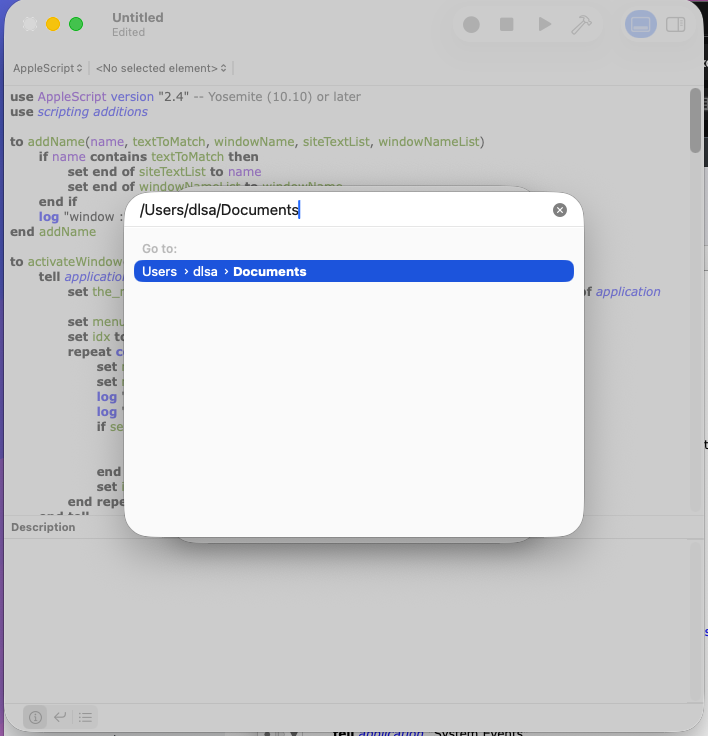
So I’m stuck with scripting the GUI. And I was going well until I had to dismiss the sheet of the save dialog that allows me to input the full path to the new file.
I have tried the sheet commands, clicking the single row that is displayed in the bottom table, keystroke in the text field, and that was it. It does not dismiss. The script ends and focus is returned to Script Debugger from where the script was launched. Tried launching the script from the finder but same results.
I also tried using script debugger itself to do the work, but it crashes.
Is there some way to do this ?
Edit:
I linked the sources of the three scripts involved.
appletgenerator.scpt
openinchrome.scpt
openinsafari.scpt
Thanks,
Regards
Here is a sample script that will save the script as an App in your documents folder
use AppleScript version "2.4" -- Yosemite (10.10) or later
use scripting additions

local i, anElement
tell application "System Events" to tell application process "Script Editor"
	set frontmost to true
	delay 1
	if exists window 1 then
		click menu item "Save…" of menu "File" of menu bar 1
		repeat until exists sheet 1 of window 1
			delay 0.5
		end repeat
		tell sheet 1 of window 1
			tell pop up button 2
				if value ≠ "Application" then
					click
					repeat until exists menu 1
						delay 0.5
					end repeat
					click menu item "Application" of menu 1
				end if
			end tell
			keystroke "g" using {command down, shift down}
			repeat until sheet 1 exists
				delay 0.5
			end repeat
			tell sheet 1
				set value of text field 1 to (POSIX path of (path to documents folder)) as text
				delay 0.5
				keystroke return
			end tell
			repeat while sheet 1 exists
				delay 0.5
			end repeat
			tell (text field 1 whose value of attribute "AXIdentifier" = "saveAsNameTextField")
				set value to "MyScriptName" -- name the script application here
			end tell
			click button "Save"
		end tell
	end if
end tell
Hi,
Thanks for your reply. With your script I got it working in an easier way than what I was doing. But I had to do some modifications because the widget structure I have needed it (I’m on Tahoe)
on testSave(appletPath, appletName)
	local i, anElement
	tell application "System Events" to tell application process "Script Editor"
		set frontmost to true
		delay 1
		if exists window "Untitled" then
			click menu item "Save…" of menu "File" of menu bar 1
			repeat until exists sheet 1 of window "Untitled"
				delay 0.5
			end repeat
			keystroke "g" using {command down, shift down}
			tell sheet 1 of window "Untitled"
				repeat until sheet 1 exists
					delay 0.5
				end repeat
				tell sheet 1
					set value of text field 1 to (POSIX path of folder appletPath)
					delay 0.5
					keystroke return
				end tell
				repeat while sheet 1 exists
					delay 0.5
				end repeat
			end tell
			tell splitter group 1 of sheet 1 of window "Untitled"
				set fileNameField to text field named "Save As:"
				set value of fileNameField to appletName
				tell pop up button "File Format:"
					if value ≠ "Application" then
						click
						repeat until exists menu 1
							delay 0.5
						end repeat
						click menu item "Application" of menu 1
					end if
				end tell
				click button "Save"
			end tell
		end if
	end tell
end testSave
Thanks,
Regards