Oxylos. A Golden Gate computer is a Mac computer running macOS 27.0 Golden Gate. I’ll be more specific in the future.
I still can’t get your script to run. However, I’ll be interested to read through it tomorrow to understand its operation.
The column shell command can be replaced with AppleScript or ASObjC code. Both approaches should not be used, though, and which you use is entirely your preference. I’ll work on an ASObjC regex solution tomorrow–it would truncate long columns and include the necessary space padding for proper alignment.
If time permits, can you post the raw data of 5 or so of the Led Zeppelin records before any processing for column length or swiftDialog display. Also, at what point in the script does the column-line-too-long error occur?
It sounds like we’re getting close to a final script–all that’s needed are a few refinements.
Here is a solution that does not need any third party utility.
Run the script as is to see if it works right.
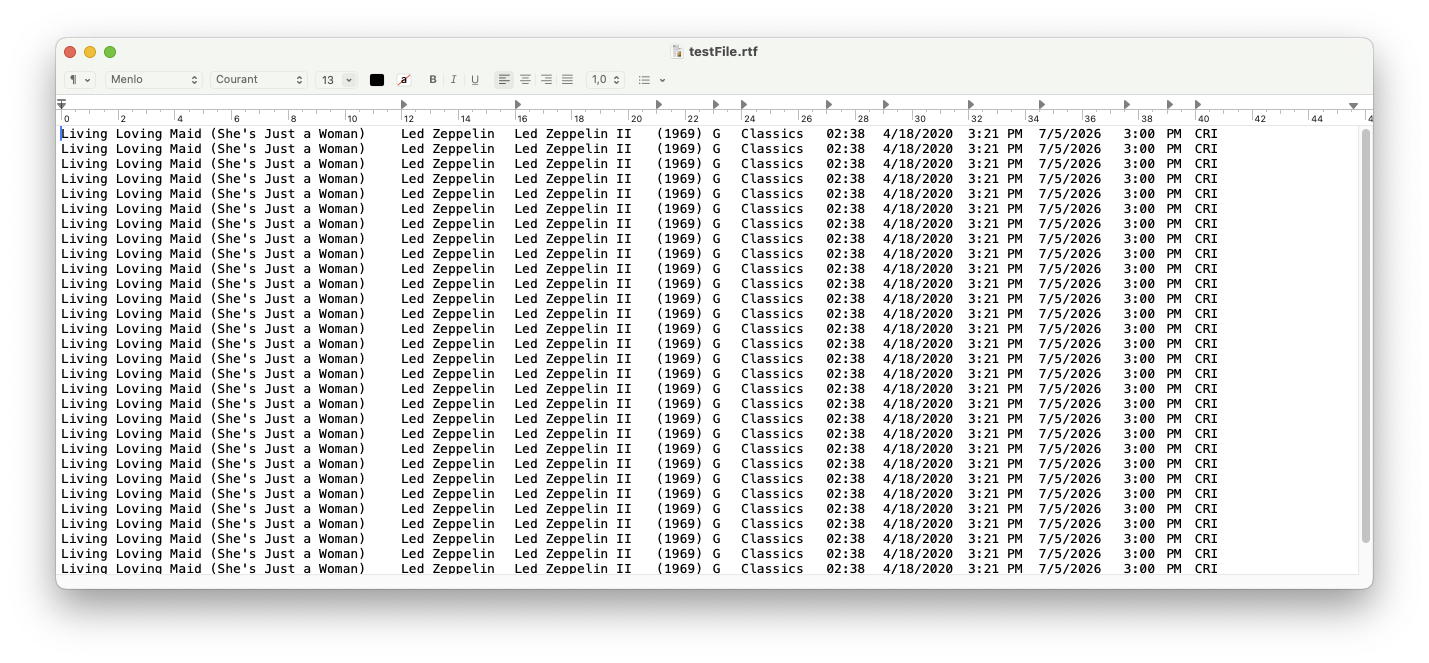
You should get what you see in the following screen shot.
After that, try to inject your data.
You may need to correct the tabulations count and positions, and maybe the window width.
Nothing more.
use framework "Foundation"
use framework "AppKit"
use scripting additions
property mm2pt : 2.834645669291 -- used to convert with precision millimeters to points
-- create a test text
set theText to "Living Loving Maid (She's Just a Woman) Led Zeppelin Led Zeppelin II (1969) G Classics 02:38 4/18/2020 3:21 PM 7/5/2026 3:00 PM CRI"
repeat 5 times
set theText to theText & return & theText
end repeat
set theText to current application's NSString's stringWithString:theText
-- define the font
set foreColor to current application's NSDictionary's dictionaryWithObject:(current application's NSColor's blackColor()) forKey:(current application's NSForegroundColorAttributeName)
set theFont to current application's NSFont's fontWithName:"Menlo" |size|:13
-- create a new paragraph style
set paraStyle to current application's NSParagraphStyle's defaultParagraphStyle()'s mutableCopy()
-- define position of tabulations
set thePos to {120, 160, 210, 230, 240, 270, 290, 320, 345, 375, 390, 400}
-- add the tab stops to the paragraph style
paraStyle's setTabStops:{}
set theTabs to current application's NSMutableArray's new()
repeat with aPos in thePos
(theTabs's addObject:(current application's NSTextTab's alloc()'s initWithTextAlignment:(current application's NSTextAlignmentLeft) location:(aPos * mm2pt) options:(missing value)))
end repeat
paraStyle's setTabStops:theTabs
-- create a custom style with the above
set customStyle to current application's NSMutableDictionary's dictionaryWithObjects:{paraStyle, theFont} forKeys:{current application's NSParagraphStyleAttributeName, (current application's NSFontAttributeName)}
customStyle's addEntriesFromDictionary:foreColor
-- apply the custom paragraph style to the imported text
set styledString to current application's

alloc()'s initWithString:theText attributes:customStyle
-- create an RTF file to preserve tabs, font, and text size
set destFile to "~/Desktop/testFile.rtf"
set destFile to (current application's NSString's stringWithString:destFile)'s stringByExpandingTildeInPath()
set RTFData to (styledString's RTFFromRange:({0, styledString's |length|()}) documentAttributes:(missing value))
set theResult to (RTFData's writeToFile:destFile atomically:(true))
-- open the file in TextEdit
tell application id "com.apple.TextEdit"
activate
set destFile to destFile as string
if path of documents contains destFile then close (document 1 whose path = destFile) saving no
open destFile as «class furl»
set {theX, theY, theW, theH} to bounds of window 1
set bounds of window 1 to {theX, theY, 1800, theH}
end tell
This script worked without issue on my computer running macOS Golden Gate Public Beta 2.
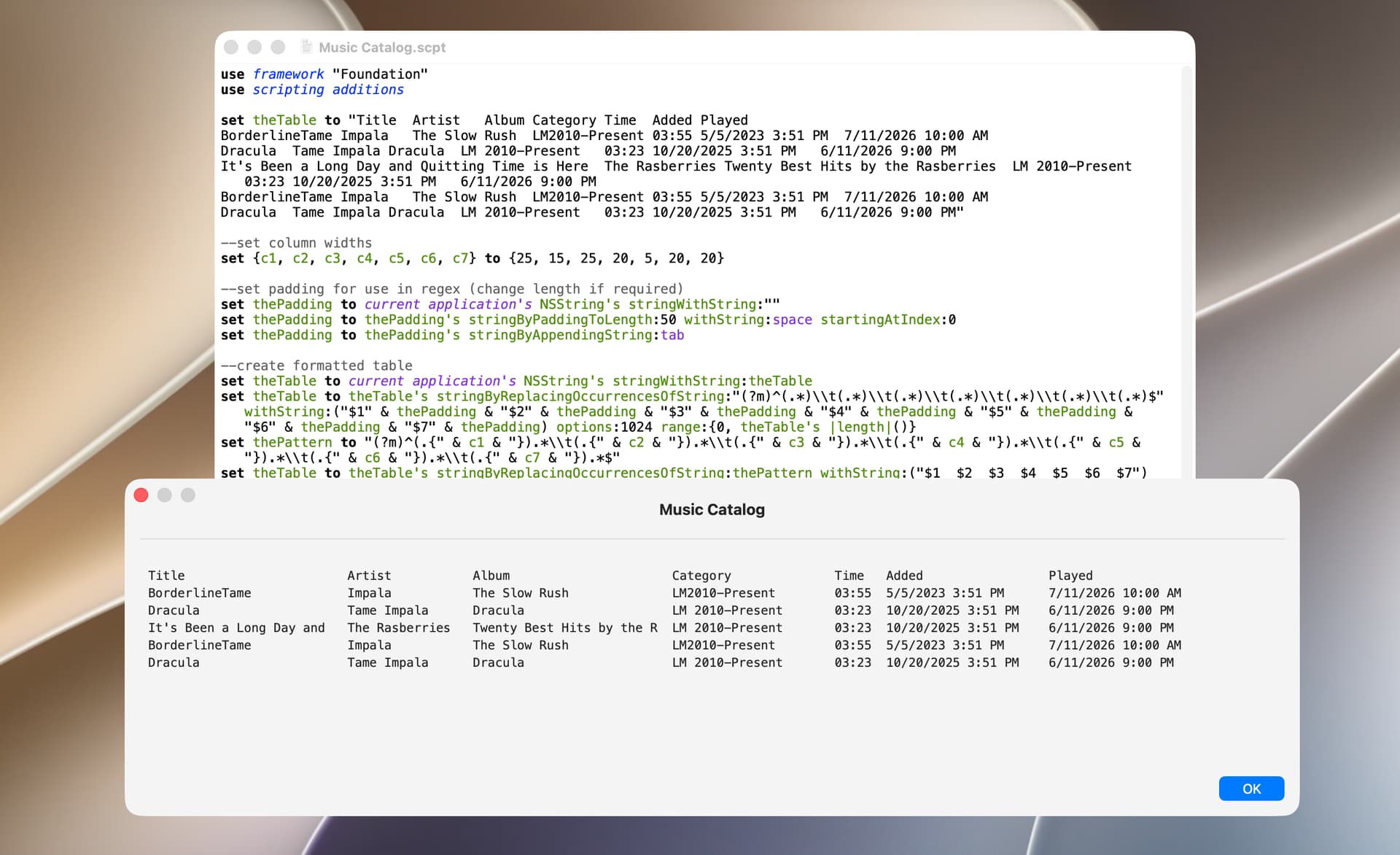
use framework "Foundation"
use scripting additions

set theTable to "Title	Artist	Album	Category	Time	Added	Played
BorderlineTame	Impala	The Slow Rush	LM2010-Present	03:55	5/5/2023 3:51 PM	7/11/2026 10:00 AM
Dracula	Tame Impala	Dracula	LM 2010-Present	03:23	10/20/2025 3:51 PM	6/11/2026 9:00 PM
It's Been a Long Day and Quitting Time is Here	The Rasberries	Twenty Best Hits by the Rasberries	LM 2010-Present	03:23	10/20/2025 3:51 PM	6/11/2026 9:00 PM
BorderlineTame	Impala	The Slow Rush	LM2010-Present	03:55	5/5/2023 3:51 PM	7/11/2026 10:00 AM
Dracula	Tame Impala	Dracula	LM 2010-Present	03:23	10/20/2025 3:51 PM	6/11/2026 9:00 PM"

--set column widths
set {c1, c2, c3, c4, c5, c6, c7} to {25, 15, 25, 20, 5, 20, 20}

--set padding for use in regex (change length if required)
set thePadding to current application's NSString's stringWithString:""
set thePadding to thePadding's stringByPaddingToLength:50 withString:space startingAtIndex:0
set thePadding to thePadding's stringByAppendingString:tab

--create formatted table
set theTable to current application's NSString's stringWithString:theTable
set theTable to theTable's stringByReplacingOccurrencesOfString:"(?m)^(.*)\\t(.*)\\t(.*)\\t(.*)\\t(.*)\\t(.*)\\t(.*)$" withString:("$1" & thePadding & "$2" & thePadding & "$3" & thePadding & "$4" & thePadding & "$5" & thePadding & "$6" & thePadding & "$7" & thePadding) options:1024 range:{0, theTable's |length|()}
set thePattern to "(?m)^(.{" & c1 & "}).*\\t(.{" & c2 & "}).*\\t(.{" & c3 & "}).*\\t(.{" & c4 & "}).*\\t(.{" & c5 & "}).*\\t(.{" & c6 & "}).*\\t(.{" & c7 & "}).*$"
set theTable to theTable's stringByReplacingOccurrencesOfString:thePattern withString:("$1  $2  $3  $4  $5  $6  $7") options:1024 range:{0, theTable's |length|()}

--use the formatted table in an app such as TextEdit
--set theTable to theTable as text

--change line endings and display table in swiftDialog
set theTable to theTable's stringByReplacingOccurrencesOfString:linefeed withString:"<br>" options:1024 range:{0, theTable's |length|()} --format line endings for markdown
do shell script "/usr/local/bin/dialog --title 'Music Catalog' --titlefont 'size=15' --message " & quoted form of (theTable as text) & " --messagefont 'size=12,name=Menlo' --messagealignment left --width 1150 --height 300 --windowbuttons close --hideicon --resizable; exit 0"
peavine,
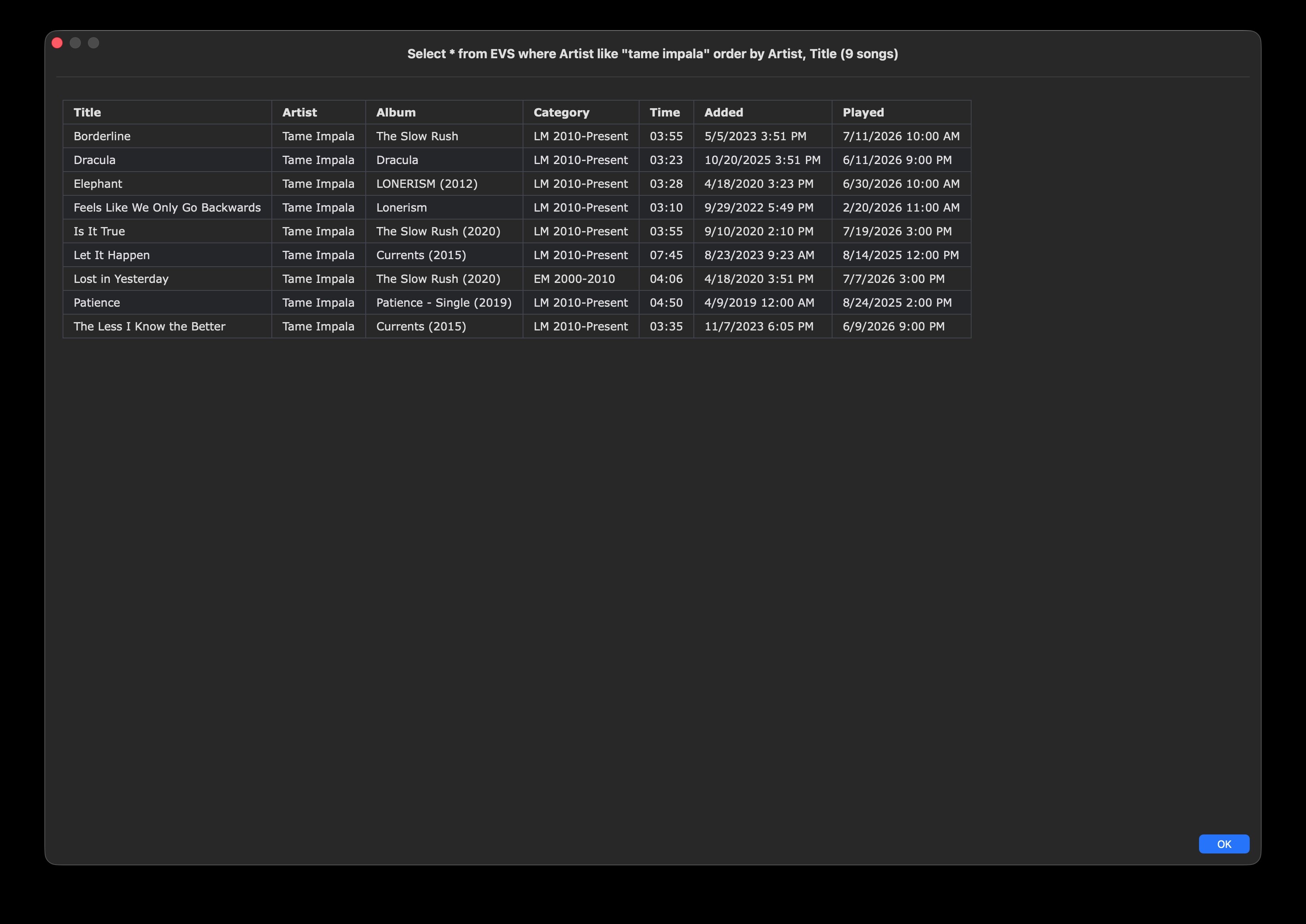
I went back to your initial post and tried your table method instead. Turned out much simpler, no fixed font or space padding required. Much preferred and worked just fine, for a limited number of records. For instance, Artist=Tame Impala is only 9 records, here is the result.
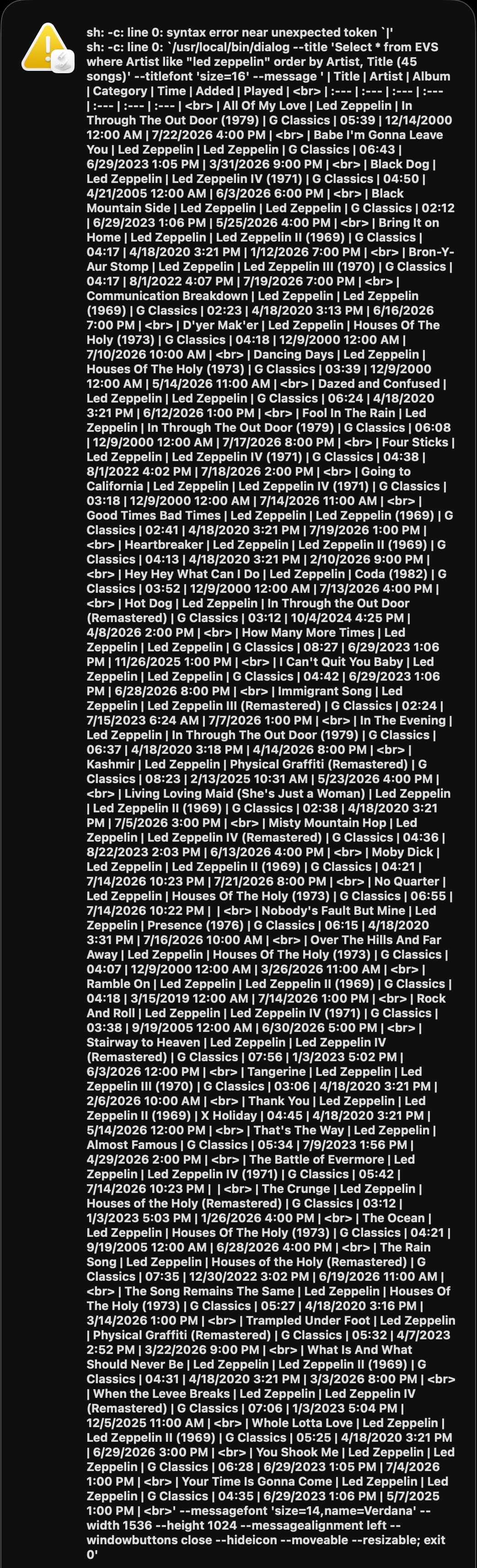
But Artist=Led Zeppelin (45 records) crashed.
------------------------------------------------------------------------------------------------------------------------
(*
	KPCW EVS

	Written July 2026 by Jay Zorzy

	Query the KPCW EVS database.	  It has almost 20,000 records.

		V1.0 (7/27/2026) Written, macOS Tahoe 26.5.2
*)
------------------------------------------------------------------------------------------------------------------------
use AppleScript version "2.4" -- Yosemite (10.10) or later
use sqlLib : script "SQLite Lib2" version "1.1.0" --SQL stuff
use scripting additions

property noText : ""
property DBfile : "~/Library/Databases/KPCW.db" --SQL database
property aTitle : "EVS Query"
property aPrompt : "Enter artist or song title"
property buttonCancel : "Cancel"
property buttonArtist : "Artist"
property buttonSong : "Song"
property qPrefix : "Select * from EVS where "
property qArtist : "Artist like \""
property qSong : "Title like \""
property qSuffix : "\" order by Artist, Title"

property aBar : " | "
property aLine : aBar & ":---"
property theHeader : {aBar & "Title", aBar & "Artist", aBar & "Album", aBar & "Category", aBar & "Time", aBar & "Added", aBar & "Played"}

property winWide : 1536
property winHigh : 1024
property swiftDialog : "/usr/local/bin/dialog"
property newLine : "<br>"
property endRecord : newLine --or return

------------------------------------------------------------------------------------------------------------------------
---  Format Header
set fmtHeader to noText
repeat with i from 1 to length of theHeader --each label
	set fmtHeader to fmtHeader & (item i of theHeader)
end repeat --theHeader list
set fmtHeader to fmtHeader & aBar & endRecord --EOL

repeat with i from 1 to length of theHeader --each line
	set fmtHeader to fmtHeader & aLine
end repeat --theHeader list
set fmtHeader to fmtHeader & aBar & endRecord --EOL

---  Open the Music Library
set KPCWdb to open db in file DBfile

repeat --until Cancel
	try --Prompt user for search parameters (Artist/Song string)
		display dialog aPrompt default answer noText with title aTitle buttons {buttonCancel, buttonArtist, buttonSong} cancel button buttonCancel
		copy the result as list to {theAction, theAnswer}

		if (theAction = buttonArtist) then --Artist
			set aQuery to qPrefix & qArtist & theAnswer & qSuffix
		else if (theAction = buttonSong) then --Song
			set aQuery to qPrefix & qSong & theAnswer & qSuffix
		end if
	on error --Cancel button
		exit repeat
	end try

	---  Query the EVS
	set evsResults to query db KPCWdb sql string aQuery result type list of records
	set recCount to count of evsResults

	---  Format records
	set fmtResults to fmtHeader --header built first
	repeat with i from 1 to recCount --Format columns for each record
		set fmtResults to fmtResults & aBar & Title of item i of evsResults
		set fmtResults to fmtResults & aBar & Artist of item i of evsResults
		set fmtResults to fmtResults & aBar & Album of item i of evsResults
		set fmtResults to fmtResults & aBar & Category of item i of evsResults
		set fmtResults to fmtResults & aBar & |Time| of item i of evsResults
		set fmtResults to fmtResults & aBar & Added of item i of evsResults
		set fmtResults to fmtResults & aBar & Played of item i of evsResults & aBar & endRecord
	end repeat --Format Records

	---  Format the text to display (title and body)
	if (recCount = 1) then
		set theWord to " song"
	else
		set theWord to " songs"
	end if
	set theTitle to (aQuery & " (" & recCount as text) & theWord & ")" --Title

	---  Body already to go, form the command line to call swiftDialog
	set theCommand to ((swiftDialog & " --title '" & theTitle & "' --titlefont 'size=16' --message '" & fmtResults & ¬
		"' --messagefont 'size=14,name=Verdana' --width " & winWide as text) & " --height " & winHigh as text) & ¬
		" --messagealignment left --windowbuttons close --hideicon --moveable --resizable; exit 0"

	---  Display any results to user
	if (recCount > 0) then do shell script theCommand

end repeat --until Cancel

close KPCWdb --close the Music Library

---  End KPCW EVS
Oxylos. I edited my earlier markdown-table script to include a table with 80 lines, and it worked fine. So, 45 Led Zeppelin records should not be an issue. I tested your script and received the same error as before, which prevents me from troubleshooting the crash described in your post.
It appears likely that the actual Led Zeppelin music data contains something (perhaps some character) that is causing swiftDialog or the shell to issue an error. I looked through the error message screenshot you posted and didn’t see anything. If you could run your script and post the the value of the fmtResults variable, I’d be happy to test it for errors. I looked at your script and it seems fairly straightforward.
BTW, if you post the fmtResults, please post it as code just to make sure that no characters are changed by the forum software.
I just noticed that you use single quotes to bracket fmtResults instead of the quoted form of property. It’s always been my understanding (perhaps mistakenly) that the quoted form of property does a better job of handling special characters. Anyways, you might give this a try FWIW.
peavine,
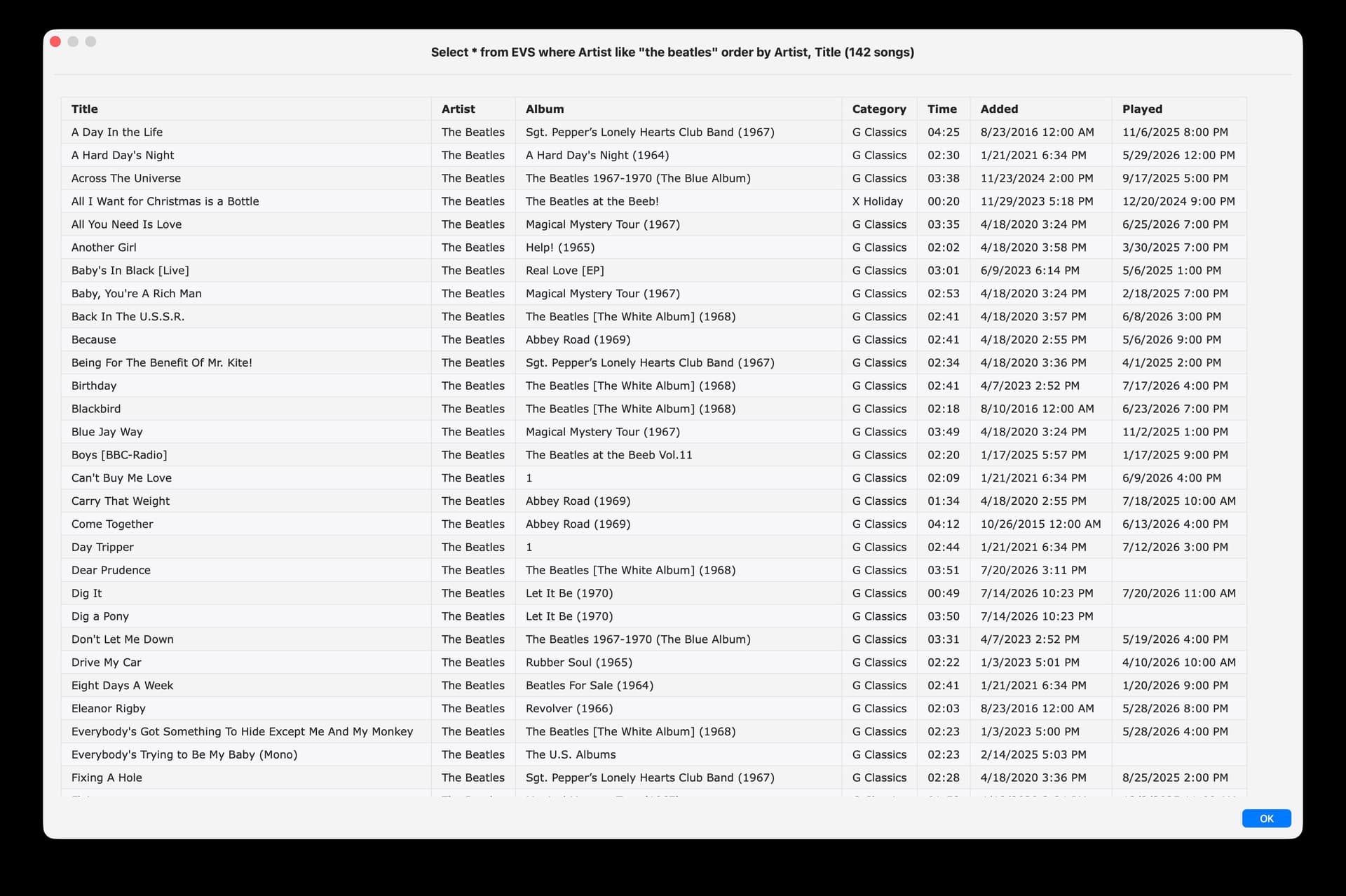
I had tried quoted form of theResults numerous times in the past but I mistakenly neglected to remove the single quotes from the command line (after --message) until now. That simple fix did the trick as I just queried on The Beatles which produced 142 records and it worked and displayed perfectly. My bad.
	---  Body already to go, form swiftDialog command line, display any results to user
	set theCommand to ((swiftDialog & " --title '" & theTitle & "' --titlefont 'size=16' --message " & quoted form of fmtResults & ¬
		" --messagefont 'size=14,name=Verdana' --width " & winWide as text) & " --height " & winHigh as text) & ¬
		" --messagealignment left --windowbuttons close --hideicon --moveable --resizable; exit 0"
	if (recCount > 0) then do shell script theCommand