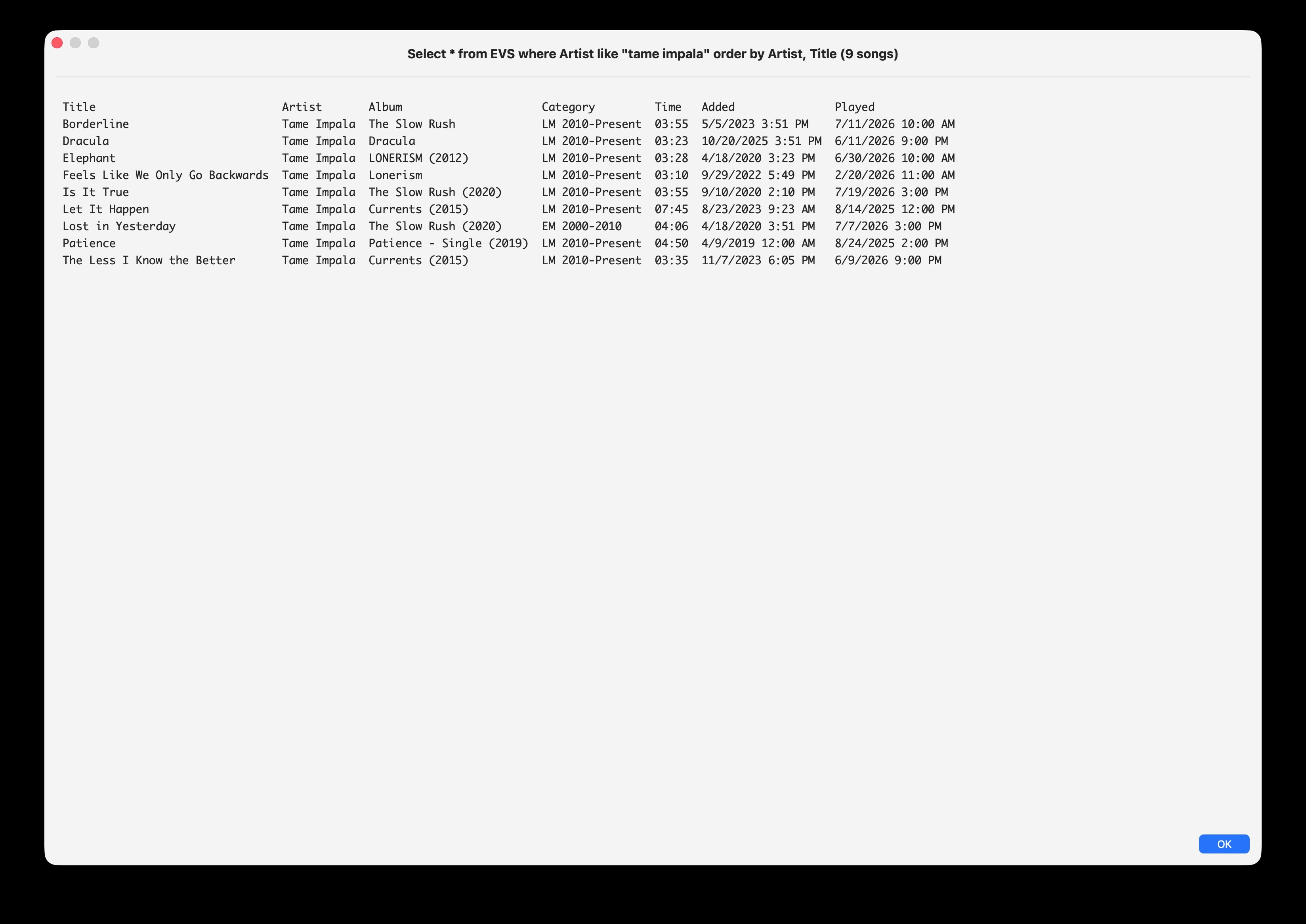
I’m writing a script to query an SQL database and put the results in a simple text window. I’ve tried using apps like TextEdit or Notes but they don’t comply and seem overkill. I just need a simple MacOS window into which I can put aligned text. No images, colors or anything fancy, just text. A sole close button would suffice. And no toolbar. Just a frame, a close button, title and the formatted text.
So ideally the window would have:
Red X close button in upper left corner (no yellow minimize / green maximize needed)
Title text (in bold)
Body text - formatted monospaced font, with Tabs to separate columns and Carriage Returns to separate records
To specify dimensions might be nice
I need only the Window for temporary viewing, then close and discard the results; no interest in saving to a file.
If you are looking for something like a library script that can be called with various arguments, I recently posted a sample in a recent topic here. Changing the font and color set in the library should be fairly straight-forward, and more tab stops can be added if needed.
Sorry if this is NS(whatever) 101. As you can see, I need only basic functionality to create and populate a simple window. Would still greatly value some perhaps one line answers such as “go here to learn more”, “you can create such a window with these steps”, “here are the details on classes you’ll need to specify those window dimensions, close button, title and body text”, appreciate whatever can get me rolling. And btw I’ve already written the SQL access and its query results are perfectly formatted so just need some help putting that text in the aforementioned window. Thanks.
Why not open that SQL database (e.g. sqlite3) using this construct:
sqlite3 -header -csv /path/to/db
and when you run the script, simply redirect the output to a CSV on your Desktop:
./sql_dtu.zsh > ~/Desktop/my.csv
Then, in the Finder, click once on that CSV file and press the space bar. Apple’s Quick Look will open that CSV in columns. When done viewing, just click the ESC key to dismiss.
That is what I do with this Zsh script to get output from the Safari History database:
#!/bin/zsh

: <<'COMMENT'
Generate a CSV document with headers showing current Safari History
database content. You can view the columnar CSV in a scrollable QuickLook window,
or load it into a spreadsheet

Reference: http://2016.padjo.org/tutorials/sqlite-your-browser-history/

Usage in Terminal:
./sql_dtu.zsh > ~/Desktop/hist.csv

VikingOSX, 2020-07-16, Apple Support Communities, No warranties expressed or implied.
COMMENT

sqlite3 -header -csv $HOME/Library/Safari/History.db \
"SELECT DISTINCT
    datetime(visit_time + 978307200, 'unixepoch', 'localtime') AS visit_time,
    coalesce(nullif(title,''), 'Unavailable') as title, url
FROM
    history_visits
INNER JOIN
    history_items ON
        history_items.id = history_visits.history_item;"
exit 0
Beats time lost learning/coding unfamiliar Cocoa framework (Foundation/AppKit) details. That sqlite3 code works just fine on Safari 26.6 with macOS Tahoe 26.6.
Oxylos. The suggestion from VikingOSX to use Quick Look is an excellent one. FWIW, Quick Look can be called from within a script by way of the qlmanage shell command, although the [DEBUG] text in the window title is an annoyance. A simple example:
set theFile to POSIX path of (choose file)
do shell script "/usr/bin/qlmanage -p " & quoted form of theFile
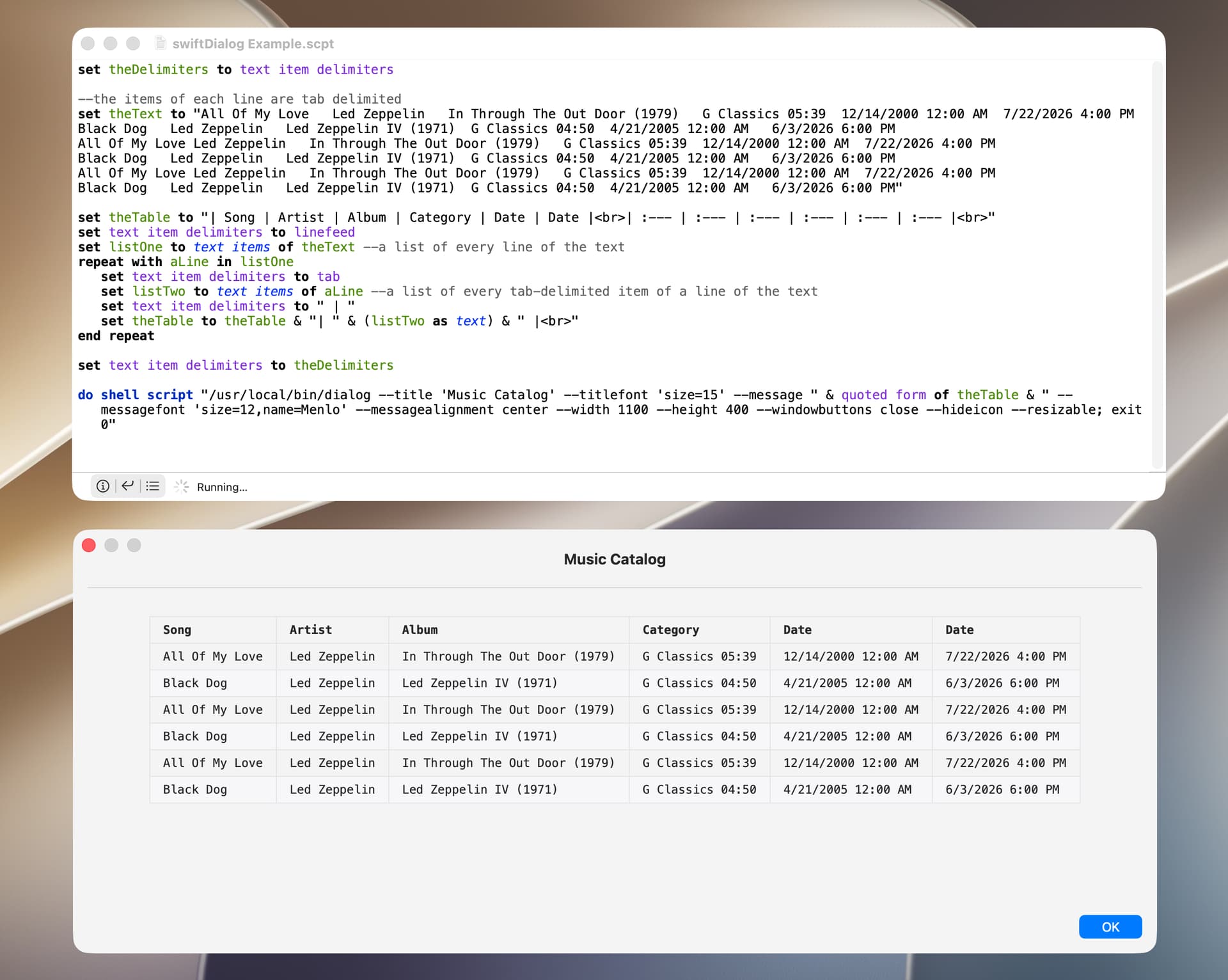
You might also consider using the open source swiftDialog app (here). You can simply display your text without change or you can format it as a markdown table.
set theDelimiters to text item delimiters

--the items of each line are tab delimited
set theText to "All Of My Love	Led Zeppelin	In Through The Out Door (1979)	G Classics 05:39	12/14/2000 12:00 AM	7/22/2026 4:00 PM
Black Dog	Led Zeppelin	Led Zeppelin IV (1971)	G Classics 04:50	4/21/2005 12:00 AM	6/3/2026 6:00 PM
All Of My Love	Led Zeppelin	In Through The Out Door (1979)	G Classics 05:39	12/14/2000 12:00 AM	7/22/2026 4:00 PM
Black Dog	Led Zeppelin	Led Zeppelin IV (1971)	G Classics 04:50	4/21/2005 12:00 AM	6/3/2026 6:00 PM
All Of My Love	Led Zeppelin	In Through The Out Door (1979)	G Classics 05:39	12/14/2000 12:00 AM	7/22/2026 4:00 PM
Black Dog	Led Zeppelin	Led Zeppelin IV (1971)	G Classics 04:50	4/21/2005 12:00 AM	6/3/2026 6:00 PM"

set theTable to "| Song | Artist | Album | Category | Date | Date |<br>| :--- | :--- | :--- | :--- | :--- | :--- |<br>"
set text item delimiters to linefeed
set listOne to text items of theText --a list of every line of the text
repeat with aLine in listOne
	set text item delimiters to tab
	set listTwo to text items of aLine --a list of every tab-delimited item of a line of the text
	set text item delimiters to " | "
	set theTable to theTable & "| " & (listTwo as text) & " |<br>"
end repeat

set text item delimiters to theDelimiters

do shell script "/usr/local/bin/dialog --title 'Music Catalog' --titlefont 'size=15' --message " & quoted form of theTable & " --messagefont 'size=12,name=Menlo' --messagealignment center --width 1100 --height 400 --windowbuttons close --hideicon --resizable; exit 0"
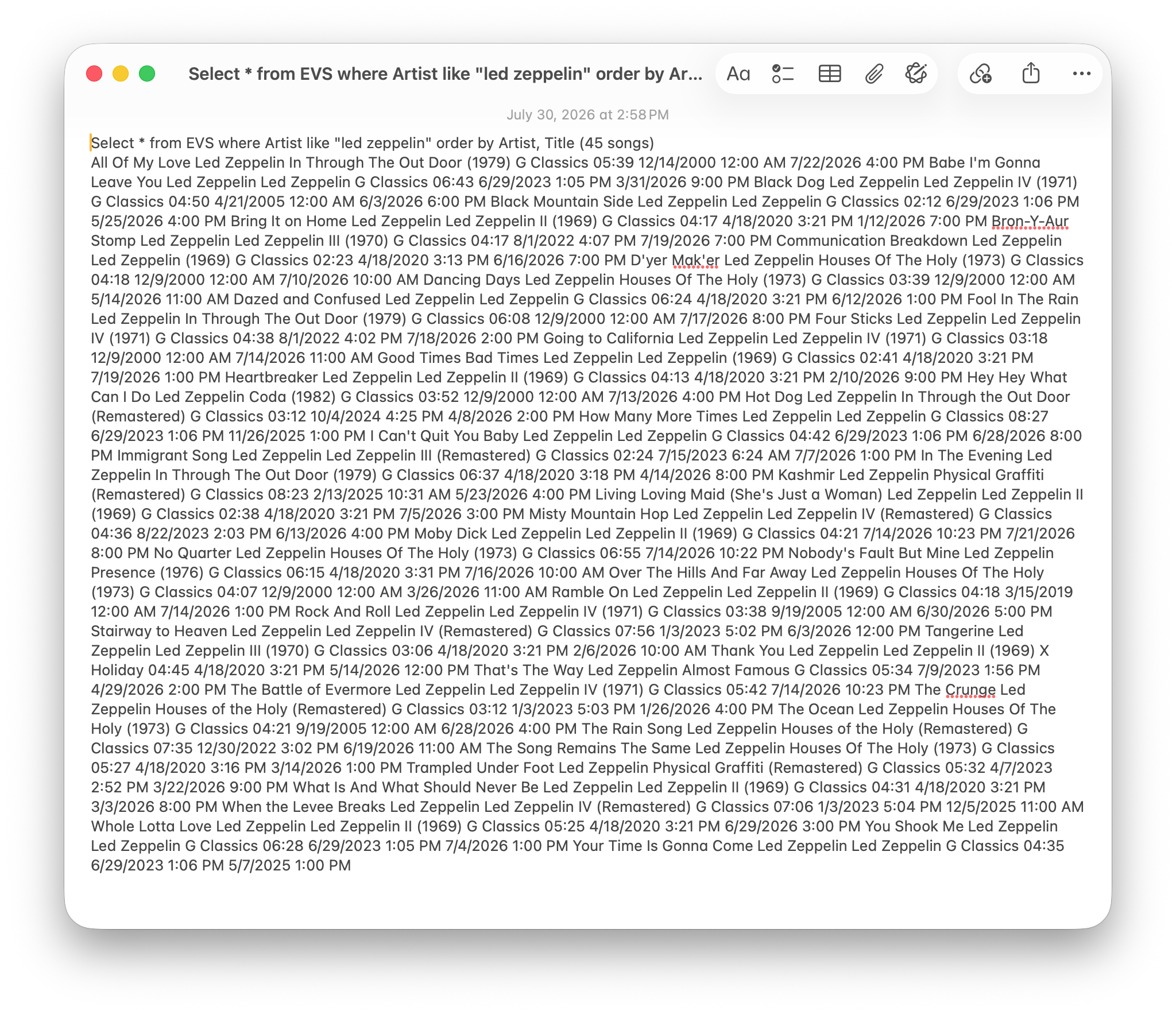
How do you a) set the font, b) retain multiples of space characters, c) insert tabs, and d) insert line breaks (i.e. return)? My example with 45 records is perfectly formatted in its script variable but when put into Notes comes out as just a giant stream of words.
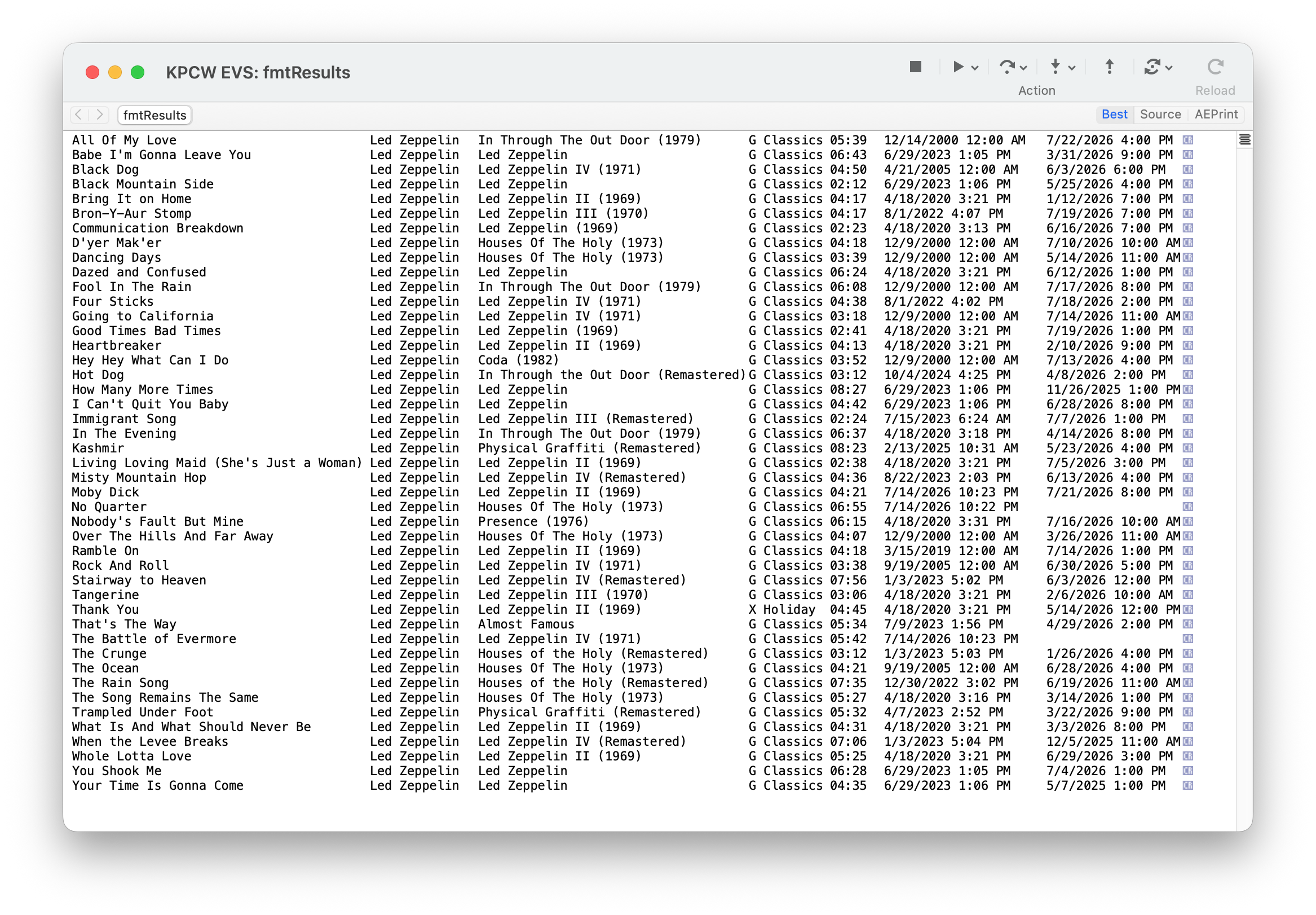
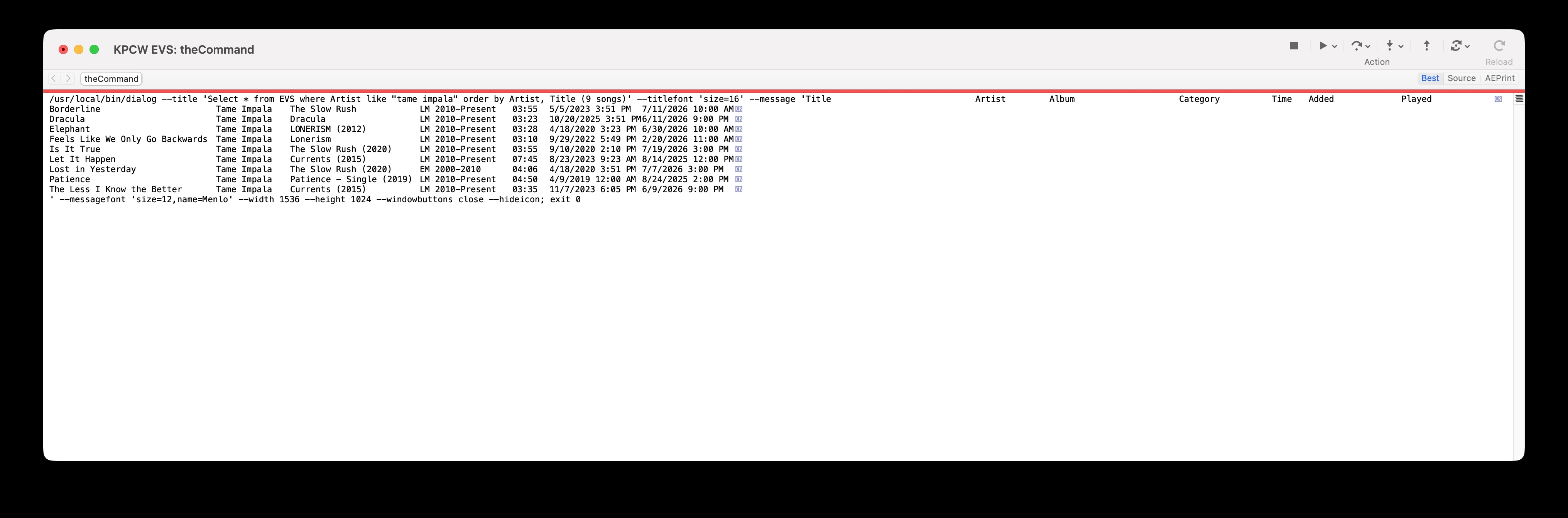
Your tabular view is slick but I might prefer a more basic format. Like exactly as shown in Script Debugger window of variable fmtResults here (although nice to have column headers Title, Artist, etc. in bold). But I can’t seem to get the formatting sent to scriptDialog correct…
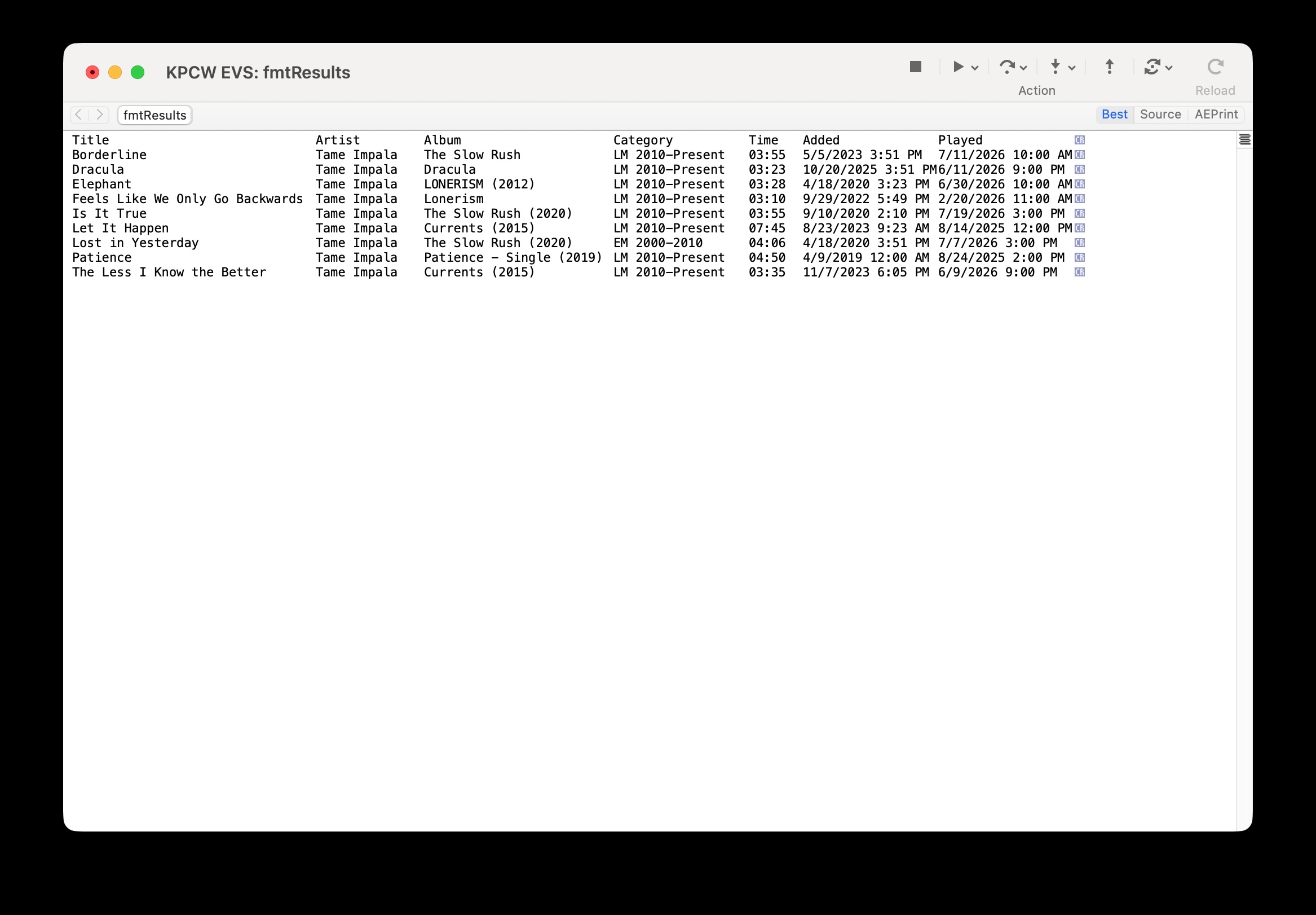
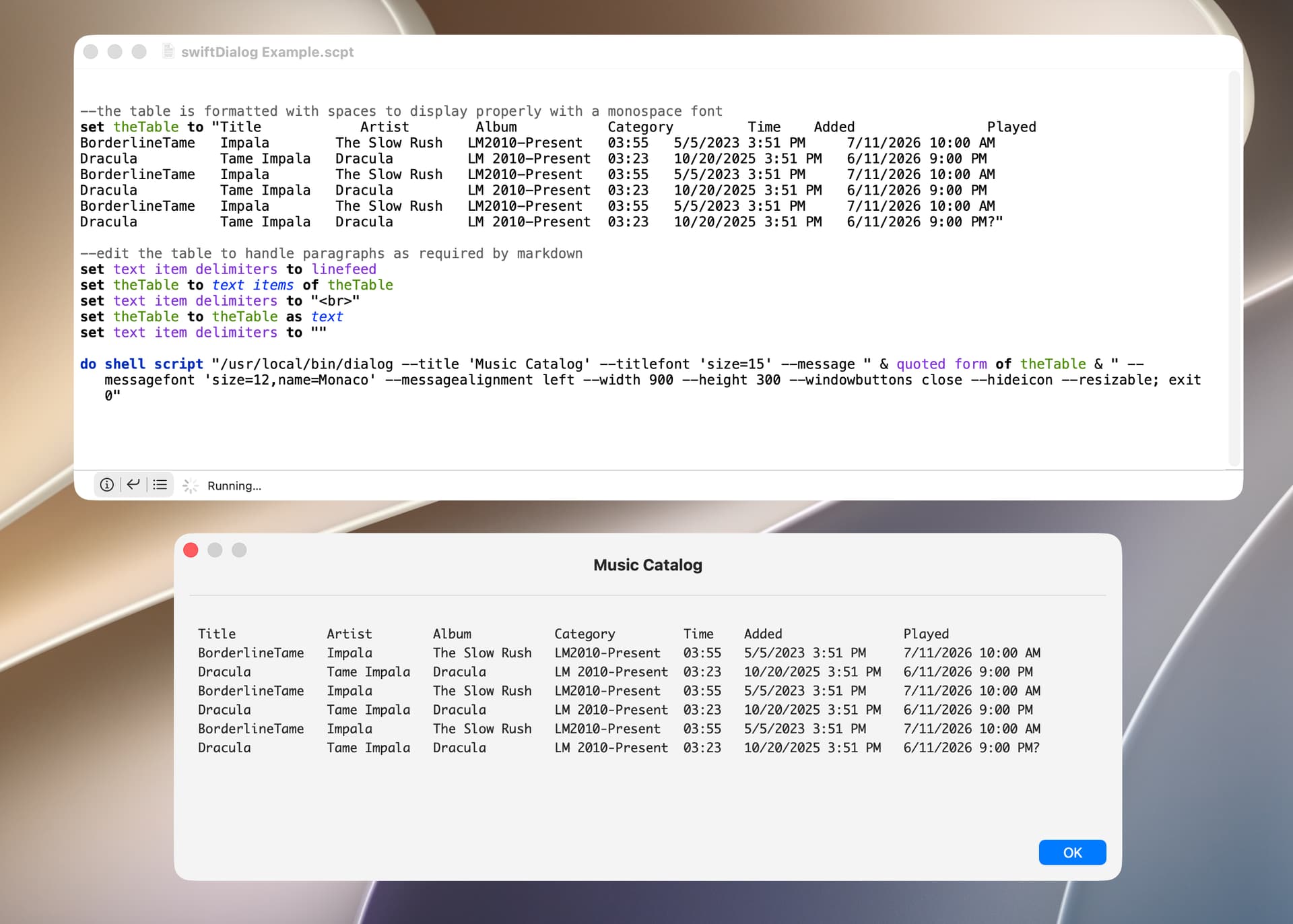
Oxylos. I didn’t understand that your table text is formatted with spaces to display properly with a monospace font. I guess that’s what you meant when you referred to aligned text. This script should do what you want.
--the table is formatted with spaces to display properly with a monospace font
set theTable to "Title            Artist        Album           Category         Time    Added                Played
BorderlineTame   Impala        The Slow Rush   LM2010-Present   03:55   5/5/2023 3:51 PM     7/11/2026 10:00 AM
Dracula          Tame Impala   Dracula         LM 2010-Present  03:23   10/20/2025 3:51 PM   6/11/2026 9:00 PM
BorderlineTame   Impala        The Slow Rush   LM2010-Present   03:55   5/5/2023 3:51 PM     7/11/2026 10:00 AM
Dracula          Tame Impala   Dracula         LM 2010-Present  03:23   10/20/2025 3:51 PM   6/11/2026 9:00 PM
BorderlineTame   Impala        The Slow Rush   LM2010-Present   03:55   5/5/2023 3:51 PM     7/11/2026 10:00 AM
Dracula          Tame Impala   Dracula         LM 2010-Present  03:23   10/20/2025 3:51 PM   6/11/2026 9:00 PM?"

--edit the table to handle paragraphs as required by markdown
set text item delimiters to linefeed
set theTable to text items of theTable
set text item delimiters to "<br>"
set theTable to theTable as text
set text item delimiters to ""

do shell script "/usr/local/bin/dialog --title 'Music Catalog' --titlefont 'size=15' --message " & quoted form of theTable & " --messagefont 'size=12,name=Monaco' --messagealignment left --width 900 --height 300 --windowbuttons close --hideicon --resizable; exit 0"
FWIW, the following is from the swiftDialog documentation:
Newlines
In Markdown due to the definition of how paragraphs and line breaks are handled, a single \n is not sufficient to create a new line. You should end a line with two spaces, and then a \n or you can trigger a new paragraph with a double \n\n. You can also use the <br> tag to denote a newline which will get interpreted as \n ([space][space]\n)
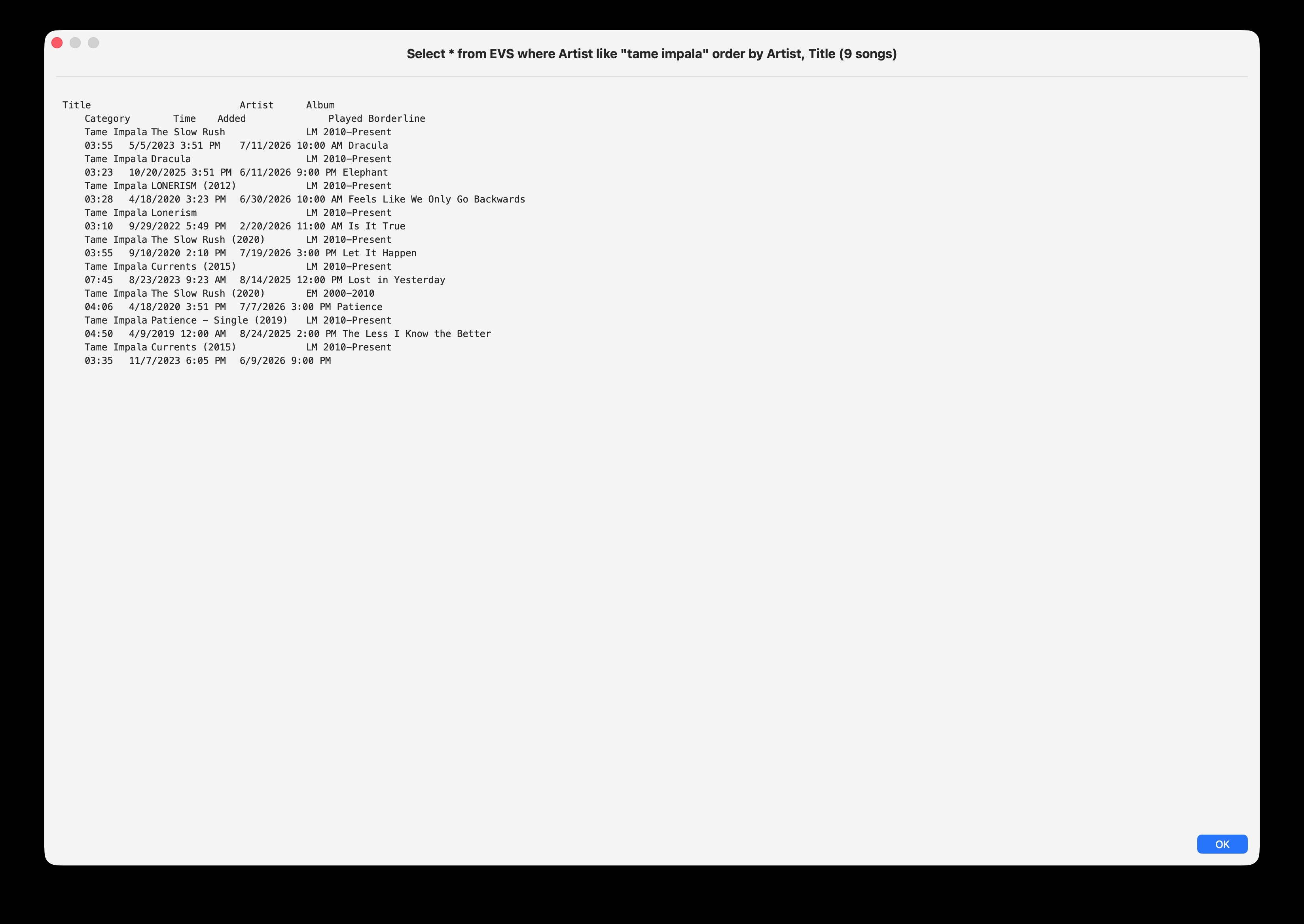
Used your code, but no luck. See attached. This was with br instead of return. I don’t understand why it insists on wrapping the text at some unknown margin but this is frustrating .
Would love to share my code, but no clue how to post it so it has that lovely “Open in Script Editor” button. As if I don’t already feel stupid, I can’t even do that.
My fmtResults look exactly like your theTable, as far as I can tell. Puzzled over this infuriatingly simple stuff.
You can find many examples and tips in this forum.
Base Classes:
NSWindow
which contains a contentView that you
need to add.
NSView
Base class of most sub contents in the contentView and the contentView itself
NSRect
The window and view’s all have a frame property NSRect class
Which can initialize them with or set later.
NSSize and NSPoint
are sub elements of the NSRect
needsDisplay (BOOL)
usually after updating a NSView you want to mark it for needing updating.
===============================
contentView
NSScrollView
If your text is large than your windows frame you may want to set this to a NSScrollView
Then set the scrollView’s documentView to one of the text type views below.
Otherwise set it to one of the text type views.
Text Type Views
Your two main options are
NSTextField (classic and simple) NSTextView (modern and can be more
Complex)
I would go with the NSTextField
Once you have your text you then
Call on text type class
You post code in the forum by putting 3 backtick characters and nothing else on a line, followed by the AppleScript or other code on subsequent lines, followed by 3 backtick characters and nothing else on a line. The backtick character is also called a grave accent and is on the key above the tab key on my English keyboard.
BTW, it’s still not clear to me if the columns of your table are separated by spaces or tabs. Posting your AppleScript should clarify this. The screenshots you have posted appear to use spaces to separate columns.
FWIW, the following uses the shell to create a table from tab-delimited text.
--tab delimiters are used
set theTable to "Title	Artist	Album	Category	Time	Added	Played
BorderlineTame	Impala	The Slow Rush	LM2010-Present	03:55	5/5/2023 3:51 PM	7/11/2026 10:00 AM
Dracula	Tame Impala	Dracula	LM 2010-Present	03:23	10/20/2025 3:51 PM	6/11/2026 9:00 PM
BorderlineTame	Impala	The Slow Rush	LM2010-Present	03:55	5/5/2023 3:51 PM	7/11/2026 10:00 AM
Dracula	Tame Impala	Dracula	LM 2010-Present	03:23	10/20/2025 3:51 PM	6/11/2026 9:00 PM"

--format the table into columns
set theTable to do shell script ("echo " & quoted form of theTable & " | column -t -s $'	'") --from Google AI

--format line endings for use with markdown
set text item delimiters to return --carriage return line endings
set theTable to text items of theTable
set text item delimiters to "<br>"
set theTable to theTable as text
set text item delimiters to ""


do shell script "/usr/local/bin/dialog --title 'Music Catalog' --titlefont 'size=15' --message " & quoted form of theTable & " --messagefont 'size=12,name=Menlo' --messagealignment left --width 900 --height 300 --windowbuttons close --hideicon --resizable; exit 0"
Thank you for your patient help. So that’s a “backtick”.
Columns are tab-separated.
I first separated records with return, as shown in screenshot of fmtResults by [CR]. But now using br (in var newLine).
Here’s the code.
------------------------------------------------------------------------------------------------------------------------
(*
	KPCW EVS

	Written July 2026 by Jay Zorzy

	Query the KPCW EVS database.	  It has almost 20,000 records.

		V1.0 (7/27/2026) Written.
*)
------------------------------------------------------------------------------------------------------------------------
use AppleScript version "2.4" -- Yosemite (10.10) or later
use sqlLib : script "SQLite Lib2" version "1.1.0" --SQL stuff
use scripting additions

property noText : ""
property DBfile : "~/Library/Databases/KPCW.db" --SQL database
property aTitle : "EVS Query"
property aPrompt : "Enter artist or song title"
property buttonCancel : "Cancel"
property buttonArtist : "Artist"
property buttonSong : "Song"
property qPrefix : "Select * from EVS where "
property qArtist : "Artist like \""
property qSong : "Title like \""
property qSuffix : "\" order by Artist, Title"

property theHeader : {"Title", "Artist", "Album", "Category", "Time", "Added", "Played"}

property winWide : 1536
property winHigh : 1024
property swiftDialog : "/usr/local/bin/dialog"
property newLine : "<br>"

set KPCWdb to open db in file DBfile

------------------------------------------------------------------------------------------------------------------------
repeat --until Cancel
	try --Prompt user for search parameters (Artist/Song string)
		display dialog aPrompt default answer noText with title aTitle buttons {buttonCancel, buttonArtist, buttonSong} cancel button buttonCancel
		copy the result as list to {theAction, theAnswer}

		if (theAction = buttonArtist) then --Artist
			set aQuery to qPrefix & qArtist & theAnswer & qSuffix
		else if (theAction = buttonSong) then --Song
			set aQuery to qPrefix & qSong & theAnswer & qSuffix
		end if
	on error --Cancel button
		exit repeat
	end try

	---  Query the EVS
	set evsResults to query db KPCWdb sql string aQuery result type list of records
	set recCount to count of evsResults

	---  Scan records for max strings for formatting
	set maxTitle to 0 --Reset max markers
	set maxArtist to 0
	set maxAlbum to 0
	set maxCategory to 0
	set maxTime to 0
	set maxAdded to 0
	set maxPlayed to 0
	repeat with i from 1 to recCount --Scan records
		set lenTitle to length of (Title of item i of evsResults)
		if (lenTitle > maxTitle) then set maxTitle to lenTitle

		set lenArtist to length of (Artist of item i of evsResults)
		if (lenArtist > maxArtist) then set maxArtist to lenArtist

		set lenAlbum to length of (Album of item i of evsResults)
		if (lenAlbum > maxAlbum) then set maxAlbum to lenAlbum

		set lenCategory to length of (Category of item i of evsResults)
		if (lenCategory > maxCategory) then set maxCategory to lenCategory

		set lenTime to length of (|Time| of item i of evsResults)
		if (lenTime > maxTime) then set maxTime to lenTime

		set lenAdded to length of (Added of item i of evsResults)
		if (lenAdded > maxAdded) then set maxAdded to lenAdded

		set lenPlayed to length of (Played of item i of evsResults)
		if (lenPlayed > maxPlayed) then set maxPlayed to lenPlayed

	end repeat --Scan records

	---  Format Header
	set fmtHeader to noText
	set maxHeader to {maxTitle, maxArtist, maxAlbum, maxCategory, maxTime, maxAdded, maxPlayed}
	repeat with i from 1 to length of theHeader
		set iLabel to (item i of theHeader)
		set fmtLabel to iLabel
		repeat with j from 1 to ((item i of maxHeader) - (length of iLabel))
			set fmtLabel to fmtLabel & space
		end repeat
		set fmtHeader to fmtHeader & fmtLabel & tab

	end repeat --theHeader list

	---  Format records
	---  Columns blank-filled and separated by tabs
	set fmtResults to fmtHeader & newLine
	set maxRecord to 0
	repeat with i from 1 to recCount --Format records
		set iTitle to (Title of item i of evsResults)
		set fmtTitle to iTitle
		repeat with j from 1 to (maxTitle - (length of iTitle))
			set fmtTitle to fmtTitle & space
		end repeat
		set fmtTitle to fmtTitle & tab

		set iArtist to (Artist of item i of evsResults)
		set fmtArtist to iArtist
		repeat with j from 1 to (maxArtist - (length of iArtist))
			set fmtArtist to fmtArtist & space
		end repeat
		set fmtArtist to fmtArtist & tab

		set iAlbum to (Album of item i of evsResults)
		set fmtAlbum to iAlbum
		repeat with j from 1 to (maxAlbum - (length of iAlbum))
			set fmtAlbum to fmtAlbum & space
		end repeat
		set fmtAlbum to fmtAlbum & tab

		set iCategory to (Category of item i of evsResults)
		set fmtCategory to iCategory
		repeat with j from 1 to (maxCategory - (length of iCategory))
			set fmtCategory to fmtCategory & space
		end repeat
		set fmtCategory to fmtCategory & tab

		set iTime to (|Time| of item i of evsResults)
		set fmtTime to iTime
		repeat with j from 1 to (maxTime - (length of iTime))
			set fmtTime to fmtTime & space
		end repeat
		set fmtTime to fmtTime & tab

		set iAdded to (Added of item i of evsResults)
		set fmtAdded to iAdded
		repeat with j from 1 to (maxAdded - (length of iAdded))
			set fmtAdded to fmtAdded & space
		end repeat
		set fmtAdded to fmtAdded & tab

		set iPlayed to (Played of item i of evsResults)
		set fmtPlayed to iPlayed
		repeat with j from 1 to (maxPlayed - (length of iPlayed))
			set fmtPlayed to fmtPlayed & space
		end repeat
		set fmtPlayed to fmtPlayed & tab

		---  Build record, terminated with newLine (<br> or return)
		set theRecord to fmtTitle & fmtArtist & fmtAlbum & fmtCategory & fmtTime & fmtAdded & fmtPlayed & newLine
		set lenRecord to length of theRecord
		if (lenRecord > maxRecord) then set maxRecord to lenRecord

		set fmtResults to fmtResults & theRecord

	end repeat --Format Records

	---  Format the text to display (title and body)
	if (recCount = 1) then
		set theWord to " song"
	else
		set theWord to " songs"
	end if
	set theTitle to (aQuery & " (" & recCount as text) & theWord & ")" --Title

	---  Body already to go, form the command line to call swiftDialog
	set text item delimiters to linefeed
	set fmtResults to text items of fmtResults
	set text item delimiters to newLine
	set fmtResults to fmtResults as text
	set text item delimiters to ""

	set theCommand to ((swiftDialog & " --title '" & theTitle & "' --titlefont 'size=16' --message " & quoted form of fmtResults & ¬
		" --messagefont 'size=14,name=Monaco' --width " & winWide as text) & " --height " & winHigh as text) & ¬
		" --messagealignment left --windowbuttons close --hideicon --moveable --resizable; exit 0"

	---  Display any results to user
	if (recCount > 0) then do shell script theCommand

end repeat --until Cancel

close KPCWdb
Oxylos. Your script wouldn’t run on my Golden Gate computer and reported the following error:
error “The bundle “FMDBAS” couldn’t be loaded because it doesn’t contain a version for the current architecture.” number -4960 from framework “FMDBAS”
I suspect the script solution is to edit the first portion of your script to use carriage-return line endings (instead of <br>) and to replace the swiftDialog portion of your script with the following:
--format the table into columns
--change "theTable" to whatever is used in the earlier portion of the script
set theTable to do shell script ("echo " & quoted form of theTable & " | column -t -s $'	'") --from Google AI

--format line endings for use with markdown
set text item delimiters to return --carriage return line endings
set theTable to text items of theTable
set text item delimiters to "<br>"
set theTable to theTable as text
set text item delimiters to ""


do shell script "/usr/local/bin/dialog --title 'Music Catalog' --titlefont 'size=15' --message " & quoted form of theTable & " --messagefont 'size=12,name=Menlo' --messagealignment left --width 900 --height 300 --windowbuttons close --hideicon --resizable; exit 0"
If that doesn’t work, please post the returned output of the first portion of your script as code (so no characters will be changed.
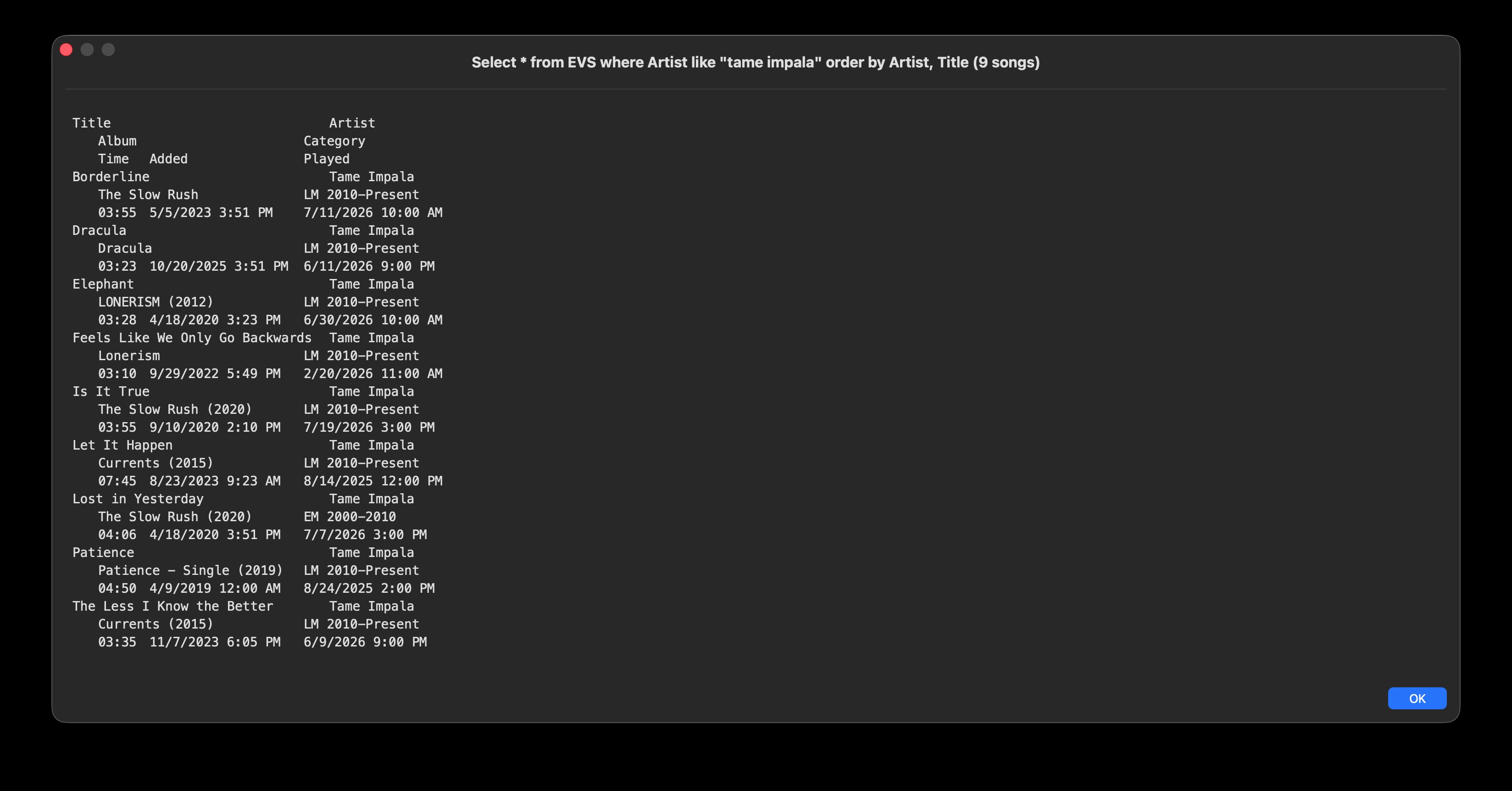
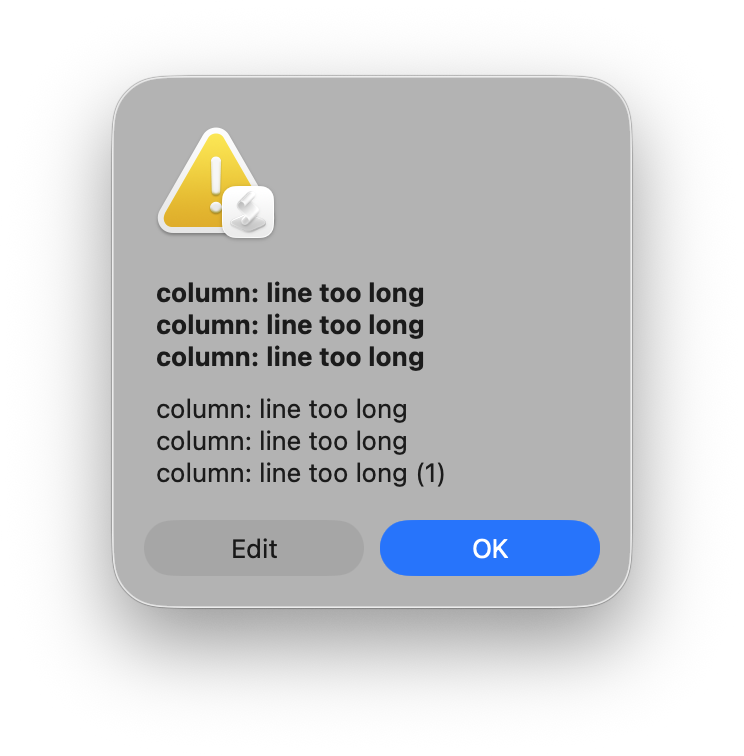
Must say it seems clumsy that we need to pipe the formatted results table through Unix utilities and can’t accomplish that with code in the script. Something odd about the tabs and carriage returns.
Here is the working code. What is a Golden Gate computer?
------------------------------------------------------------------------------------------------------------------------
(*
	KPCW EVS

	Written July 2026 by Jay Zorzy

	Query the KPCW EVS database.	  It has almost 20,000 records.

		V1.0 (7/27/2026) Written, macOS Tahoe 26.5.2
*)
------------------------------------------------------------------------------------------------------------------------
use AppleScript version "2.4" -- Yosemite (10.10) or later
use sqlLib : script "SQLite Lib2" version "1.1.0" --SQL stuff
use scripting additions

property noText : ""
property DBfile : "~/Library/Databases/KPCW.db" --SQL database
property aTitle : "EVS Query"
property aPrompt : "Enter artist or song title"
property buttonCancel : "Cancel"
property buttonArtist : "Artist"
property buttonSong : "Song"
property qPrefix : "Select * from EVS where "
property qArtist : "Artist like \""
property qSong : "Title like \""
property qSuffix : "\" order by Artist, Title"

property theHeader : {"Title", "Artist", "Album", "Category", "Time", "Added", "Played"}

property winWide : 1536
property winHigh : 1024
property swiftDialog : "/usr/local/bin/dialog"
property endRecord : return
property newLine : "<br>"

set KPCWdb to open db in file DBfile

------------------------------------------------------------------------------------------------------------------------
repeat --until Cancel
	try --Prompt user for search parameters (Artist/Song string)
		display dialog aPrompt default answer noText with title aTitle buttons {buttonCancel, buttonArtist, buttonSong} cancel button buttonCancel
		copy the result as list to {theAction, theAnswer}

		if (theAction = buttonArtist) then --Artist
			set aQuery to qPrefix & qArtist & theAnswer & qSuffix
		else if (theAction = buttonSong) then --Song
			set aQuery to qPrefix & qSong & theAnswer & qSuffix
		end if
	on error --Cancel button
		exit repeat
	end try

	---  Query the EVS
	set evsResults to query db KPCWdb sql string aQuery result type list of records
	set recCount to count of evsResults

	---  Scan records for max strings for formatting
	set maxTitle to 0 --Reset max markers
	set maxArtist to 0
	set maxAlbum to 0
	set maxCategory to 0
	set maxTime to 0
	set maxAdded to 0
	set maxPlayed to 0
	repeat with i from 1 to recCount --Scan records
		set maxTitle to SetMax(length of (Title of item i of evsResults), maxTitle)
		set maxArtist to SetMax(length of (Artist of item i of evsResults), maxArtist)
		set maxAlbum to SetMax(length of (Album of item i of evsResults), maxAlbum)
		set maxCategory to SetMax(length of (Category of item i of evsResults), maxCategory)
		set maxTime to SetMax(length of (|Time| of item i of evsResults), maxTime)
		set maxAdded to SetMax(length of (Added of item i of evsResults), maxAdded)
		set maxPlayed to SetMax(length of (Played of item i of evsResults), maxPlayed)
	end repeat --Scan records

	---  Format Header
	set fmtHeader to noText
	set maxHeader to {maxTitle, maxArtist, maxAlbum, maxCategory, maxTime, maxAdded, maxPlayed}
	repeat with i from 1 to length of theHeader
		set fmtHeader to fmtHeader & FormatColumn(item i of theHeader, item i of maxHeader)
	end repeat --theHeader list

	---  Format records
	---  Columns blank-filled and separated by tabs
	set fmtResults to fmtHeader & endRecord
	set maxRecord to 0
	repeat with i from 1 to recCount --Format records
		set fmtTitle to FormatColumn(Title of item i of evsResults, maxTitle)
		set fmtArtist to FormatColumn(Artist of item i of evsResults, maxArtist)
		set fmtAlbum to FormatColumn(Album of item i of evsResults, maxAlbum)
		set fmtCategory to FormatColumn(Category of item i of evsResults, maxCategory)
		set fmtTime to FormatColumn(|Time| of item i of evsResults, maxTime)
		set fmtAdded to FormatColumn(Added of item i of evsResults, maxAdded)
		set fmtPlayed to FormatColumn(Played of item i of evsResults, maxPlayed)

		---  Build record, terminated with endRecord (<br> or return)
		set theRecord to fmtTitle & fmtArtist & fmtAlbum & fmtCategory & fmtTime & fmtAdded & fmtPlayed & endRecord
		set lenRecord to length of theRecord
		if (lenRecord > maxRecord) then set maxRecord to lenRecord

		set fmtResults to fmtResults & theRecord

	end repeat --Format Records

	---  Format the text to display (title and body)
	if (recCount = 1) then
		set theWord to " song"
	else
		set theWord to " songs"
	end if
	set theTitle to (aQuery & " (" & recCount as text) & theWord & ")" --Title

	---  Body already to go, form the command line to call swiftDialog
	set fmtResults to do shell script ("echo " & quoted form of fmtResults & " | column -t -s $'	'") --from Google AI

	set theCommand to ((swiftDialog & " --title '" & theTitle & "' --titlefont 'size=16' --message " & quoted form of fmtResults & ¬
		" --messagefont 'size=14,name=Monaco' --width " & winWide as text) & " --height " & winHigh as text) & ¬
		" --messagealignment left --windowbuttons close --hideicon --moveable --resizable; exit 0"

	---  Display any results to user
	if (recCount > 0) then do shell script theCommand

end repeat --until Cancel

close KPCWdb
---  End KPCW EVS

---  Small handler to compare and set max length of a column
on SetMax(aLen, aMax)
	if (aLen > aMax) then set aMax to aLen
	return aMax
end SetMax

---  Format a fixed size column by padding with spaces and adding a tab delimeter
on FormatColumn(aVal, aMax)
	set aCol to aVal --Put column value
	repeat with i from 1 to (aMax - (length of aVal))
		set aCol to aCol & space --Pad with spaces
	end repeat
	set aCol to aCol & tab --Add tab delimeter
	return aCol --formatted column
end FormatColumn