Hello.
I can’t find any information on how to write a script that would allow me to create a duplicate of the tab that is currently active in the Script Editor.
In other words, it would be equivalent to
-
Copying the contents of the active tab in the Script Editor
-
Simulating a click on the ‘+’ button to the right of the tab title [this creates a new empty tab] (this is the real challenge)
-
Pasting the contents from the clipboard
I’d be grateful for any help in advance.
Script Editor and Script Debugger use different property labels, but you can make a new document with a property of the current script:
tell application "Script Debugger" -- "Script Editor"
   set props to (get properties of document 1)
   tell (make new document) to set its properties to {source text:(source text of props)} -- {contents:(contents of props)}
end tell
You can also create templates in Script Debugger.
Another thing to be careful of is when closing the next to last tab in Script Editor, as it tends to crash (at least in my Tahoe system).
My sincere thanks for your prompt and generous help.
The drawback of your suggestion is that it requires the use of an application that is not part of macOS.
I would also consider a solution using the Terminal or an alternative algorithm that produced the desired result to be valid.
Thank you very much
Apple’s Script Editor is a part of the macOS install. Determining what the content of the front window/tab of the script editor is or creating a new window/tab would involve that script editor (Terminal or not). This is starting to sound like a X-Y problem - what exactly are you trying to do (that is involving duplicating a script editor window/tab)?
DJUNQUERA. The following does what you want, although it’s a bit of a kludge. A different method of creating a new tab would be better, and I agree that clicking on the ‘+’ button would be preferred, but I don’t know how to do that.
tell application "Script Editor"
	activate
	tell document 1 to set allCode to contents
end tell


set the clipboard to allCode

tell application "System Events" to tell process "Script Editor"
	click menu item "New" of menu "File" of menu bar 1
	delay 0.5
	click menu item "Merge All Windows" of menu "Window" of menu bar 1
	delay 0.5
	click menu item "Paste" of menu "Edit" of menu bar 1
end tell
The following is a slightly different version for testing:
tell application "Script Editor"
	activate
	tell document 1 to set allCode to contents
end tell

tell application "System Events" to tell process "Script Editor"
	click menu item "New" of menu "File" of menu bar 1
	delay 0.5
	click menu item "Merge All Windows" of menu "Window" of menu bar 1
	delay 0.5
end tell

tell application "Script Editor"
	tell document 1 to set contents to allCode
end tell
I tested the above script on my macOS 27.0 Golden Gate Public Beta 2 computer without issue. I ran the script by way of FastScripts, which seemed to work better without the visible distraction of the new window.
I included the statements for Script Editor in the comments of my example. Using that, make new document will create a new window or tab according to the system preferences, so it might be helpful to know the setting.
1 Like
Good point! My settings prefer a new window rather than a tab. If a tab is preferred, the following worked for me. This is a very-minor edit of red_menace’s suggestion.
tell application "Script Editor"
	activate
	tell document 1 to set allCode to contents
	tell (make new document) to set its properties to {contents:allCode}
end tell
Thank you very much, Peavine, for responding to my request for help.
The flow is interrupted after a new window is created (the clipboard contents don’t paste into it), and the rest of the code stops executing.
However, I see the biggest problem in the statement
click menu item “Merge All Windows” of menu “Window” of menu bar 1
since that menu option, which is present in both versions, isn’t selective—it merges all Script Editor windows and tabs that may exist into a single window.
Protecting the other Script Editor windows so they aren’t affected by that statement requires complicating the code and makes your approach unsuitable for achieving the desired result.
DJUNQUERA. It hadn’t occurred to me that you might have multiple Script Editor windows open, and that means my approach isn’t going to work (as you note). I assume you have configured System Settings to prefer windows rather than tabs, which means that the approach suggested by red_manace also will not work.
In preliminary testing, the following worked on my computer running macOS 27.0 Public Beta 2. I had multiple windows open, and the new tab was created in the frontmost window.
tell application "Script Editor"
	activate
	tell document 1 to set allCode to contents
end tell

tell application "System Events" to tell process "Script Editor"
	keystroke "n" using {command down, option down}
end tell

delay 1 --test smaller values

tell application "Script Editor"
	tell document 1 to set contents to allCode
end tell
2 Likes
:-)) 
It works perfectly. Thank you very much.
I wasn’t aware of (and haven’t yet been able to find among the options in the Script Editor app) the Cmd-Opt-N keyboard shortcut that lets you create a tab in that app.
That method makes it unnecessary to try to simulate clicking the “+” button to the right of the tab titles, which seems to be incredibly difficult.
I also noticed that you didn’t need to use the keyboard shortcut to copy and paste from the clipboard, since you solved it by using “contents.”
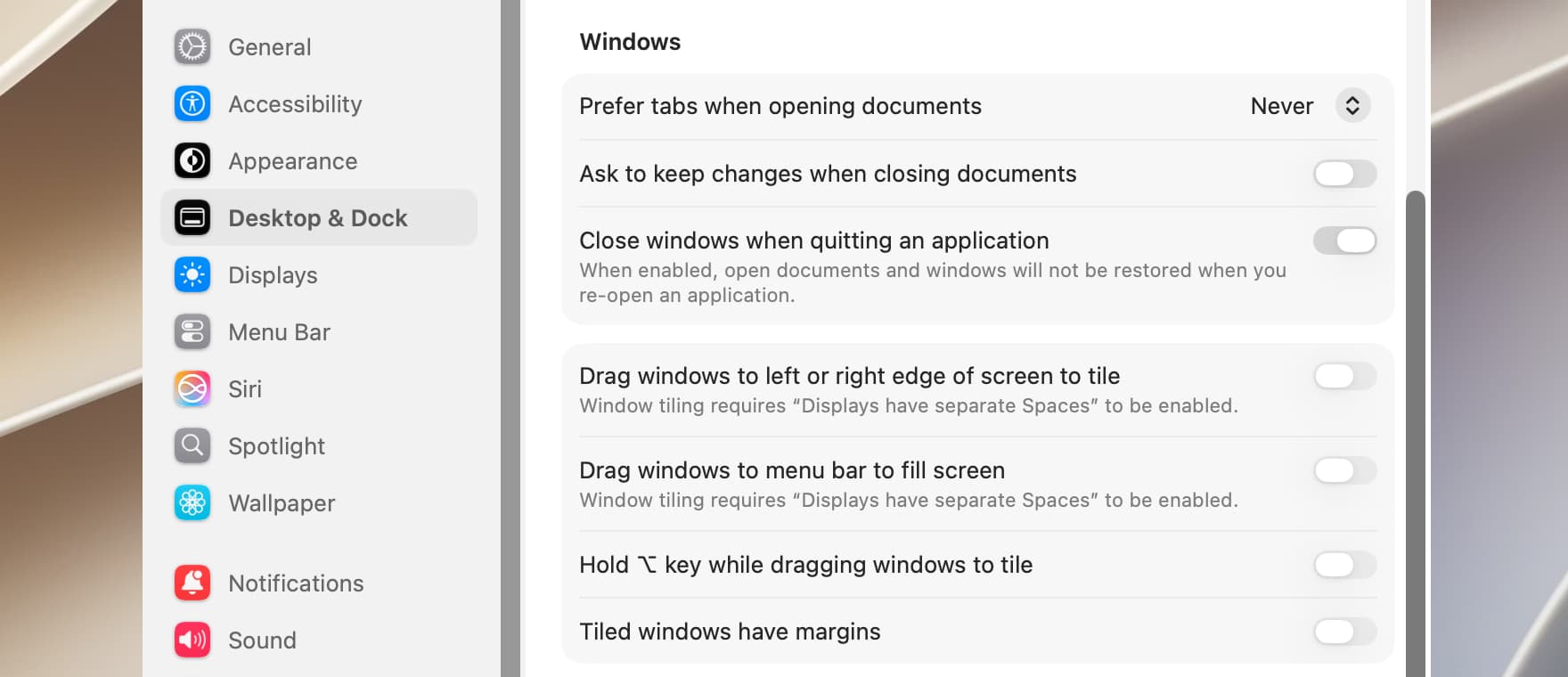
I tried unsuccessfully to find where in System Preferences you can adjust the priority of windows or tabs (I’d appreciate it if you could point that out to me).
Thank you very much again.
You’re most welcome.
On macOS Golden Gate, it’s the first item under the Windows heading in Desktop & Dock.
I found it where you told me to look.
In my settings, “Prefer tabs when opening documents … Full screen” is selected.
I’d also appreciate it if you could tell me which menu in the Script Editor contains the shortcut that adds a tab to the frontmost window.
Hi.
Maybe you could use the fact that Script Editor returns name references to its documents to identify when the new document’s frontmost.
I’m not sure what the difference is between a document’s contents and its text. Both return exactly the same thing. But unlike with contents, it’s possible to set the text of one document to that of another without the need for an intervening variable:
tell application "Script Editor"
	activate
	set frontDoc to front document -- Name reference returned.
end tell

tell application "System Events" to keystroke "n" using {command down, option down}

tell application "Script Editor"
	repeat while (front document is frontDoc)
		delay 0.2
	end repeat
	set front document's text to frontDoc's text
end tell
Both versions work perfectly—yours and Peavine’s.
Thank you very much, Nigel_Garvey, for what I’ve learned from your comment.
Script Editor doesn’t have a menu item for adding a tab, since it doesn’t appear to have a concept of anything except creating a document, which as mentioned, creates a window or tab according to the system preferences. The tab bar, which contains the plus button, doesn’t even show up until there are multiple tabs, which depend on the preference or the merging of windows.
This still seems like an X-Y problem though, since duplicating an editor document in the editor doesn’t quite sound like the end goal. You have yet to explain exactly what it is you are actually trying to accomplish, so any alternative solutions for whatever that is will have to wait for the next topic, I guess.
1 Like
Thank you for your explanations…
The only reason I’m interested in a script like the one requested is for those cases where the new script contains enough similar code that it’s worth copying the contents of the current tab into a new tab so I can edit it later.
I was also hoping that someone might know the AppleScript code that simulates clicking the “+” button in the Script Editor window.
GUI scripting the plus/new tab button would be something like (Tahoe):
tell application "System Events"
	tell application "Script Editor" to activate
	click button 1 of tab group 1 of window 1 of application process "Script Editor"
end tell
But again, this seems a bit clunky - is this something like a clipping/snippet editor without the editor? Sticky notes on the desktop is also handy for stashing notes and whatnot. Something like a script to wrap selected or clipboard text with an insertion wrapper that works with the Scripts Menu might also be something to look at.
:-)) Thank you very much, red_menace, for providing the code I was also looking for.
Please explain in a bit more detail the comment that accompanied the code—the one that solved the issue with the “+” next to the tab title in the Script Editor.
I’m not sure I understood it correctly.
Did you perhaps mean that to get a copy of the script content currently displayed, Sticky or any other text-supporting app would have been sufficient?
If so, remember that the goal is to save time when copying code similar to what’s already in a Script Editor window.
On the other hand, the Script Editor itself seems to think it’s useful to have the option to duplicate the code in a window or tab, which is why it offers a “Duplicate” option—and it does so in a new window rather than a tab (that difference—the tab—is what I was interested in achieving).
If that’s not what you meant in your comment, please try to clarify it for me.
The script editors provide for a duplication or copy of an entire script document so that you can work on a copy instead of the original, but it looked like you were wanting something else (since the menu items are there and have key shortcuts and everything), so I’ve been trying to figure out what that was.
I was reading too much into what you were trying to do, so I missed that the issue was about the whole window/tab preference that Script Editor was selectively ignoring. I almost never use tabs with Script Editor since it constantly crashes when I do, so I didn’t really think about it.
:-)) I still don’t know where in the menu the Cmd-Opt-N shortcut is—it was the key to solving the problem.
The menus only show Cmd-N, and the result is, as expected, the creation of a window, not a tab.
The only thing I can think of—though I have no basis for this—is that in macOS apps that support tabs, the Cmd-Opt-N shortcut results in the creation of a new tab in all of them.