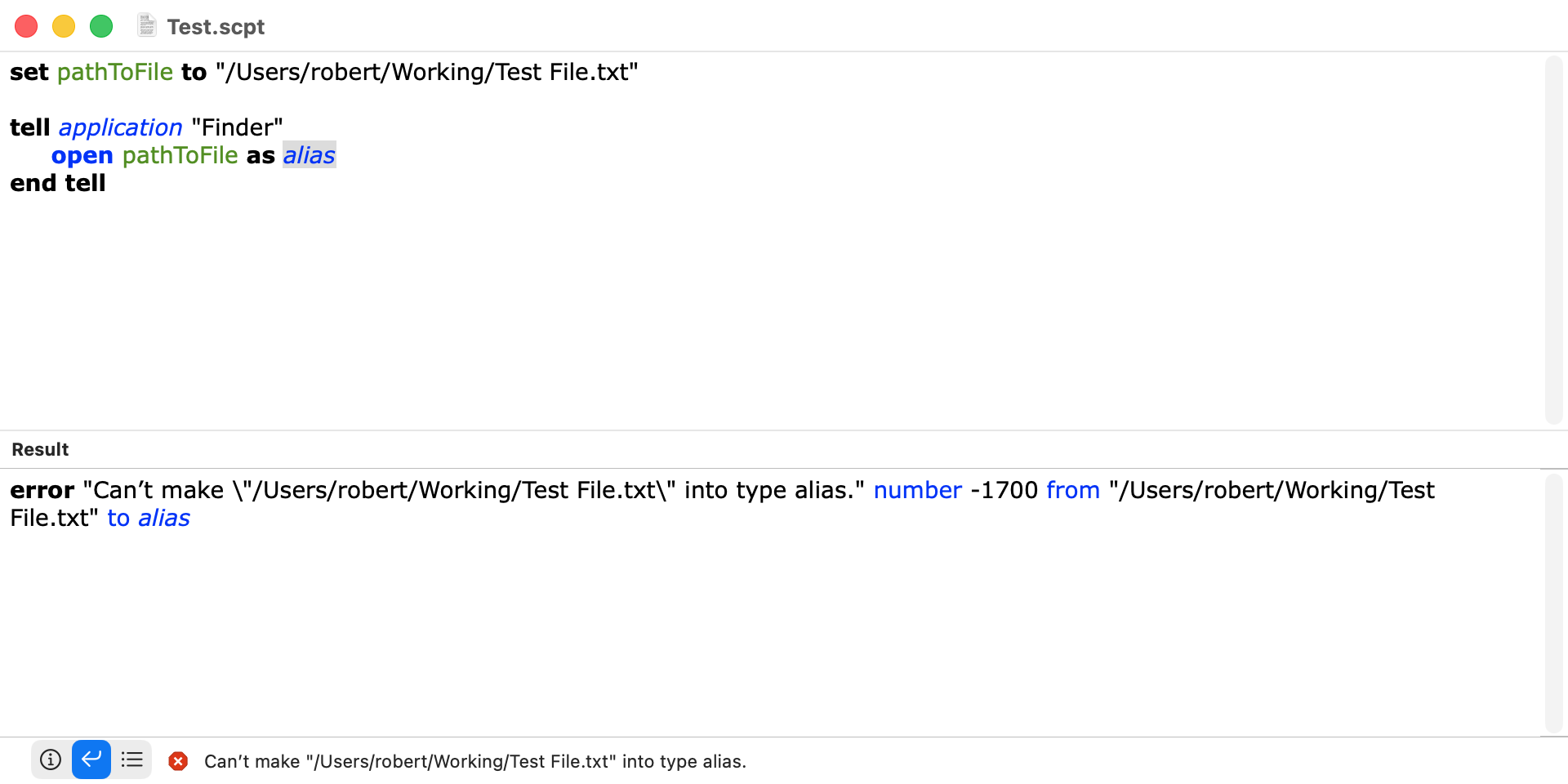
I have a script which finds a file and gets its POSIX path. The script then needs to open the file with the relevant default application. It currently does so using Finder:
tell application "Finder"
	open pathToFile as alias
end tell
Sometimes when the file is on an external drive, it get this error:
The application "(null)" does not have permission to open "[name of file]".
Does that mean Finder could not determine the default application ? I have checked to ensure that all relevant applications do have external volume permissions [Full disk Access].
Would using System Events be better ?
Should I just send the file to Finder instead of its alias ?
I can’t see a pattern. It just happens sometimes and sometimes not. Why does it not happen in every case ?
I should have explained the code is in my applet which is used by a variety of people who use different applications. So, my code doesn’t know which application is the default for the file.
Sorry if I misunderstood your point.
If the script is run via /usr/bin/osascript or as an applet, rather than from Script Editor
When opening many files, sometimes adding a small delay before open can avoid the issue.
If your script gives an error like this,
#!/usr/bin/env osascript
#coding: utf-8
use AppleScript version "2.8"
use scripting additions

set listFilePath to {"/Library/Documentation/License.lpdf/Contents/Resources/English.lproj/License.html", "/Library/Documentation/License.lpdf/Contents/Resources/German.lproj/License.html", "/Library/Documentation/License.lpdf/Contents/Resources/French.lproj/License.html", "/Library/Documentation/License.lpdf/Contents/Resources/Dutch.lproj/License.html", "/Library/Documentation/License.lpdf/Contents/Resources/Italian.lproj/License.html", "/Library/Documentation/License.lpdf/Contents/Resources/Japanese.lproj/License.html", "/Library/Documentation/License.lpdf/Contents/Resources/Spanish.lproj/License.html"} as list

set listAliasFilePath to {} as list
repeat with itemFilePath in listFilePath
	set itemAlisFilePath to (POSIX file itemFilePath) as alias
	set end of listAliasFilePath to itemAlisFilePath
end repeat

repeat with itemAliasFilePath in listAliasFilePath
	set aliasFilePath to itemAliasFilePath as alias
	#######
	#	delay 0.2
	tell application "Finder"
		open aliasFilePath
	end tell
end repeat
return
it often works fine after adding a delay.
#!/usr/bin/env osascript
#coding: utf-8
use AppleScript version "2.8"
use scripting additions

set listFilePath to {"/Library/Documentation/License.lpdf/Contents/Resources/English.lproj/License.html", "/Library/Documentation/License.lpdf/Contents/Resources/German.lproj/License.html", "/Library/Documentation/License.lpdf/Contents/Resources/French.lproj/License.html", "/Library/Documentation/License.lpdf/Contents/Resources/Dutch.lproj/License.html", "/Library/Documentation/License.lpdf/Contents/Resources/Italian.lproj/License.html", "/Library/Documentation/License.lpdf/Contents/Resources/Japanese.lproj/License.html", "/Library/Documentation/License.lpdf/Contents/Resources/Spanish.lproj/License.html"} as list

set listAliasFilePath to {} as list
repeat with itemFilePath in listFilePath
	set itemAlisFilePath to (POSIX file itemFilePath) as alias
	set end of listAliasFilePath to itemAlisFilePath
end repeat

repeat with itemAliasFilePath in listAliasFilePath
	set aliasFilePath to itemAliasFilePath as alias
	#######
	delay 0.2
	tell application "Finder"
		open aliasFilePath
		#open file aliasFilePath
		#open location aliasFilePath
	end tell
end repeat
return
It doesn’t seem to be a script error; it feels more like Finder can’t keep up with the processing. It might also be related to TCC (Transparency, Consent, and Control) permission checks happening in between.
Neophyte. Your script does not work for me under any circumstance, and I wouldn’t expect it to work. So, clearly I don’t understand something.
FWIW, the following are four approaches that will open a file using the default app. They all worked without issue on my Tahoe computer. The test file was on an external drive.
--make POSIX path into file object and use Finder
set pathToFile to "/Volumes/Store/Save/Test File.txt"
set theFile to POSIX file pathToFile
tell application "Finder"
	open theFile
end tell

--use HFS path and Finder
set pathToFile to "Store:Save:Test File.txt"
tell application "Finder"
	open alias pathToFile
end tell

--use POSIX path and System Events
set pathToFile to "/Volumes/Store/Save/Test File.txt"
tell application "System Events"
	open file pathToFile
end tell

--use POSIX path and the shell
set pathToFile to "/Volumes/Store/Save/Test File.txt"
do shell script "open " & quoted form of pathToFile
BTW, if this is an issue with other people using your script, you may want to edit the script to check if there is a default application for the problematic file. For example:
set theFile to "/Users/robert/Working/Test File.txt"

tell application "System Events"
	set theDefaultApplication to name of default application of file theFile --> "CotEditor.app"
end tell
If its helpful this will identify the default app given the path.
use scripting additions
use framework "Foundation"

Application_Default_Given_File(choose file)

on Application_Default_Given_File(thePath)
	try
		set thePath to POSIX path of thePath
		set theURL to current application's |NSURL|'s fileURLWithPath:thePath
		set workspace to current application's NSWorkspace's sharedWorkspace()
		set theResult to POSIX path of ((workspace's URLForApplicationToOpenURL:theURL) as text)
		return (POSIX file theResult) as alias
	on error errorText number errornumber partial result errorResults from errorObject to errorExpectedType
		error "<Application_Default_Given_File>" & errorText number errornumber partial result errorResults from errorObject to errorExpectedType
	end try
end Application_Default_Given_File
Yes, that’s a good idea. I think I’ve needed delays before telling Finder to do things in the past. The script is running from osascript and the action is triggered by the results of a do shell script. Some delay might help Finder catch up with file changes especially on external volumes. This might explain why the error doesn’t occur every time.
As mentioned, it does often work. Apologies if variable name pathToFile is misleading. It includes the file name. Anyway, I’ll try your suggestions. I tried System Events but got an error with every formulation I tried. I’ve been doing this for 8 years and still can’t get System Events calls to work in less than a day.
Thanks. My applet doesn’t need to know the default application the user uses. It just needs to open the file for the user to look at.
Neophyte. The following is what I was referring to. As far as I know, you cannot coerce a POSIX path to an alias and that’s what your script attempts to do.
You can create a file object from a POSIX path with POSIX file and then coerce the file object to an alias. That’s how IceFole handles this. Perhaps I do not understand the first paragraph of your first post in this thread.
Anyways, it sounds like your script is a complicated one, and there’s probably a large number of possible reasons for the error message. I’m sure you’ll sort it out.
If I specify the application to open the files, I don’t need to add a delay, so it feels like Finder is opening the documents without waiting for a response from LaunchServices.
Maybe this is a bug of Finder.
If Finder processes the request without waiting for LaunchServices, it might not be very desirable behavior from a security point of view.
#!/usr/bin/env osascript
#coding: utf-8
use AppleScript version "2.8"
use scripting additions

set listFilePath to {"/Library/Documentation/License.lpdf/Contents/Resources/English.lproj/License.html", "/Library/Documentation/License.lpdf/Contents/Resources/German.lproj/License.html", "/Library/Documentation/License.lpdf/Contents/Resources/French.lproj/License.html", "/Library/Documentation/License.lpdf/Contents/Resources/Dutch.lproj/License.html", "/Library/Documentation/License.lpdf/Contents/Resources/Italian.lproj/License.html", "/Library/Documentation/License.lpdf/Contents/Resources/Japanese.lproj/License.html", "/Library/Documentation/License.lpdf/Contents/Resources/Spanish.lproj/License.html"} as list

set listAliasFilePath to {} as list
repeat with itemFilePath in listFilePath
	set itemAlisFilePath to (POSIX file itemFilePath) as alias
	set end of listAliasFilePath to itemAlisFilePath
end repeat


repeat with itemAliasFilePath in listAliasFilePath
	set aliasFilePath to itemAliasFilePath as alias

	tell file aliasFilePath
		set recordInfoFor to (info for) as record
	end tell

	set strUTI to (type identifier of recordInfoFor) as text

	if strUTI starts with "dyn." then
		tell application "Finder"
			open file alisFilePath
		end tell
		tell application "Finder" to activate
	else
		set aliaAppPath to (default application of recordInfoFor) as alias
		tell file aliaAppPath
			set recordInfoFor to (info for) as record
		end tell
		set strBundleID to (bundle identifier of recordInfoFor) as text
		tell application id strBundleID
			open location aliasFilePath
		end tell
	end if


end repeat


return
Many thanks people for your contributions. Have been working on other problems and this one is on the back burner now. Adding a delay might help. I’ve also made a change following peavine’s reminder about not coercing to POSIX past to alias.