Get Folders and Files Recursively with ASObjC

kerflooey. Thanks for looking at my script.

I believe the issue is that you are running the script in Script Editor (which is a perfectly reasonable thing to do). I’ve edited my script to return a list of file objects, and these should display as expected with Script Editor. I’ve also added but commented out a line that will cause the script to return a list of POSIX paths.

Thanks, Fredrik71, that worked.

Thanks. Yes, I was using Script Editor.

The following script searches a folder and its subfolders and returns files with specific file extensions. The timing result with a folder that contained 512 matching files out of 527 total files in 126 folders was 21 milliseconds:

use framework "Foundation"
use scripting additions

set theFolder to POSIX path of (choose folder)
set fileExtensions to {"pdf"} -- one or more file extensions not case sensitive
set theFiles to getFiles(theFolder, fileExtensions)

on getFiles(theFolder, fileExtensions)
	set fileManager to current application's NSFileManager's defaultManager()
	set theFolder to current application's |NSURL|'s fileURLWithPath:theFolder
	set fileExtensions to (current application's NSArray's arrayWithArray:fileExtensions)'s valueForKey:"lowercaseString"
	set folderContents to (fileManager's enumeratorAtURL:theFolder includingPropertiesForKeys:{} options:6 errorHandler:(missing value))'s allObjects() -- deep search that skips hidden files and package contents
	set thePredicate to current application's NSPredicate's predicateWithFormat_("pathExtension.lowercaseString IN %@", fileExtensions)
	return (folderContents's filteredArrayUsingPredicate:thePredicate) as list -- a list of file objects
	-- return ((folderContents's filteredArrayUsingPredicate:thePredicate)'s valueForKey:"path") as list -- a list of POSIX paths
end getFiles

If file extension cannot be used, the file’s type as determined by its Spotlight metadata will work, provided the drive is indexed. The timing result with my test folder was 60 milliseconds.

set theFolder to quoted form of POSIX path of (choose folder)
set theSearch to quoted form of ("kMDItemContentType == \"com.adobe.pdf\"")
-- set theSearch to quoted form of ("kMDItemKind == \"PDF document\"") -- a different approach
set theFiles to paragraphs of (do shell script "mdfind -onlyin" & space & theFolder & space & theSearch)

A somewhat common task is getting the contents of a folder sorted by some date. The following script returns regular files sorted by modification date:

use framework "Foundation"
use scripting additions

set sourceFolder to POSIX path of (choose folder)
set theFiles to getFiles(sourceFolder)

on getFiles(theFolder) -- theFolder requires a POSIX path
	set fileManager to current application's NSFileManager's defaultManager()
	set theFolder to current application's |NSURL|'s fileURLWithPath:theFolder
	set fileKey to current application's NSURLIsRegularFileKey -- does not return packages
	set dateKey to current application's NSURLContentModificationDateKey
	set pathKey to current application's NSURLPathKey
	set folderContents to (fileManager's enumeratorAtURL:theFolder includingPropertiesForKeys:{} options:6 errorHandler:(missing value))'s allObjects() -- options:7 will not recurse
	set theFiles to current application's NSMutableArray's new()
	repeat with anItem in folderContents
		set {theResult, aRegularFile} to (anItem's getResourceValue:(reference) forKey:fileKey |error|:(missing value))
		if aRegularFile as boolean is true then (theFiles's addObject:(anItem's resourceValuesForKeys:{dateKey, pathKey} |error|:(missing value)))
	end repeat
	theFiles's sortUsingDescriptors:{current application's NSSortDescriptor's sortDescriptorWithKey:dateKey ascending:true}
	return (theFiles's valueForKey:pathKey) as list -- returns a list of POSIX paths
end getFiles

The dateKey can be set to other values including:

NSURLAddedToDirectoryDateKey
NSURLAttributeModificationDateKey
NSURLContentAccessDateKey
NSURLCreationDateKey

The timing result with a folder that contained 534 files in 127 folders was 55 milliseconds. I tested numerous alternatives, but they were no faster.

The following script separately returns all folders and files in a specified folder and its subfolders. It is a minor refinement of my script in post 1. The timing result was 5 milliseconds when run on a folder containing 105 files in 11 subfolders and was 57 milliseconds when run on my home folder. Packages are returned with files.

If files or folders only are needed, this script remains the fastest alternative. For files, simply edit the last line of the handler to return theFiles. For folders, delete the last three lines of the handler and return theFolders.

The handler returns arrays of URLs, and these are coerced to a list of files, which can be used in a basic AppleScript.

use framework "Foundation"
use scripting additions

set theFolder to POSIX path of (choose folder)
set {theFolders, theFiles} to getFoldersAndFiles(theFolder)
set theFolders to theFolders as list
set theFiles to theFiles as list

on getFoldersAndFiles(theFolder)
	set fileManager to current application's NSFileManager's defaultManager()
	set theFolder to current application's |NSURL|'s fileURLWithPath:theFolder
	set directoryKey to current application's NSURLIsDirectoryKey
	set packageKey to current application's NSURLIsPackageKey
	set folderContents to (fileManager's enumeratorAtURL:theFolder includingPropertiesForKeys:{} options:6 errorHandler:(missing value))'s allObjects() --option 6 skips hidden files and package contents
	set theFolders to current application's NSMutableArray's new()
	set booleanTrue to current application's NSNumber's numberWithBool:true --thanks KniazidisR
	repeat with anItem in folderContents
		set {theResult, aDirectory} to (anItem's getResourceValue:(reference) forKey:directoryKey |error|:(missing value))
		if aDirectory is booleanTrue then
			set {theResult, aPackage} to (anItem's getResourceValue:(reference) forKey:packageKey |error|:(missing value))
			if not (aPackage is booleanTrue) then (theFolders's addObject:anItem)
		end if
	end repeat
	set theFiles to folderContents's mutableCopy()
	theFiles's removeObjectsInArray:theFolders
	return {theFolders, theFiles} --arrays of URLs
end getFoldersAndFiles
2 Likes

Here’s a script that uses Shane’s FileManagerLib, and runs just as fast, but is simpler to write, plus you get all the functionality of Shane’s library.

use framework "Foundation"
use scripting additions
use script "filemanagerlib"
set theFolder to path to documents folder as string
set theFolder to POSIX path of theFolder
set {theFolders, theFiles} to getFoldersAndFiles(theFolder)

on getFoldersAndFiles(aPath)
	set theFolders to objects of aPath ¬
		searching subfolders true ¬
		include folders true ¬
		include files false ¬
		result type paths list
	set theFiles to objects of aPath ¬
		searching subfolders true ¬
		include folders false ¬
		include files true ¬
		result type paths list
	return {theFolders, theFiles}
end getFoldersAndFiles

FileManager Lib and other appleScript libs and apps can be found here: Freeware | Late Night Software

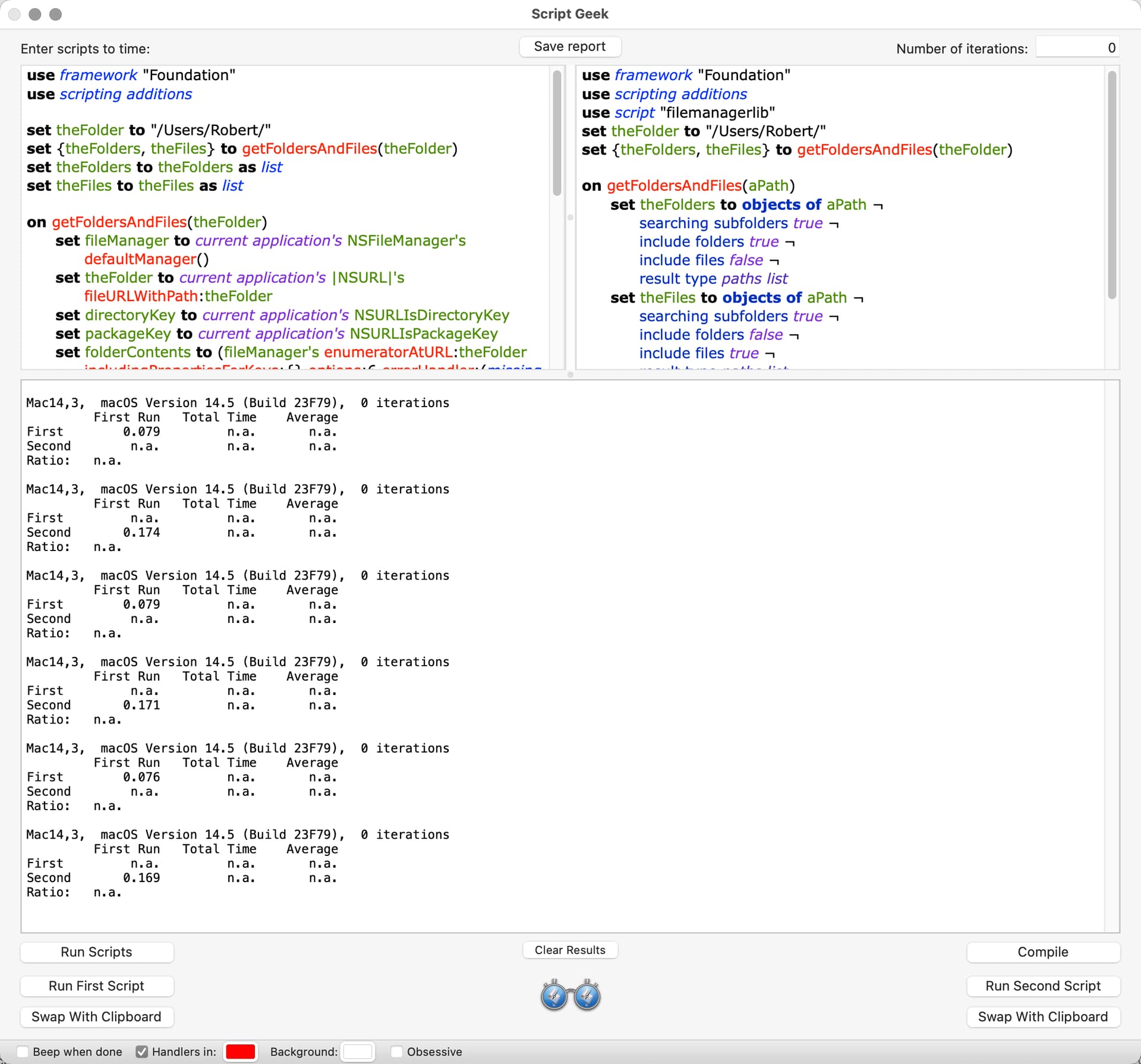
Ed. I tested our scripts with Script Geek. The target was my home folder. My script took 74 milliseconds, and your script took 167 milliseconds. I edited the scripts to return files only, and the timing results were 72 milliseconds for my script and 98 milliseconds for your script. This testing assumes that the Foundation framework is in memory, which would normally be the case. I tested the scripts with smaller folders and received similar results.

BTW, I agree that Shane’s script libraries are great. I use them constantly.

When I tested them the first run was inconsistent, but when you remove that the timing was exactly the same.

Ed. That’s a mystery. I seem to recall that there was a significant speed bump in ASObjC a few versions of macOS back, and perhaps that’s the explanation (I’m on Sonoma). I retested just to make sure.

This is a variant of a script I posted in another forum. The script searches the specified folder and its subfolders and returns the most-recently modified file that contains a specified string in its file name. The timing result when run on my smallish home folder was 13 milliseconds.

The script uses the CONTAINS operator to make string comparisons, but the following can be substituted:

  • BEGINSWITH and ENDSWITH, both of which do what you would expect.
  • LIKE allows the use of * and ? wildcard characters.
  • MATCHES allows the use of a regular expression.

You can make these operators case and/or diacritic insensitive by appending [c], [d], or [cd] to the operator (e.g. CONTAINS[c]).

use framework "Foundation"
use scripting additions

set theFile to getFile("/Users/Robert", "Test") --the parameters are the target folder and search string

on getFile(theFolder, matchString)
	set fileManager to current application's NSFileManager's defaultManager()
	set theFolder to current application's |NSURL|'s fileURLWithPath:theFolder
	set fileKey to current application's NSURLIsRegularFileKey
	set dateKey to current application's NSURLContentModificationDateKey --NSURLCreationDateKey if desired
	set pathKey to current application's NSURLPathKey
	set folderContents to (fileManager's enumeratorAtURL:theFolder includingPropertiesForKeys:{} options:6 errorHandler:(missing value))'s allObjects() -- change options 6 to 7 to not descend into subfolders
	set thePredicate to current application's NSPredicate's predicateWithFormat_("lastPathComponent CONTAINS %@", matchString)
	set filteredFiles to folderContents's filteredArrayUsingPredicate:thePredicate
	set sortedFiles to current application's NSMutableArray's new()
	repeat with anItem in filteredFiles
		set {theResult, aRegularFile} to (anItem's getResourceValue:(reference) forKey:fileKey |error|:(missing value))
		if aRegularFile as boolean is true then (sortedFiles's addObject:(anItem's resourceValuesForKeys:{dateKey, pathKey} |error|:(missing value)))
	end repeat
	sortedFiles's sortUsingDescriptors:{current application's NSSortDescriptor's sortDescriptorWithKey:dateKey ascending:false}
	set thePaths to (sortedFiles's valueForKey:pathKey)
	if thePaths's |count|() is 0 then return "No matching files found"
	return (thePaths's objectAtIndex:0) as text
end getFile
1 Like

A script by Nigel in another thread prompted me to revisit an issue I investigated a few years back, which is how best to set NSURLResourceKeys when using the getResourceValue method. The results were the same as before:

  • pre-fetching the resource keys in the enumeratorAtURL and contentsOfDirectoryAtURL methods had no impact on the time it took the code to run; and

  • getting the resource keys inside of a repeat loop slows the script considerably.

I’ve included my testing below.

use framework "Foundation"

--SET KEY INSIDE OF REPEAT LOOP (117 MILLISECONDS)
set regularFiles to getFilesOne("/Users/robert/")
on getFilesOne(theFolder)
	set theFolder to current application's |NSURL|'s fileURLWithPath:theFolder
	set fileManager to current application's NSFileManager's defaultManager()
	set theFiles to (fileManager's enumeratorAtURL:theFolder includingPropertiesForKeys:{} options:6 errorHandler:(missing value))'s allObjects()'s mutableCopy()
	repeat with i from theFiles's |count|() to 1 by -1
		set {theResult, aRegularFile} to ((theFiles's objectAtIndex:(i - 1))'s getResourceValue:(reference) forKey:(current application's NSURLIsRegularFileKey) |error|:(missing value))
		if aRegularFile as boolean is false then (theFiles's removeObjectAtIndex:(i - 1))
	end repeat
	return theFiles as list
end getFilesOne

--SET KEY TO VARIABLE OUTSIDE OF REPEAT LOOP (84 MILLISECONDS)
set regularFiles to getFilesTwo("/Users/robert/")
on getFilesTwo(theFolder)
	set theFolder to current application's |NSURL|'s fileURLWithPath:theFolder
	set fileManager to current application's NSFileManager's defaultManager()
	set fileKey to current application's NSURLIsRegularFileKey
	set theFiles to (fileManager's enumeratorAtURL:theFolder includingPropertiesForKeys:{} options:6 errorHandler:(missing value))'s allObjects()'s mutableCopy()
	repeat with i from theFiles's |count|() to 1 by -1
		set {theResult, aRegularFile} to ((theFiles's objectAtIndex:(i - 1))'s getResourceValue:(reference) forKey:fileKey |error|:(missing value))
		if aRegularFile as boolean is false then (theFiles's removeObjectAtIndex:(i - 1))
	end repeat
	return theFiles as list
end getFilesTwo

--SET KEY TO STRING VALUE INSIDE OF REPEAT LOOP (82 MILLISECONDS)
set regularFiles to getFilesThree("/Users/robert/")
on getFilesThree(theFolder)
	set theFolder to current application's |NSURL|'s fileURLWithPath:theFolder
	set fileManager to current application's NSFileManager's defaultManager()
	set theFiles to (fileManager's enumeratorAtURL:theFolder includingPropertiesForKeys:{} options:6 errorHandler:(missing value))'s allObjects()'s mutableCopy()
	repeat with i from theFiles's |count|() to 1 by -1
		set {theResult, aRegularFile} to ((theFiles's objectAtIndex:(i - 1))'s getResourceValue:(reference) forKey:"NSURLIsRegularFileKey" |error|:(missing value))
		if aRegularFile as boolean is false then (theFiles's removeObjectAtIndex:(i - 1))
	end repeat
	return theFiles as list
end getFilesThree

--PRE-FETCH KEY FOR EACH ITEM IN DIRECTORY (83 MILLISECONDS)
set regularFiles to getFilesFour("/Users/robert/")
on getFilesFour(theFolder)
	set theFolder to current application's |NSURL|'s fileURLWithPath:theFolder
	set fileManager to current application's NSFileManager's defaultManager()
	set fileKey to current application's NSURLIsRegularFileKey
	set theFiles to (fileManager's enumeratorAtURL:theFolder includingPropertiesForKeys:{fileKey} options:6 errorHandler:(missing value))'s allObjects()'s mutableCopy()
	repeat with i from theFiles's |count|() to 1 by -1
		set {theResult, aRegularFile} to ((theFiles's objectAtIndex:(i - 1))'s getResourceValue:(reference) forKey:fileKey |error|:(missing value))
		if aRegularFile as boolean is false then (theFiles's removeObjectAtIndex:(i - 1))
	end repeat
	return theFiles as list
end getFilesFour

BTW, a further reduction in timing results of about 8 percent can often be achieved by setting the Boolean NSNumber object outside the repeat loop (thanks KniazidisR). However, the documentation for the resource key needs to be consulted to see what it returns.

use framework "Foundation"
set booleanFalse to current application's NSNumber's numberWithBool:false -->(NSNumber) NO

Nigel’s script also reminded me that a filter can be used to get desired disk items. This script took 70 milliseconds to run and is functionally equivalent to those in the preceding post, except that this script returns paths and the others return file objects. BTW, the resource keys are pre-cached in this script, but this makes no difference in the timing result that I can ascertain.

use framework "Foundation"

set regularFiles to getFiles("/Users/robert/")

on getFiles(theFolder)
	set theFolder to current application's |NSURL|'s fileURLWithPath:theFolder
	set fileManager to current application's NSFileManager's defaultManager()
	set fileKey to current application's NSURLIsRegularFileKey
	set pathKey to current application's NSURLPathKey
	set folderContents to (fileManager's enumeratorAtURL:theFolder includingPropertiesForKeys:{fileKey, pathKey} options:6 errorHandler:(missing value))'s allObjects() --option 6 skips hidden items and package contents
	set fileData to current application's NSMutableArray's new()
	repeat with anItem in folderContents
		(fileData's addObject:(anItem's resourceValuesForKeys:{fileKey, pathKey} |error|:(missing value)))
	end repeat
	set thePredicate to current application's NSPredicate's predicateWithFormat_("%K == YES", fileKey)
	(fileData's filterUsingPredicate:thePredicate)
	return (fileData's valueForKey:pathKey) as list
end getFiles

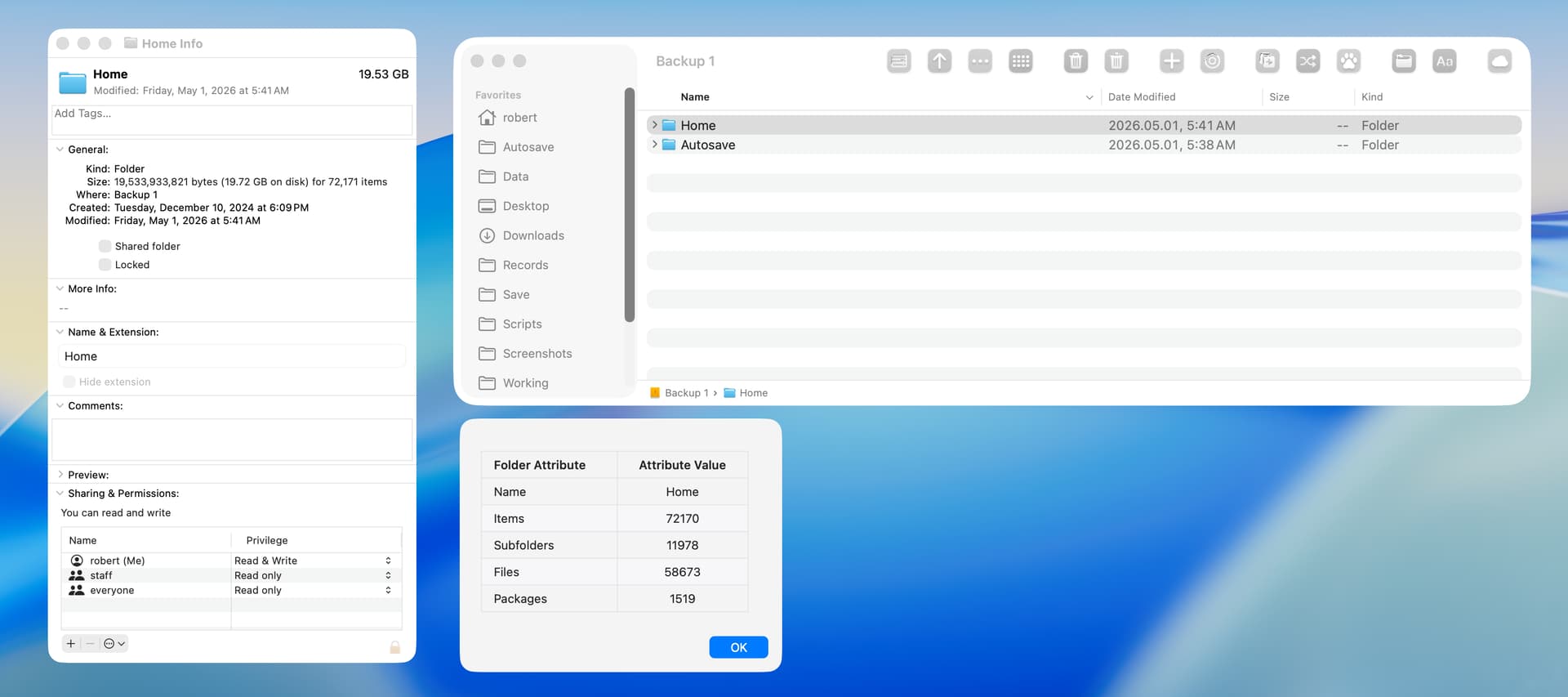
The following script returns the number of items, subfolders, files, and packages contained in a folder selected in a Finder window. The open source swiftDialog utility is required. The timing result on my smallish Home folder with the dialog disabled was 67 milliseconds.

--The open source swiftDialog utility is required
--https://github.com/swiftDialog/swiftDialog

use framework "Foundation"
use scripting additions

on main()
	set theFolder to getSelectedFolder() --get folder selected in Finder window
	set {folderName, itemCount, subfolderCount, packageCount} to getFolderData(theFolder) --get folder attributes
	set fileCount to (itemCount - subfolderCount - packageCount) --calculate file count from other counts
	set tableHeader to "| Folder Attribute     |   Attribute Value   |" & linefeed & "| :--- |  :---: |" --four non-breaking spaces added with  
	set tableData to "| Name | " & folderName & " |" & linefeed & "| Items | " & itemCount & " |" & linefeed & "| Subfolders | " & subfolderCount & " |" & linefeed & "|Files | " & fileCount & " |" & linefeed & "|Packages | " & packageCount & " |"
	set markdownTable to tableHeader & linefeed & tableData
	do shell script "/usr/local/bin/dialog --title none --message " & quoted form of markdownTable & " --messagefont 'size=13' --messagealignment left --messageposition top --width 370 --height 245 --hideicon --resizable; exit 0"
end main

on getSelectedFolder()
	tell application "Finder"
		set theSelection to selection
		if (count theSelection) is 1 and (class of (item 1 of theSelection)) is folder then --folder selected in Viewer pane
			return (item 1 of theSelection) as alias
		else if theSelection is {} then --folder selected in Sidebar
			try
				return (target of Finder window 1) as alias
			on error
				display dialog "A single folder must be selected in a Finder window." buttons {"OK"} cancel button 1 default button 1
			end try
		else --2 or more items selected or selected item is not a folder
			display dialog "A single folder must be selected in a Finder window." buttons {"OK"} cancel button 1 default button 1
		end if
	end tell
end getSelectedFolder

on getFolderData(theFolder)
	set fileManager to current application's NSFileManager's defaultManager()
	set theFolder to current application's |NSURL|'s fileURLWithPath:(POSIX path of theFolder)
	set folderContents to (fileManager's enumeratorAtURL:theFolder includingPropertiesForKeys:{} options:6 errorHandler:(missing value))'s allObjects() --option 6 skips hidden files and package contents
	set folderKey to current application's NSURLIsDirectoryKey
	set packageKey to current application's NSURLIsPackageKey
	set booleanTrue to current application's NSNumber's numberWithBool:true --optimizes repeat loop
	set theSubfolders to current application's NSMutableArray's new()
	set thePackages to current application's NSMutableArray's new()
	repeat with anItem in folderContents
		set {theResult, aFolder} to (anItem's getResourceValue:(reference) forKey:folderKey |error|:(missing value))
		if aFolder is booleanTrue then
			set {theResult, aPackage} to (anItem's getResourceValue:(reference) forKey:packageKey |error|:(missing value))
			if aPackage is booleanTrue then
				(thePackages's addObject:anItem)
			else
				(theSubfolders's addObject:anItem)
			end if
		end if
	end repeat
	set folderName to theFolder's lastPathComponent() as text
	return {folderName, folderContents's |count|(), theSubfolders's |count|(), thePackages's |count|()}
end getFolderData

main()

The following is an example with a large backup folder. There is always a discrepancy of 1 item when comparing the results of this script with the Finder, and this is because the Finder includes the source folder in the count.

I’ve been watching this thread progress over time and it’s been very helpful and informative. I made an architectural design choice related to this topic that I would appreciate feedback on. I hope no one minds a topically-related aside here.

I have a FileSystem library (asobjc) that provides handlers for listing filesystem objects (list all contents, list top level contents, list folders, list files, list packages, list all Folders, Files, and Packages, list aliases, and list symlinks). These all return arrays of NSURLs.

I have an NSURL library (asobjc) that provides handers for filtering and sorting of arrays of NSURLs. I have 7 NSURL sorting handlers (access date, content mod date, attribute mod date, creation date, added date, name, size), and 24 NSURL filtering handlers (extension matches, filename matches, filename contains, path contains, access date before/after, mod date before/after, created date before/after, etc.). These all return arrays of NSURLs.

There are so many possible combinations of file/folder/package-property-matches-or-doesn’t-match-criteria that it’s impractical to try to write custom code for them all. But at some point I’m going to want all the files in a hierarchy whose name matches a search string, are the correct file type, and have been modified in the last 7 days, so I decided to separate the file-listing from the filtering and sorting.

NSURL array filtering

If you want to use multiple criteria to return filesystem objects the permutations can become enormous, so, instead of writing a ton of variations of ways to gather file/folder/packages matching or not matching some criteria, I decided to get the full set of NSURLs for the directory and then pass them through appropriate NSURL-filtering handlers. Since these filtering handlers also return an array of NSURLs you can pass them through as many filters as needed. You can combine any of these filtering handlers to achieve any subset of files you want without coding a specific combination.

Get some set of (file/folder/package NSURLs) and pass them through → (IS FILE filter) → (filename CONTAINS filter) → (extension MATCHES filter) → (created date AFTER filter) → (SORT by mod date)

Pertinent, I suppose, is that in addition to the file-folder-package listing handlers, I also have file-folder-package copy, duplicate, move, and delete handlers. Without making a number of variations on these file-manipulation handlers, I can use the NSURL filter handlers and get the functionality. i.e. When I want to Move all Folders in the targetDirectory whose name matches “temp” and whose created date is today I can just list the targetDirectory, filter for name is “temp”, filter for created date is today and pass the resulting list to the Move handler.

This made my libs more feature-complete, but also greatly reduced the amount of code I had in these libraries and it performs very well. Opinions, criticism or stark warnings of impending doom are welcome.
1 Like

Paul. I have to admit up front that I don’t know much about script libraries. However, I was interested how the user would request and how the script library would get and return the desired data.

I think better about issues such as this by writing code, so I wrote the following script. A few comments:

  • The script is in the form of a regular handler, but I tested it as a script library without issue.

  • When the NSURL of a symbolic link is added to an array and then coerced to a list, the linked file is returned instead of the symbolic link. If the script is edited to return POSIX paths, the actual path to the symbolic link is returned. I don’t know any way to change this behavior.

  • The script returns a list rather than an array, so that it can be tested with Script Editor.

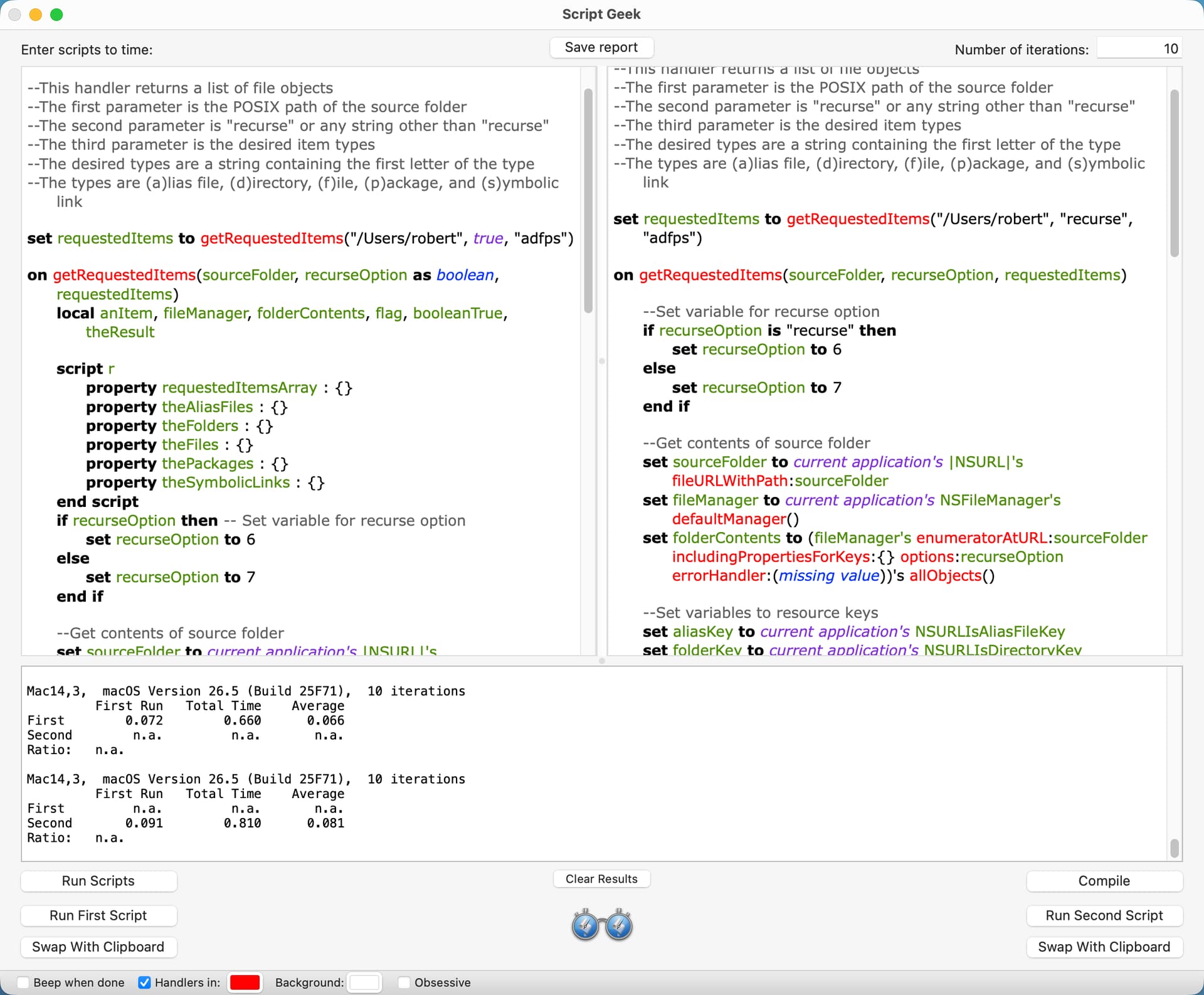
  • The timing result of the script as written on my M4 Mac mini was 88 milliseconds. The timing result if the requested type was alias file and the source folder contained 13 items with 1 alias file was 2 milliseconds. The second timing result surprised me, but I double-checked everything.

  • I’d be very interested to see how your script works.

use framework "Foundation"
use scripting additions

--This handler returns a list of file objects
--The first parameter is the POSIX path of the source folder
--The second parameter is "recurse" or any string other than "recurse"
--The third parameter is the desired item types and consist of the first letter of the type
--The types are (a)lias file, (d)irectory, (f)ile, (p)ackage, and (s)ymbolic link

set requestedItems to getRequestedItems("/Users/robert", "recurse", "adfps")

on getRequestedItems(sourceFolder, recurseOption, requestedItemsString)
	
	--Set variable for recurse option
	if recurseOption is "recurse" then
		set recurseOption to 6
	else
		set recurseOption to 7
	end if
	
	--Get contents of source folder
	set sourceFolder to current application's |NSURL|'s fileURLWithPath:sourceFolder
	set fileManager to current application's NSFileManager's defaultManager()
	set folderContents to (fileManager's enumeratorAtURL:sourceFolder includingPropertiesForKeys:{} options:recurseOption errorHandler:(missing value))'s allObjects() --hidden files and package contents are skipped
	
	--Set variables to resource keys
	set aliasKey to current application's NSURLIsAliasFileKey
	set folderKey to current application's NSURLIsDirectoryKey
	set packageKey to current application's NSURLIsPackageKey
	set symbolicLinkKey to current application's NSURLIsSymbolicLinkKey
	
	--Initialize arrays
	set theAliasFiles to current application's NSMutableArray's new()
	set theFiles to current application's NSMutableArray's new()
	set theFolders to current application's NSMutableArray's new()
	set thePackages to current application's NSMutableArray's new()
	set theSymbolicLinks to current application's NSMutableArray's new()
	
	--Set variable to Boolean NSNumber to optimize repeat loop
	set booleanTrue to current application's NSNumber's numberWithBool:true
	
	--Add items in folder contents to arrays
	repeat with anItem in folderContents
		repeat 1 times
			
			--Folders and packages
			set {theResult, aFolder} to (anItem's getResourceValue:(reference) forKey:folderKey |error|:(missing value))
			if aFolder is booleanTrue then
				set {theResult, aPackage} to (anItem's getResourceValue:(reference) forKey:packageKey |error|:(missing value))
				if aPackage is booleanTrue then
					(thePackages's addObject:anItem)
				else
					(theFolders's addObject:anItem)
				end if
				exit repeat
			end if
			
			--Alias files and symbolic links		
			set {theResult, anAlias} to (anItem's getResourceValue:(reference) forKey:aliasKey |error|:(missing value))
			if anAlias is booleanTrue then
				set {theResult, aSymbolicLink} to (anItem's getResourceValue:(reference) forKey:symbolicLinkKey |error|:(missing value))
				if aSymbolicLink is booleanTrue then
					(theSymbolicLinks's addObject:anItem)
				else
					(theAliasFiles's addObject:anItem)
				end if
				exit repeat
			end if
			
			--Files
			(theFiles's addObject:anItem)
		end repeat
	end repeat
	
	--Return a list with the items of the requested type
	--Change addObjectsFromArray to addObject to return a list of lists
	set requestedItemsArray to current application's NSMutableArray's new()
	repeat with aList in {{"a", theAliasFiles}, {"d", theFolders}, {"f", theFiles}, {"p", thePackages}, {"s", theSymbolicLinks}}
		if requestedItemsString contains (item 1 of aList) then (requestedItemsArray's addObjectsFromArray:(item 2 of aList))
	end repeat
	return requestedItemsArray as list
end getRequestedItems

Thanks for the post. I enjoy learning new stuff.

Here’s my version of your script…

use framework "Foundation"
use scripting additions

property ca : current application

--This handler returns a list of file objects
--The first parameter is the POSIX path of the source folder
--The second parameter is "recurse" or any string other than "recurse"
--The third parameter is the desired item types
--The desired types are a string containing the first letter of the type
--The types are (a)lias file, (d)irectory, (f)ile, (p)ackage, and (s)ymbolic link

set requestedItems to getRequestedItems("/Users", true, "adfps")

on getRequestedItems(sourceFolder, recurseOption as boolean, requestedItems)
	local anItem, fileManager, theResult, fileOptions
	
	script r
		property requestedItemsArray : {}
		property theAliasFiles : {}
		property theFolders : {}
		property theFiles : {}
		property thePackages : {}
		property theSymbolicLinks : {}
		property folderContents : missing value
	end script
	--=r
	
	-- calculate fileOptions
	set fileOptions to ((ca's NSDirectoryEnumerationSkipsHiddenFiles) as integer) + ((ca's NSDirectoryEnumerationSkipsPackageDescendants) as integer)
	if not recurseOption then set fileOptions to fileOptions + ((ca's NSDirectoryEnumerationSkipsSubdirectoryDescendants) as integer) -- Set variable for recurse option
	
	--Get contents of source folder
	set fileManager to ca's NSFileManager's defaultManager()
	set r's folderContents to (fileManager's enumeratorAtURL:(current application's |NSURL|'s fileURLWithPath:sourceFolder) includingPropertiesForKeys:{} options:fileOptions errorHandler:(missing value))'s allObjects()
	
	--Add items in folder contents to arrays
	repeat with anItem in r's folderContents
		--set anItem to contents of anItem
		set theResult to item 1 of ((anItem's resourceValuesForKeys:{"NSURLIsDirectoryKey", "NSURLIsPackageKey", "NSURLIsAliasFileKey", "NSURLIsSymbolicLinkKey"} |error|:(missing value)) as list)
		set anItem to anItem as «class furl»
		if theResult's NSURLIsDirectoryKey then -- Folders and packages
			if theResult's NSURLIsPackageKey then
				set end of r's thePackages to anItem
			else
				set end of r's theFolders to anItem
			end if
		else if theResult's NSURLIsAliasFileKey then -- Alias files and symbolic links
			if theResult's NSURLIsSymbolicLinkKey then
				set end of r's theSymbolicLinks to anItem
			else
				set end of r's theAliasFiles to anItem
			end if
		else -- Files
			set end of r's theFiles to anItem
		end if
	end repeat
	set r's folderContents to missing value
	
	--Return a list with the items of the requested type
	repeat with i in requestedItems
		set n to offset of i in "adfps"
		if n > 0 then set r's requestedItemsArray to r's requestedItemsArray & (item n of {r's theAliasFiles, r's theFolders, r's theFiles, r's thePackages, r's theSymbolicLinks})
	end repeat
	return r's requestedItemsArray
end getRequestedItems

See if it’s faster? ** EDIT ** - minor edits done!

Robert. Thanks for looking at my script and for suggesting the improved version.

With 10 runs, your script averaged 66 milliseconds per run and my script 81 milliseconds. The returned results of the two scripts were identical in limited testing.

Here is another version that is even faster…

use framework "Foundation"
use scripting additions

property ca : current application

--This handler returns a list of file objects
--The first parameter is the POSIX path of the source folder
--The second parameter is "recurse" or any string other than "recurse"
--The third parameter is the desired item types
--The desired types are a string containing the first letter of the type
--The types are (a)lias file, (d)irectory, (f)ile, (p)ackage, and (s)ymbolic link

set requestedItems to getRequestedItems("/", true, "adfps")

on getRequestedItems(sourceFolder, recurseOption as boolean, requestedItems)
	local i, c, cf, anItem, fileManager, propertyKeys, theResult, fileOptions, DirectoryKey, PackageKey, AliasKey, SymbolicKey, FileKey
	
	script r
		property folderContents : missing value
	end script
	--=r
	
	-- calculate fileOptions
	set propertyKeys to {"NSURLIsDirectoryKey", "NSURLIsPackageKey", "NSURLIsAliasFileKey", "NSURLIsSymbolicLinkKey"}
	set fileOptions to ((ca's NSDirectoryEnumerationSkipsHiddenFiles) as integer) + ((ca's NSDirectoryEnumerationSkipsPackageDescendants) as integer)
	if not recurseOption then set fileOptions to fileOptions + ((ca's NSDirectoryEnumerationSkipsSubdirectoryDescendants) as integer) -- Set variable for recurse option
	
	--Get contents of source folder
	set fileManager to ca's NSFileManager's defaultManager()
	set r's folderContents to (fileManager's enumeratorAtURL:(current application's |NSURL|'s fileURLWithPath:sourceFolder) includingPropertiesForKeys:propertyKeys options:fileOptions errorHandler:(missing value))'s allObjects()
	
	--remove unwanted  items in folder contents
	set {DirectoryKey, PackageKey, AliasKey, SymbolicKey, FileKey} to {true, true, true, true, true}
	set c to false
	repeat with i in requestedItems
		set i to contents of i
		if i = "p" then
			set PackageKey to c
		else if i = "d" then
			set DirectoryKey to c
		else if i = "s" then
			set SymbolicKey to c
		else if i = "a" then
			set AliasKey to c
		else if i = "f" then
			set FileKey to c
		end if
	end repeat
	set cf to count r's folderContents
	set c to 1
	repeat with i from 1 to cf
		set anItem to item i of r's folderContents
		set theResult to item 1 of ((anItem's resourceValuesForKeys:propertyKeys |error|:(missing value)) as list)
		--set anItem to anItem as «class furl»
		if theResult's NSURLIsDirectoryKey then -- Folders and packages
			if theResult's NSURLIsPackageKey then
				if PackageKey then
					set item i of r's folderContents to item c of r's folderContents
					set c to c + 1
				end if
			else if DirectoryKey then
				set item i of r's folderContents to item c of r's folderContents
				set c to c + 1
			end if
		else if theResult's NSURLIsAliasFileKey then -- Alias files and symbolic links
			if theResult's NSURLIsSymbolicLinkKey then
				if SymbolicKey then
					set item i of r's folderContents to item c of r's folderContents
					set c to c + 1
				end if
			else if AliasKey then
				set item i of r's folderContents to item c of r's folderContents
				set c to c + 1
			end if
		else if FileKey then
			set item i of r's folderContents to item c of r's folderContents
			set c to c + 1
		end if
	end repeat
	set r's folderContents to r's folderContents as list
	--Return a list with the items of the requested type
	if c ≤ cf then return items c thru -1 of r's folderContents
	return {}
end getRequestedItems

** EDIT ** - p.s. It’s way faster

@peavine For an example of the NSURL filtering I was describing I posted on the Resource Key for NSURLs topic with five NSURL filtering subroutines and demo code. You can’t stack these filters effectively, like I described above, because they are all exclusive results. I’ll post an example of stacking multiple filters here.