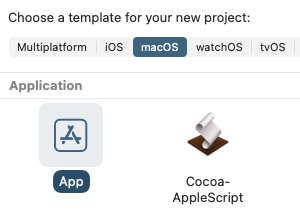
I recently tried to create a new ASOC project in Xcode but I cannot now find how to do this. It has been a while since I last created a project, back then you would open Xcode, select Application then select Cocoa-Applescript Application but all I see now is App. Any guidance would be gratefully accepted!
Current system is Apple M2 running Tahoe 26.2 using Xcode 26.2
Apple removed the AppleScriptObjC application and Automator action project templates back in Xcode 14, so you would need to add them to your user templates. I haven’t used Xcode in quite a while, but I made a quick check and project templates from Xcode 13 still work in Tahoe.
Many thanks for your reply, not sure where to find the templates or how to load them, searched online but ApplescriptObjC appears to be dead! I have tried copying and renaming existing projects but always ends up missing ‘input build file’? Is there an alternative to Xcode/ApplescriptObjC?
Put this into ~/Library/Developer/Xcode (~ is your home folder)
If there is already a folder Templates move the contents into the respective subfolders.
I kept a copy of the original Xcode 13 project templates here, and a set I created that adds a slightly customized base project (commented appDelegate and AppController files, no icon) and a few individual file templates is here.
Place the templates in a folder in your user’s Library folder at ~/Library/Developer/Xcode/Templates/. You can name this template folder whatever you want, such as “My Templates”, where it will be shown in Xcode’s template chooser. Haven’t tried the Automator action template.