tell application "Finder"
	set tdname of TargetDisk to DriveSelection
	set tdformat of TargetDisk to format of disk (tdname of TargetDisk)
end tell

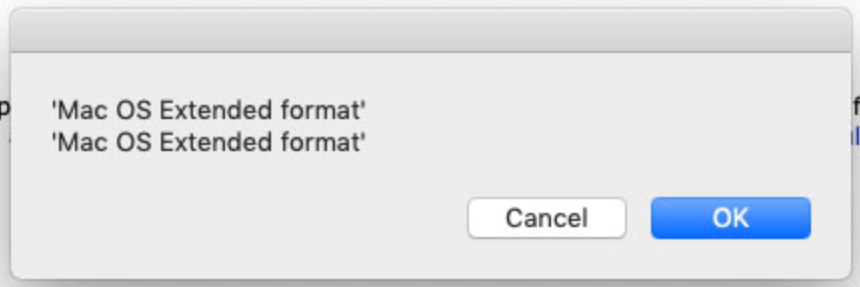
	display dialog "'" & tdformat of TargetDisk & "'" & return & "'Mac OS Extended format'"
	if tdformat of TargetDisk = "Mac OS Extended format" then
		display dialog "Result A"
	else
		display dialog "Result B"
	end if
I am getting result B every time, even when the drive is HFS+ formatted.
Not only that, but here is the result of the debugging dialog that compares the values:
Yup the format is a constant.
You can convert it to text.
PS your variables seem very wacky:
use AppleScript version "2.4" -- Yosemite (10.10) or later
use scripting additions

set TargetDisk to choose folder with prompt ¬
	"Choose Disk"
tell application "Finder"
	set tdname to name of TargetDisk
	set tdformat to format of disk (tdname)
end tell

set formatText to tdformat as text

log {"tdformat Class", class of tdformat}
-- tdformat Class, constant
log {"formatText Class", class of formatText}
-- formatText Class, text

display dialog "'" & tdformat & "'" & return & "'Mac OS Extended format'"
if formatText = "APFS format" then
	display dialog "Result A"
else
	display dialog "Result B"
end if
The value of the format property is a so called enumeration. This is not a string, it’s a list of key value pairs where the key is an AppleScript keyword and the value is a 32 bit integer constant. The benefit of an enumeration is type safety, you can only used the defined enumerations.
The enumeration in the Finder Scripting Definition file looks like this
		<enumeration name="edfm" code="edfm">
			<enumerator name="Mac OS format" code="dfhf"/>
			<enumerator name="Mac OS Extended format" code="dfh+"/>
            ...
		</enumeration>
The type of the code dfh+ ( the Mac OS Extended format constant) is called FourCharCode and represents the integer value 1684432939 which is calculated by joining the binary ASCII values. The type FourCharCode has been created for convenience reasons to convert the four character string code in the definition file into the integer.
These are the hex and binary values of the 4 characters
set charD to ASCII number "d" -- 100 -- 0x64 -- 01100100
set charF to ASCII number "f" -- 102 -- 0x66 -- 01100110
set charH to ASCII number "h" -- 104 -- 0x68-- 01101000
set charPlus to ASCII number "+" -- 43 -- 0x2b -- 00101011
And this is the binary value of the integer 1684432939 which is 0x6466682B hex
To use those constants they code must be wrapped in an application tell block which contains the enumeration.
So your script in the question works this way (note the missing double quotes around the enumeration keyword)
tell application "Finder"
	set tdname of TargetDisk to DriveSelection
	set tdformat of TargetDisk to format of disk (tdname of TargetDisk)

	display dialog "'" & tdformat of TargetDisk & "'" & return & "'Mac OS Extended format'"
	if tdformat of TargetDisk = Mac OS Extended format then
		display dialog "Result A"
	else
		display dialog "Result B"
	end if
end tell
Ok that is the understandable answer i’ve had to this question! I had another longer post that I didn’t realize was the exact same question, turning disk format results into useable values.
So I tried implementing this in the main script and here is the problem. This requires the “IF” statement be in the Finder’s “TELL” statement. But then other things inside that “THEN” clause throw errors when they’re in there. Specifically the progress bar commands.
In addition to that, it is kind of annoying to have some dialogs thrown by the applet, and some thrown by the finder. It would be better to have them all in one place.
Now all of that, points to a solution that would be so simple. Is there a way I can just get that format enumeration value and convert it to a normal string?
My script currently does this by running another script inside the main script via “run script”. This is a particularly inelegant solution. But maybe the only solution?
Yes, just coerce it to string (as text) but you have to do it inside a Finder tell block.
tell application "Finder"
	set tdname of TargetDisk to DriveSelection
	set tdformat of TargetDisk to (format of disk (tdname of TargetDisk)) as text
end tell
-- other code
I tried that and it didn’t work. I’ll try it again tomorrow and see what I can come up with. I tried so many things, maybe I’m wrong about trying exactly that.
Yeah this doesn’t work.
It works within the script editor, but it doesn’t work in an application. But its inside the TELL block so i don’t understand why it can’t show the format string.
We went on and on about this in the other post. Nobody could explain it in a way that made sense to me. Seems like in the end, what it comes down to is a glitch in applescript.
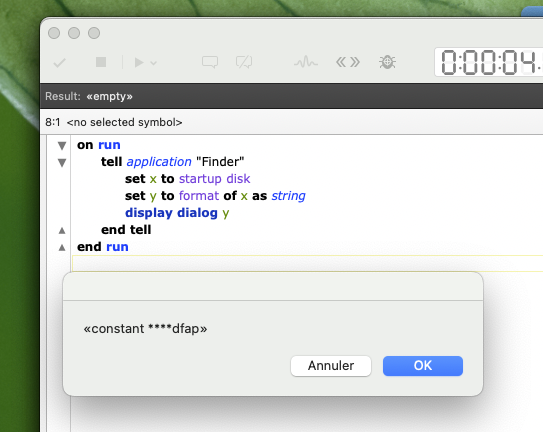
on run
	tell application "Finder"
		set x to startup disk
		set y to format of x as string
		display dialog y
	end tell
end run
^ this returns “APFS format” in the script editor, but “«constant ****dfap»” in an applet. I had to use “run script” to run the format lookup and return that to my regular script. It does work but I can’t see how it works or why it’s necessary.
You’re probably right. I can reproduce this issue here on a Mac M4 running Sequoia.
[Some strange behaviors are only present on Apple Silicon Macs]
Did you even take a look at the script I provided in your other post?
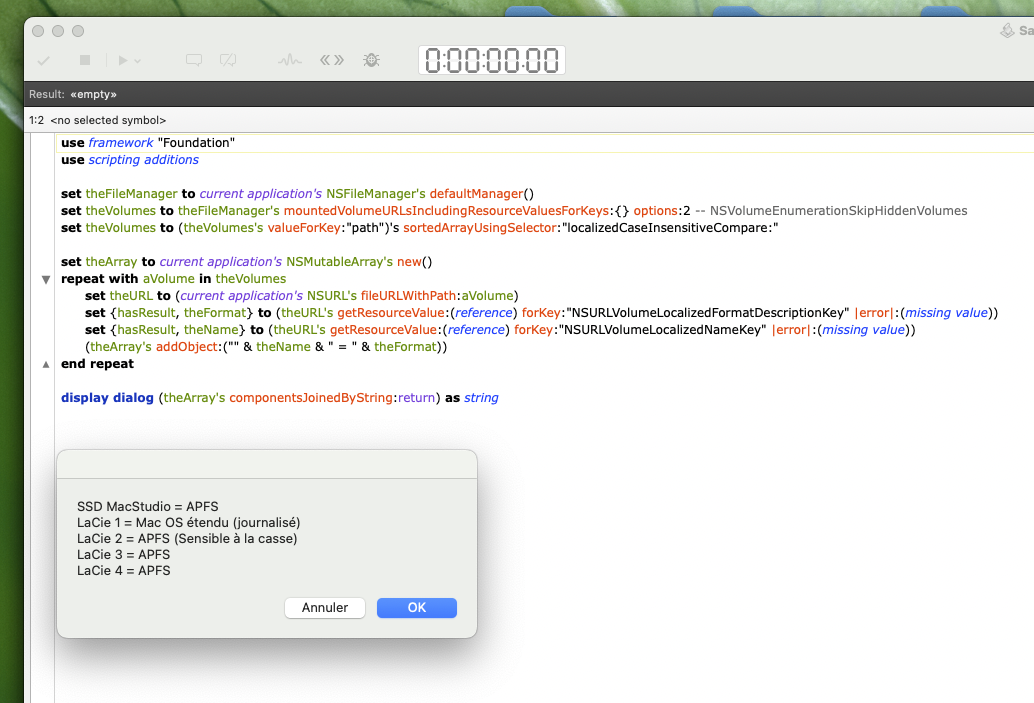
[It seems you want to avoid AppleScriptObjC, but in your case, it’s the most suitable solution.]
use framework "Foundation"
use scripting additions

set theFileManager to current application's NSFileManager's defaultManager()
set theVolumes to theFileManager's mountedVolumeURLsIncludingResourceValuesForKeys:{} options:2 -- NSVolumeEnumerationSkipHiddenVolumes
set theVolumes to (theVolumes's valueForKey:"path")'s sortedArrayUsingSelector:"localizedCaseInsensitiveCompare:"

set theArray to current application's NSMutableArray's new()
repeat with aVolume in theVolumes
	set theURL to (current application's NSURL's fileURLWithPath:aVolume)
	set {hasResult, theFormat} to (theURL's getResourceValue:(reference) forKey:"NSURLVolumeLocalizedFormatDescriptionKey" |error|:(missing value))
	set {hasResult, theName} to (theURL's getResourceValue:(reference) forKey:"NSURLVolumeLocalizedNameKey" |error|:(missing value))
	(theArray's addObject:("" & theName & " = " & theFormat))
end repeat

display dialog (theArray's componentsJoinedByString:return) as string