Somewhere before I have seen an example of code that uses the Foundation framework to call Objective-C commands to provide a display dialog with a text input area that is not just a single line tall. That can make it much easier for a user to input a return-delimited list of text. I suspect someone like @Piyomaru provided the example code.
however, when I search here, I cannot find it.
Does anyone know how to find that post? Or, can anyone provide sample code?
I’m not sure if this is what you are looking for, but AppleScript’s display dialog command converts to multiline text-entry mode when at least one linefeed or return character is included in the default answer parameter value:
activate
set textReturned to (display dialog "Enter one of more lines of text:" default answer linefeed)'s text returned
or
activate
set textReturned to (display dialog "Enter one of more lines of text:" default answer return)'s text returned
To enlarge the text entry box vertically, simply add multiple linefeed or return characters. For example:
activate
set textReturned to (display dialog "Enter one of more lines of text:" default answer (linefeed & linefeed & linefeed & linefeed & linefeed & linefeed & linefeed & linefeed & linefeed & linefeed))'s text returned
One caveat is that when the editable text field is converted to multiline text-entry mode by the above technique, the Return key no longer serves as a proxy for an OK button press but rather as a text insertion key, inserting a literal linefeed character into the text. In order to close the window with a key press, a special key combination must be used. Function-Return works on my computer, but I’ve read of others, including Command-Return or pressing the Enter key on the numeric keypad (neither of which works for me.)
2 Likes
Here is another approach that presents an appearance mode adaptable textView that allows you to enter continuous or multi-line text that is then captured by the application and presented back to you in a normal AppleScript display dialog. The window is scrollable and receptive to copy/paste.
use framework "Foundation"
use framework "AppKit"
use AppleScript version "2.5"
use scripting additions


property ca : current application
property multiText : "/System/Library/CoreServices/CoreTypes.bundle/Contents/Resources/MultipleItemsIcon.icns"
property panelText : ""

my performSelectorOnMainThread:"showTextDialog:" withObject:me waitUntilDone:true
display dialog panelText

return

-- Script uses AppKit to create a scrollable text view
on showTextDialog:sender
	set scrollFrame to ca's NSMakeRect(0, 0, 400, 200)
	set textView to ca's NSTextView's alloc()'s initWithFrame:scrollFrame
	textView's setRichText:false
	textView's setBackgroundColor:(ca's NSColor's textBackgroundColor())
	textView's setInsertionPointColor:(ca's NSColor's redColor())
	set scrollView to ca's NSScrollView's alloc()'s initWithFrame:scrollFrame
	scrollView's setDocumentView:textView
	scrollView's setHasVerticalScroller:true

	-- Configure Alert and add the view
	set alert to ca's NSAlert's alloc()'s init()
	alert's setMessageText:"User Input Required"
	alert's setAccessoryView:scrollView
	alert's addButtonWithTitle:"Submit"
	alert's addButtonWithTitle:"Cancel"
	set alertIcon to ca's NSImage's imageWithSystemSymbolName:"text.justify.left" accessibilityDescription:"Success"
	alert's setIcon:alertIcon

	if alert's runModal() is equal to (ca's NSAlertFirstButtonReturn) then
		set panelText to textView's |string|() as text
	else
		error number -128
	end if

end showTextDialog:
The text input dialog appears like the following. The cursor color can be changed, though I set it to red.
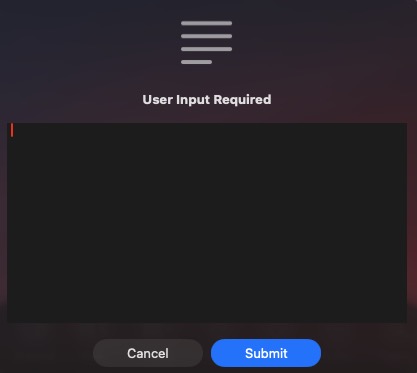
Tested with Apple’s Script Editor and Script Debugger 8.0.10 on macOS Tahoe 26.5.1.
2 Likes
You can use the tab key to move focus out of the text field to the buttons
robertfern, I can’t reproduce that behavior. In my setup, Tab, Shift-Tab, and Function-Tab cause the entire text field content to be selected, Option-Tab inserts a literal tab character, and Command-Tab opens the App Switcher menu. I can’t find a key combo other than Function-Return that moves focus to the OK button. Unless I’m missing it, I couldn’t find a Preferences/Settings item to change the tab behavior.
bmose, What OS are you on?
I’m on Sequoia
I am running macOS Tahoe 26.5.