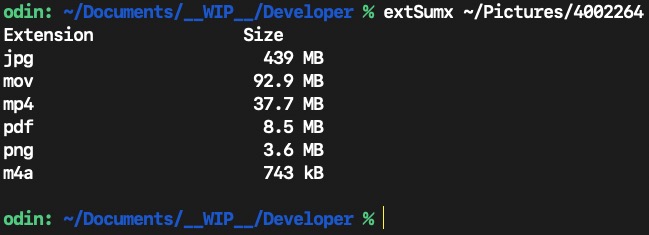
Here is the Swift source and build instructions for a command line tool to produce the following type of output: The source is best suited for opening in a proper programmer’s editor, and the only dependency is that one needs the current command-line tools for Xcode, or Xcode itself installed.
This was tested with command line tools for Xcode 26.4 (Swift 6.3) on macOS Tahoe 26.4.1. Your mileage may vary if you use older tools. It will use NSOpenPanel when no folder argument is provided on the command line.
#!/usr/bin/env swift

// Compile: xcrun --sdk macosx swiftc -Osize -o extSumx extSumx.swift
// Tested:  2026-04-18, Swift v6.3, macOS Tahoe 26.4.1
// Usage:   extSumx
//          extSumx ~/Downloads

import Foundation
import AppKit

func formatBytes(nbr: Int64) -> String {
    // automatically uses appropriate SI storage abbreviation for locale
    let autoLocale = Locale.autoupdatingCurrent.identifier
    let style = ByteCountFormatStyle(style: .file,
                                 allowedUnits: [.all],
                                 spellsOutZero: true,
                                 includesActualByteCount: false,
                                 locale: Locale(identifier: autoLocale))
    return style.format(nbr)
}

func fileChooser() -> String {
    let openPanel = NSOpenPanel()
    openPanel.isFloatingPanel = true
    openPanel.setFrame(CGRect(x: 0, y: 0, width: 600, height: 525), display: true)
    openPanel.allowsMultipleSelection = false
    openPanel.canChooseDirectories = true
    openPanel.canCreateDirectories = false
    openPanel.canChooseFiles = false
    openPanel.allowedContentTypes = [.folder]

	guard openPanel.runModal() == .OK else {
		exit(1)
	}
    return openPanel.url!.path
}

var urlFolder: URL
let inputArgs: [URL]
var extDict: [String: Int64] = [:]
let headingOne = "Extension"
let headingSpaces = String(repeating: " ", count: 15)
let headingTwo = "Size"

var mutString = NSMutableString(format: "%-16@%@%12@\n",
                                headingOne, headingSpaces, headingTwo)

inputArgs = CommandLine.arguments.dropFirst().map { URL(fileURLWithPath: $0).standardizedFileURL }

if inputArgs.isEmpty {
    urlFolder = NSURL(fileURLWithPath: fileChooser() ) as URL
} else {
	urlFolder = inputArgs[0]
}

let fm = FileManager.default
let propKeys: [URLResourceKey] = [.fileSizeKey]
let enumOptions: FileManager.DirectoryEnumerationOptions = [.skipsHiddenFiles,
                                                           .skipsPackageDescendants]
// perform a recursive dive into specified directory
let enumerator = fm.enumerator(at: urlFolder, includingPropertiesForKeys: propKeys,
                                              options: enumOptions,
                                              errorHandler: nil)

let filePaths = enumerator?.allObjects as? [URL]
for afile in filePaths! {
    let anExt = afile.pathExtension.localizedLowercase
    guard !anExt.isEmpty else {
        continue
    }
    let attributes = try fm.attributesOfItem(atPath: afile.path)
    let fileSize = (attributes[FileAttributeKey.size] as? NSNumber)!.int64Value

    // dynamically add a new extension, or update value for extension if multiples found
    if extDict[anExt] != nil {
        // add the new same extension file size to existing value
        let itsValue = fileSize + extDict[anExt]!
        extDict.updateValue(itsValue, forKey: anExt)
    } else {
        extDict[anExt] = fileSize
    }
}

// Descending sort on size
let extDictSorted = extDict.sorted(by: { $0.value > $1.value })

for (k, v) in extDictSorted {
    guard !k.isEmpty else {
        continue
    }
    mutString.appendFormat("%-16s    %12s\n", (k as NSString).utf8String!,
                            (formatBytes(nbr: v) as NSString).utf8String!)
}
print(mutString)
exit(0)
My ASObjC skills are getting rusty, so I decided to rewrite VikingOSX’s suggestion as ASObjC. The timing result was 78 milliseconds on a folder containing 567 files with 11 different extensions in 139 folders.
The approach used in my script differs in that it first excludes folders and packages by getting regular files. Also, my script displays a dialog with the file extensions and sizes.
My script should probably be edited to return different file sizes (GB, MB and so on), and a swiftDialog with a markdown table would probably be a worthwhile enhancement. Also, I think the file extensions need to be made case insensitive.
use framework "Foundation"
use scripting additions

--get regular files in the selected folder
set theFolder to current application's NSURL's fileURLWithPath:(POSIX path of (choose folder))
set folderName to theFolder's lastPathComponent() as text --used later in dialog
set fileManager to current application's NSFileManager's defaultManager()
set theFiles to (fileManager's enumeratorAtURL:theFolder includingPropertiesForKeys:{} options:6 errorHandler:(missing value))'s allObjects()'s mutableCopy() --option 6 skips hidden files and package contents
set fileKey to current application's NSURLIsRegularFileKey
set booleanFalse to current application's NSNumber's numberWithBool:false --makes repeat loop faster
repeat with i from theFiles's |count|() to 1 by -1
	set {theResult, aRegularFile} to ((theFiles's objectAtIndex:(i - 1))'s getResourceValue:(reference) forKey:fileKey |error|:(missing value))
	if aRegularFile is booleanFalse then (theFiles's removeObjectAtIndex:(i - 1))
end repeat

--loop through regular files and add extension and size to dictionary
set theDictionary to (current application's NSMutableDictionary's new())
set fileSizeKey to current application's NSURLTotalFileSizeKey --returns size similar to Finder
repeat with aFile in theFiles
	set aFileExtension to (aFile's pathExtension())'s lowercaseString()
	set {theResult, aFileSize} to (aFile's getResourceValue:(reference) forKey:fileSizeKey |error|:(missing value))
	set existingFileSize to (theDictionary's valueForKey:aFileExtension)
	if existingFileSize is (missing value) then
		(theDictionary's setObject:aFileSize forKey:aFileExtension)
	else
		set newFileSize to (aFileSize as integer) + (existingFileSize as integer)
		(theDictionary's setObject:newFileSize forKey:aFileExtension)
	end if
end repeat

--format file sizes and create text message with file extensions and file sizes
set theKeys to theDictionary's allKeys()'s sortedArrayUsingSelector:"localizedStandardCompare:"
set theFormatter to current application's NSNumberFormatter's new()
theFormatter's setFormat:("#,##0")
set theMessage to current application's NSMutableArray's new()
repeat with aKey in theKeys
	set aValue to (theDictionary's valueForKey:aKey)
	set aNumber to (theFormatter's stringFromNumber:aValue)
	set aString to current application's NSString's stringWithFormat_("%@ - %@", aKey, aNumber)
	(theMessage's addObject:aString)
end repeat
set dialogMessage to (theMessage's componentsJoinedByString:linefeed) as text

--display dialog
display dialog "The extensions and total sizes in bytes of files in the " & quote & folderName & quote & " folder are shown below. Package files are skipped." & linefeed & linefeed & dialogMessage buttons {"OK"} default button 1
EDIT: I revised the above script to make file extensions case insensitive.
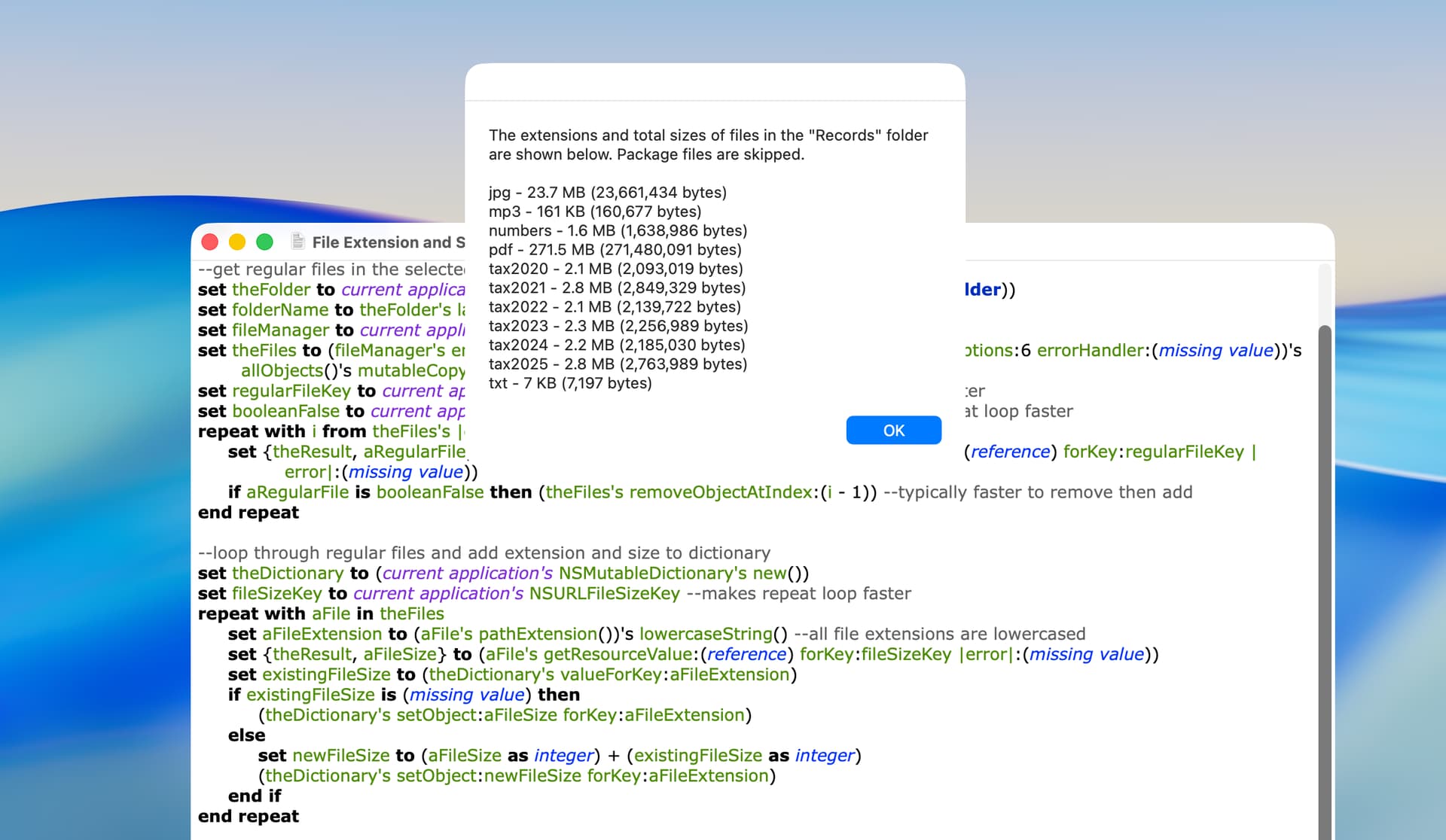
This version formats file sizes (from Shane) and lowercases extensions.
use framework "Foundation"
use scripting additions

--get regular files in the selected folder
set theFolder to current application's NSURL's fileURLWithPath:(POSIX path of (choose folder))
set folderName to theFolder's lastPathComponent() as text --used in dialog message
set fileManager to current application's NSFileManager's defaultManager()
set theFiles to (fileManager's enumeratorAtURL:theFolder includingPropertiesForKeys:{} options:6 errorHandler:(missing value))'s allObjects()'s mutableCopy() --option 6 skips hidden files and package contents
set regularFileKey to current application's NSURLIsRegularFileKey
set booleanFalse to current application's NSNumber's numberWithBool:false --makes repeat loop faster
repeat with i from theFiles's |count|() to 1 by -1
	set {theResult, aRegularFile} to ((theFiles's objectAtIndex:(i - 1))'s getResourceValue:(reference) forKey:regularFileKey |error|:(missing value))
	if aRegularFile is booleanFalse then (theFiles's removeObjectAtIndex:(i - 1))
end repeat

--loop through regular files and add extension and size to dictionary
set theDictionary to (current application's NSMutableDictionary's new())
set fileSizeKey to current application's NSURLTotalFileSizeKey --returns size similar to Finder
repeat with aFile in theFiles
	set aFileExtension to (aFile's pathExtension())'s lowercaseString() --all file extensions are lowercased
	set {theResult, aFileSize} to (aFile's getResourceValue:(reference) forKey:fileSizeKey |error|:(missing value))
	set existingFileSize to (theDictionary's valueForKey:aFileExtension)
	if existingFileSize is (missing value) then
		(theDictionary's setObject:aFileSize forKey:aFileExtension)
	else
		set newFileSize to (aFileSize as integer) + (existingFileSize as integer)
		(theDictionary's setObject:newFileSize forKey:aFileExtension)
	end if
end repeat

--format file sizes and create text message with file extensions and file sizes
set theKeys to theDictionary's allKeys()'s sortedArrayUsingSelector:"localizedStandardCompare:"
set theMessage to current application's NSMutableArray's new()
set theNSByteCountFormatter to current application's NSByteCountFormatter's alloc()'s init()
theNSByteCountFormatter's setIncludesActualByteCount:true
theNSByteCountFormatter's setCountStyle:(current application's NSByteCountFormatterCountStyleFile)
repeat with aKey in theKeys
	set aValue to (theDictionary's valueForKey:aKey)
	set formattedFileSize to (theNSByteCountFormatter's stringFromByteCount:aValue)
	set aString to current application's NSString's stringWithFormat_("%@ - %@", aKey, formattedFileSize)
	(theMessage's addObject:aString)
end repeat
set dialogMessage to (theMessage's componentsJoinedByString:linefeed) as text

--display dialog
display dialog "The extensions and total sizes of files in the " & quote & folderName & quote & " folder are shown below. Package files are skipped." & linefeed & linefeed & dialogMessage buttons {"OK"} default button 1
The following is an example. The display of the actual bytes can be disabled.
You will note that I did provide for localized SI file size punctuation and abbreviations in the formatBytes function, and did force extensions to lower case, because I got tired of seeing separate entries for the same file type.
Good job on the ASOC effort.
Here is the ASOC handler version of the Swift formatBytes function. It will return the locallized SI number punctuation and SI units for the passed file size:
use framework "Foundation"
use scripting additions

property ca : current application

set n to 123456789 as integer
-- set n to 12345678987654321 as real
log (my formatBytes(n)) as text
return

on formatBytes(nbr)
    -- the Objective-C version of this Class will inherently utilize the users current locale
    -- for formatting as it has no assignable locale property -- unlike Swift.
	set formatter to ca's NSByteCountFormatter's new()
	formatter's setAllowedUnits:(ca's NSByteCountFormatterUseAll)
	formatter's setCountStyle:(ca's NSByteCountFormatterCountStyleFile)
	formatter's setIncludesUnit:true
	formatter's setIncludesCount:true
	formatter's setAllowsNonnumericFormatting:true -- default (e.g. Zero bytes)

	return (formatter's stringFromByteCount:nbr) as text
end formatBytes
A lot of times using ASObj-C is actually slower than pure AppleScript due to the overhead in the system calls.
here is my version…
on formatBytes for n given Binary:b : false
	local i, c
	if b then
		set b to 1024
	else
		set b to 1000
	end if
	set i to n
	set c to 0
	repeat until i < b
		set i to i div b
		set c to c + 1
	end repeat
	set i to (n * 10 / (b ^ c) div 1 / 10)
	if i = (i div 1) then set i to i div 1
	return (i as text) & item (c + 1) of {" B", " KB", " MB", " GB", " TB", " PB", " EB", " ZB", " YB"}
end formatBytes
As it turns out, I may have confused the International ElectroTechnical Commission (IEC) binary suffixes (e.g. MiB) with those of the International System of Units (SI) suffixes (e.g. MB). See Binary Prefix.
My bad. Based on Apple’s ByteCountFormatStyle (Swift) and NSByteCountForrmatter (ObjC) documentation, they each depend on current System locale and format in SI units.
I did not want to change my current Language & Region default language and restart my Mac to test this issue, but feel reasonably safe in the preceding paragraph.
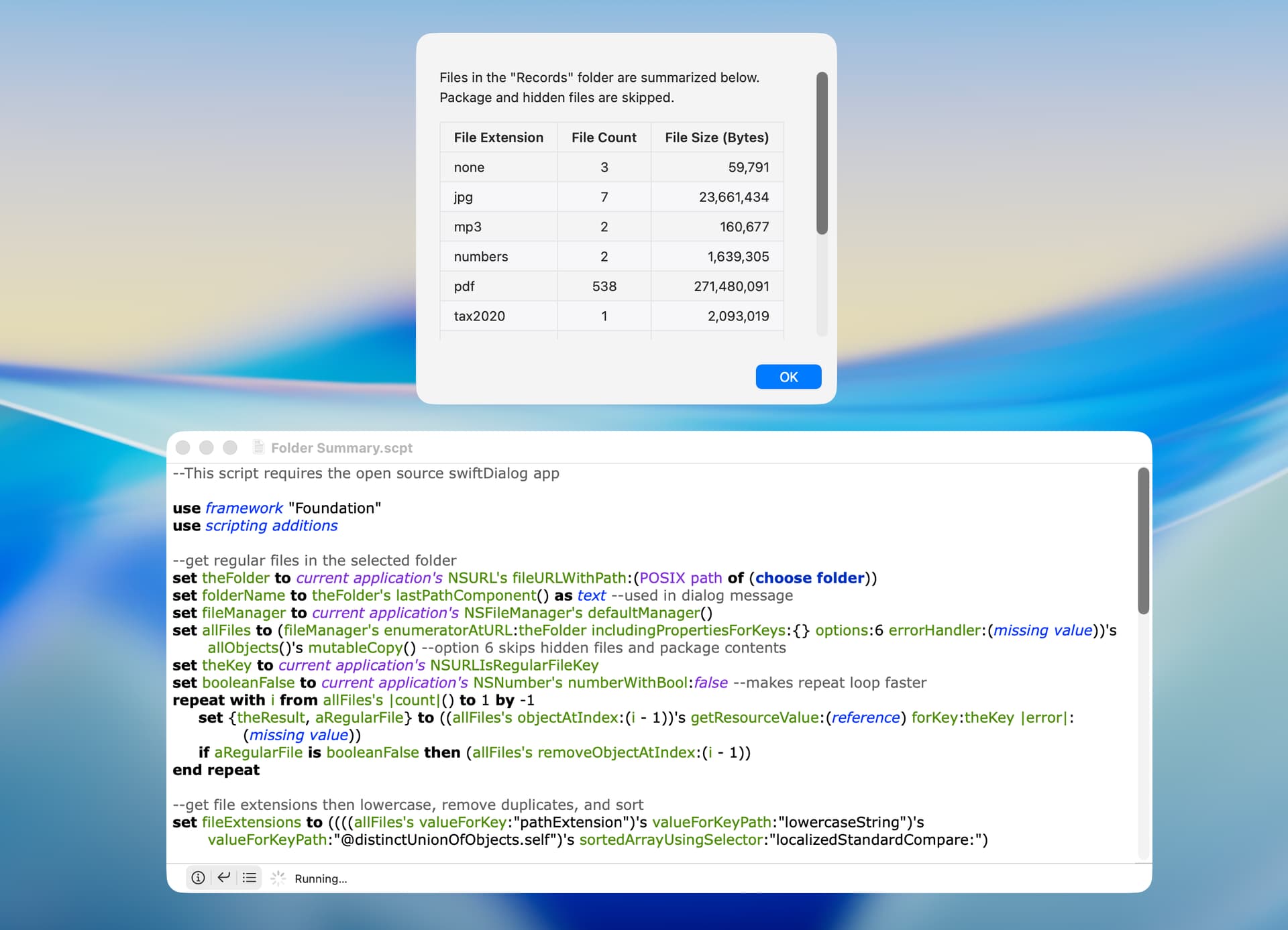
I don’t mean to clutter VikingOSX’s thread, but I wanted to write a version that used a markdown table and included a file count. This required a different scripting approach.
A few comments:
File size can mean different things, and this script uses NSURLTotalFileSizeKey, which returns the same result as the Finder. Alternatives are NSURLFileSizeKey, NSURLFileAllocatedSizeKey, and NSURLTotalFileAllocatedSizeKey.
Files without an extension are shown with the extension none.
Without the dialog, this script is as fast as my other scripts (78 milliseconds on my test folder).
This script requires the open source swiftDialog app (here).
--This script requires the open source swiftDialog app

use framework "Foundation"
use scripting additions

--get regular files in the selected folder
set theFolder to current application's NSURL's fileURLWithPath:(POSIX path of (choose folder))
set folderName to theFolder's lastPathComponent() as text --used in dialog message
set fileManager to current application's NSFileManager's defaultManager()
set allFiles to (fileManager's enumeratorAtURL:theFolder includingPropertiesForKeys:{} options:6 errorHandler:(missing value))'s allObjects()'s mutableCopy() --option 6 skips hidden files and package contents
set theKey to current application's NSURLIsRegularFileKey
set booleanFalse to current application's NSNumber's numberWithBool:false --makes repeat loop faster
repeat with i from allFiles's |count|() to 1 by -1
	set {theResult, aRegularFile} to ((allFiles's objectAtIndex:(i - 1))'s getResourceValue:(reference) forKey:theKey |error|:(missing value))
	if aRegularFile is booleanFalse then (allFiles's removeObjectAtIndex:(i - 1))
end repeat

--get file extensions then lowercase, remove duplicates, and sort
set fileExtensions to ((((allFiles's valueForKey:"pathExtension")'s valueForKey:"lowercaseString")'s valueForKeyPath:"@distinctUnionOfObjects.self")'s sortedArrayUsingSelector:"localizedStandardCompare:")

--get file size and file count
set allFilesSize to current application's NSMutableArray's new()
set allFilesCount to current application's NSMutableArray's new()
set theKey to current application's NSURLTotalFileSizeKey --returns size similar to Finder
repeat with aFileExtension in fileExtensions
	set thePredicate to current application's NSPredicate's predicateWithFormat_("pathExtension ==[c] %@", aFileExtension)
	set someFiles to (allFiles's filteredArrayUsingPredicate:thePredicate) --files with a particular extension
	(allFilesCount's addObject:(someFiles's |count|()))
	set someFilesSize to current application's NSMutableArray's new()
	repeat with aFile in someFiles
		set {theResult, aFileSize} to (aFile's getResourceValue:(reference) forKey:theKey |error|:(missing value))
		(someFilesSize's addObject:aFileSize)
	end repeat
	try
		set someFilesSize to (someFilesSize's valueForKeyPath:"@sum.self") as integer --sum individual file sizes
	on error
		display dialog "The \"Folder Summary\" AppleScript was unable to calculate a total file size and will stop. This typically happens only with folders containing extremely large amounts of data." buttons {"OK"} cancel button 1 default button 1
	end try
	(allFilesSize's addObject:someFilesSize)
end repeat

--format file sizes and create markdown table
set theFormatter to current application's NSNumberFormatter's new()
theFormatter's setFormat:("#,##0")
set theTable to current application's NSMutableArray's arrayWithArray:{"| File Extension | File Count | File Size (Bytes) |", "| :--- | :---: | ---: |"}
repeat with i from 0 to ((fileExtensions's |count|()) - 1)
	set theExtension to (fileExtensions's objectAtIndex:i)
	if (theExtension's isEqualToString:"") then set theExtension to (current application's NSString's stringWithString:"none")
	set theCount to (allFilesCount's objectAtIndex:i)
	set theSize to (theFormatter's stringFromNumber:(allFilesSize's objectAtIndex:i))
	set theString to current application's NSString's stringWithFormat_("| %@ | %@ | %@|", theExtension, theCount, theSize)
	(theTable's addObject:theString)
end repeat
set theTable to ((theTable's componentsJoinedByString:linefeed) as text)

--display dialog
set theMessage to quoted form of ("Files in the " & quote & folderName & quote & " folder are summarized below. Package and hidden files are skipped." & linefeed & linefeed & theTable)
do shell script "/usr/local/bin/dialog --title none --message " & theMessage & " --messagealignment left --messageposition top --messagefont 'size=13' --width 410 --height 330 --hideicon --resizable; exit 0"