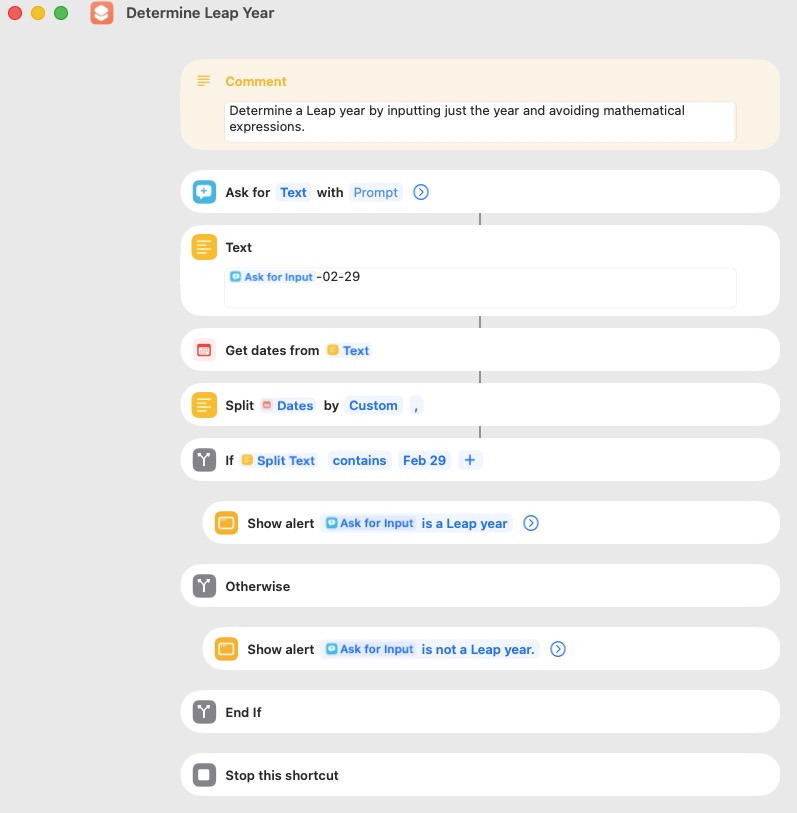
Four steps are used to determine if a year is a leap year. They can be presented in different order, but my preference for coding purposes is;
A year that can be evenly divided by 400 is a leap year (e.g. 2000).
Except as provided in step 1, a year that can be evenly divided by 100 is NOT a leap year (e.g. 1900).
Except as provided in step 2, a year that can be evenly divided by 4 is a leap year (e.g. 2004).
Every year not covered by steps 1 through 3 is NOT a leap year (e.g. 2002).
A simple and fast (1 millisecond) AppleScript that performs the above tasks is:
set testYear to 1900 --> false
set testYear to 2000 --> true
set testYear to 2002 --> false
set testYear to 2004 --> true

if (testYear mod 400 is 0) then
	return true
else if (testYear mod 100 is 0) then
	return false
else if (testYear mod 4 is 0) then
	return true
else
	return false
end if
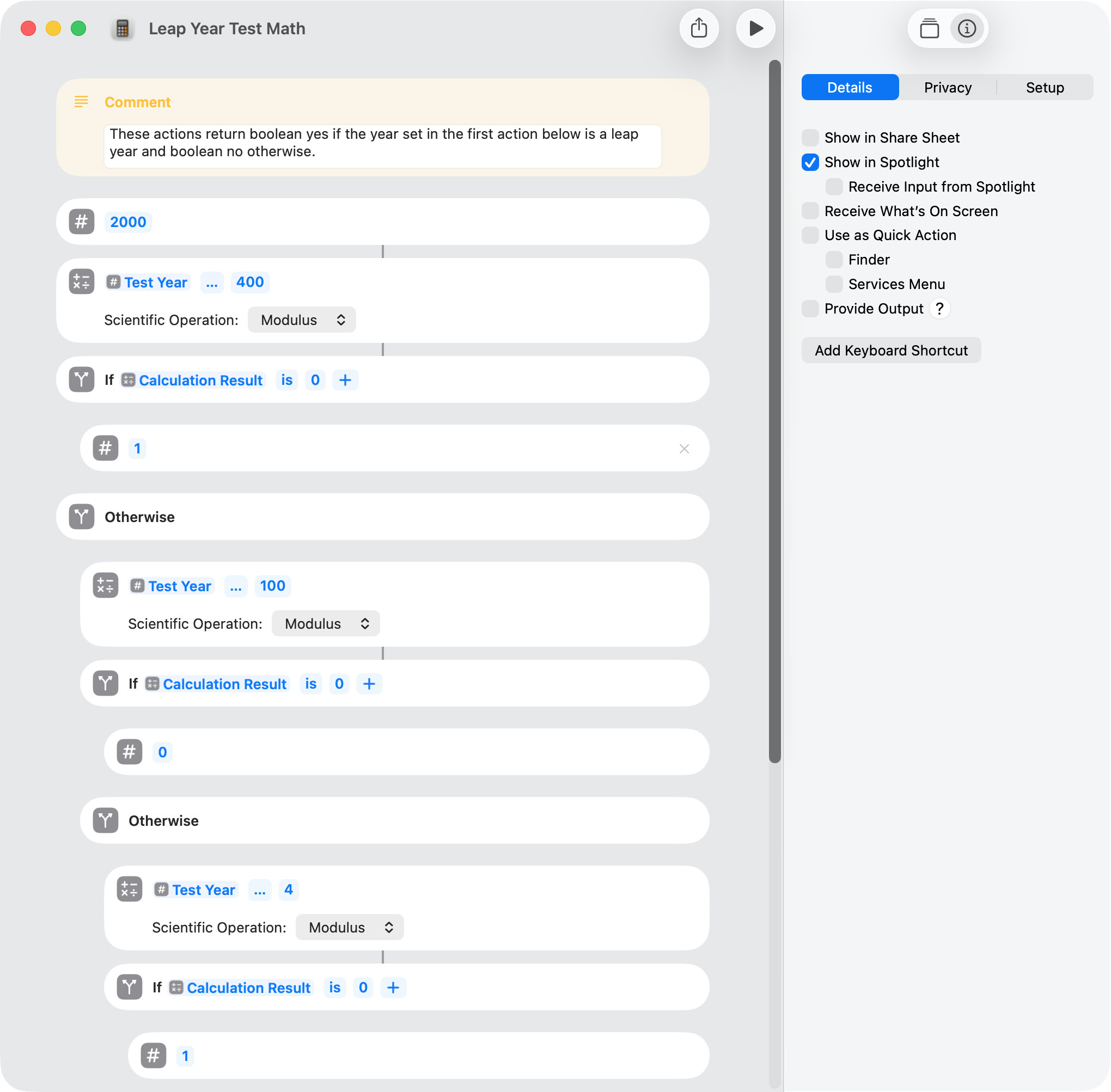
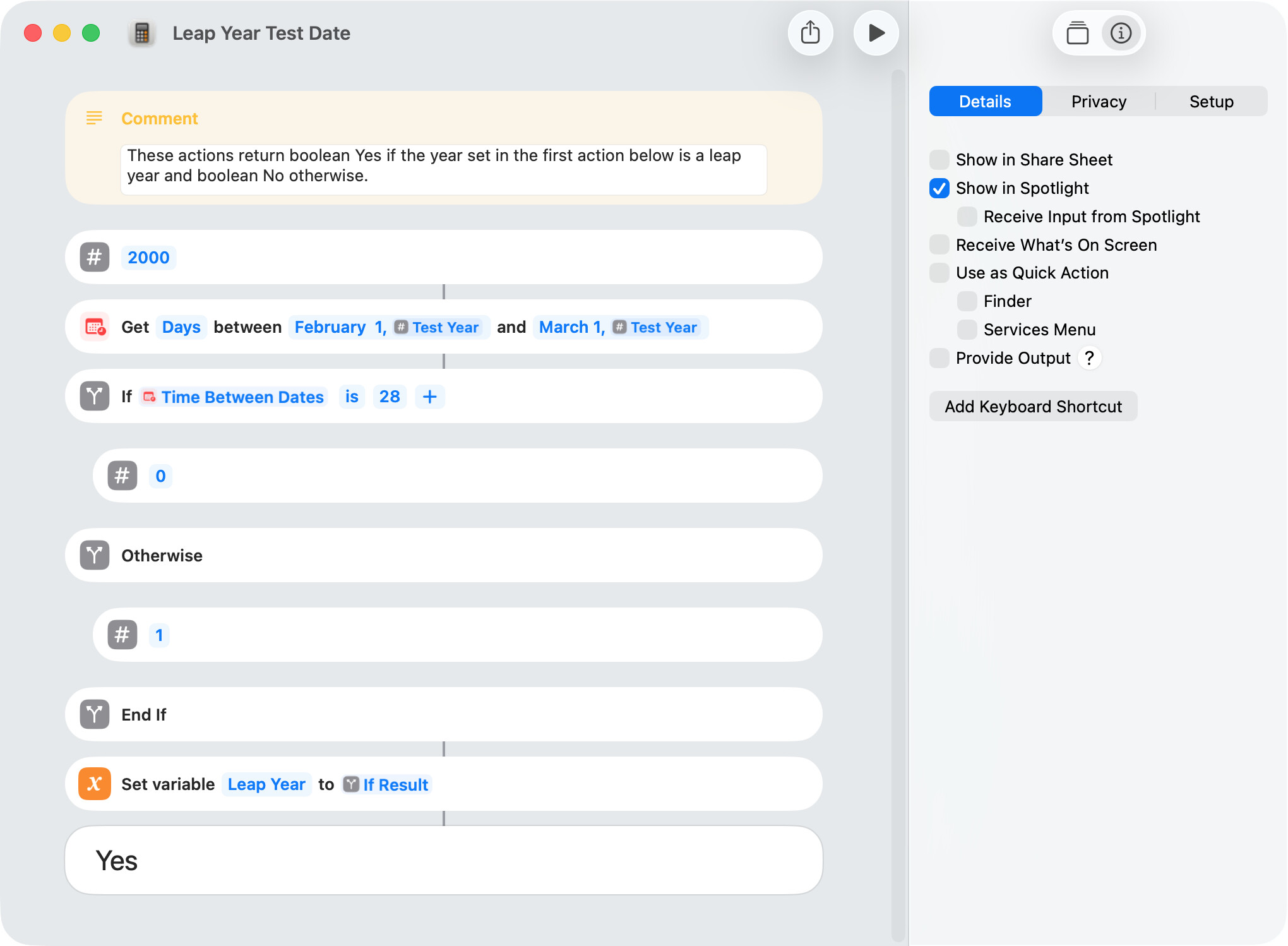
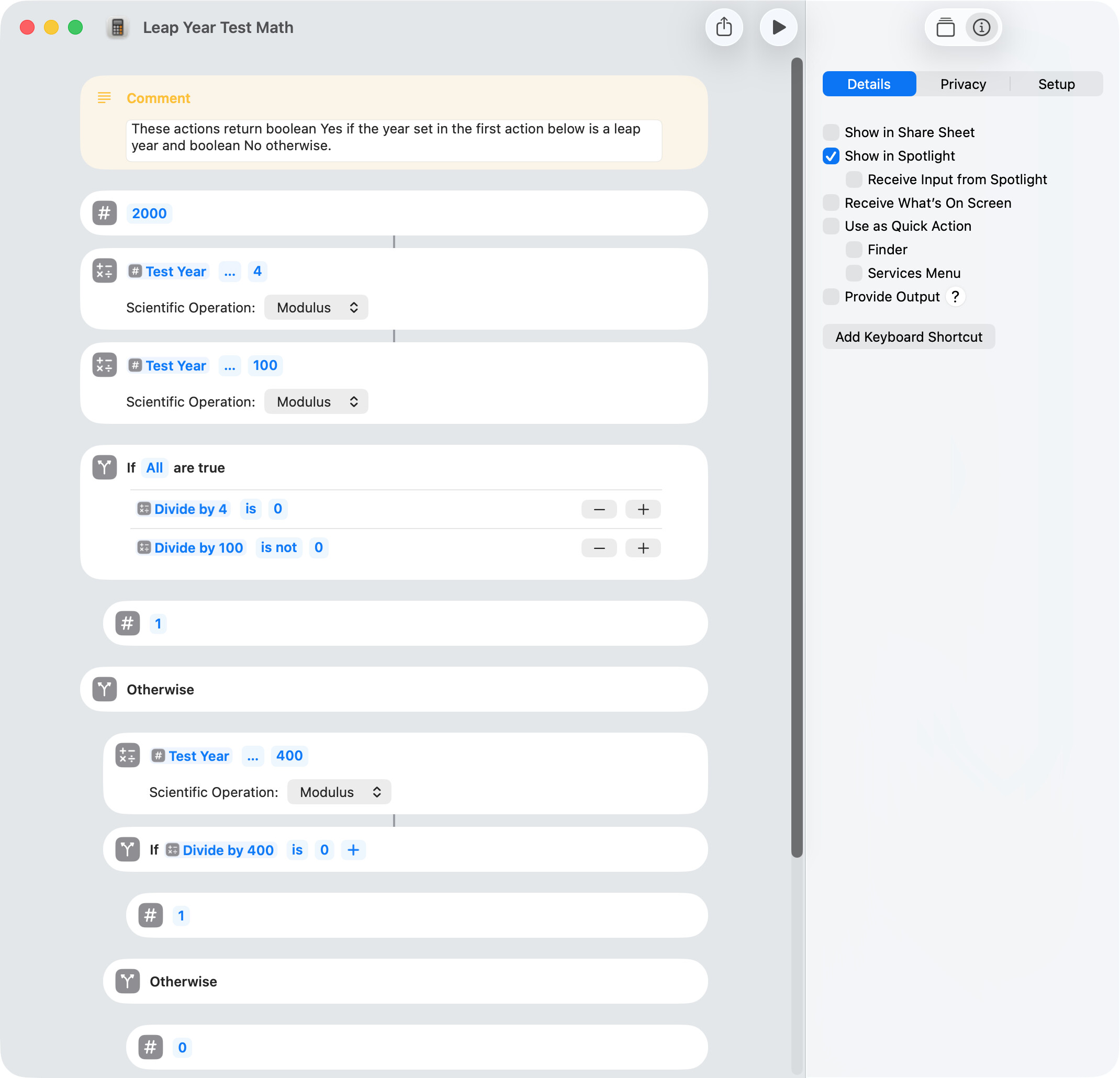
The exact same logic is employed in this shortcut, which takes 10 milliseconds to run.
use AppleScript version "2.5"
use framework "Foundation"
use scripting additions

set theYear to 2028

set cal to my NSCalendar's currentCalendar()
set dateComponents to my NSDateComponents's new()
set |month| of dateComponents to 2
set |year| of dateComponents to theYear
set theDate to cal's dateFromComponents:dateComponents
set theRange to cal's rangeOfUnit:(my NSCalendarUnitDay) inUnit:(my NSCalendarUnitMonth) forDate:theDate
set isLeapYear to theRange's |length| as integer is 29
repeat with aDate in {1900, 2000, 2002, 2004}
	isLeapYear(aDate)
end repeat

on isLeapYear(y)
	if (date ("12/1/" & y)) - (date ("1/1/" & y)) > 28857600 then return true
	return false
end isLeapYear
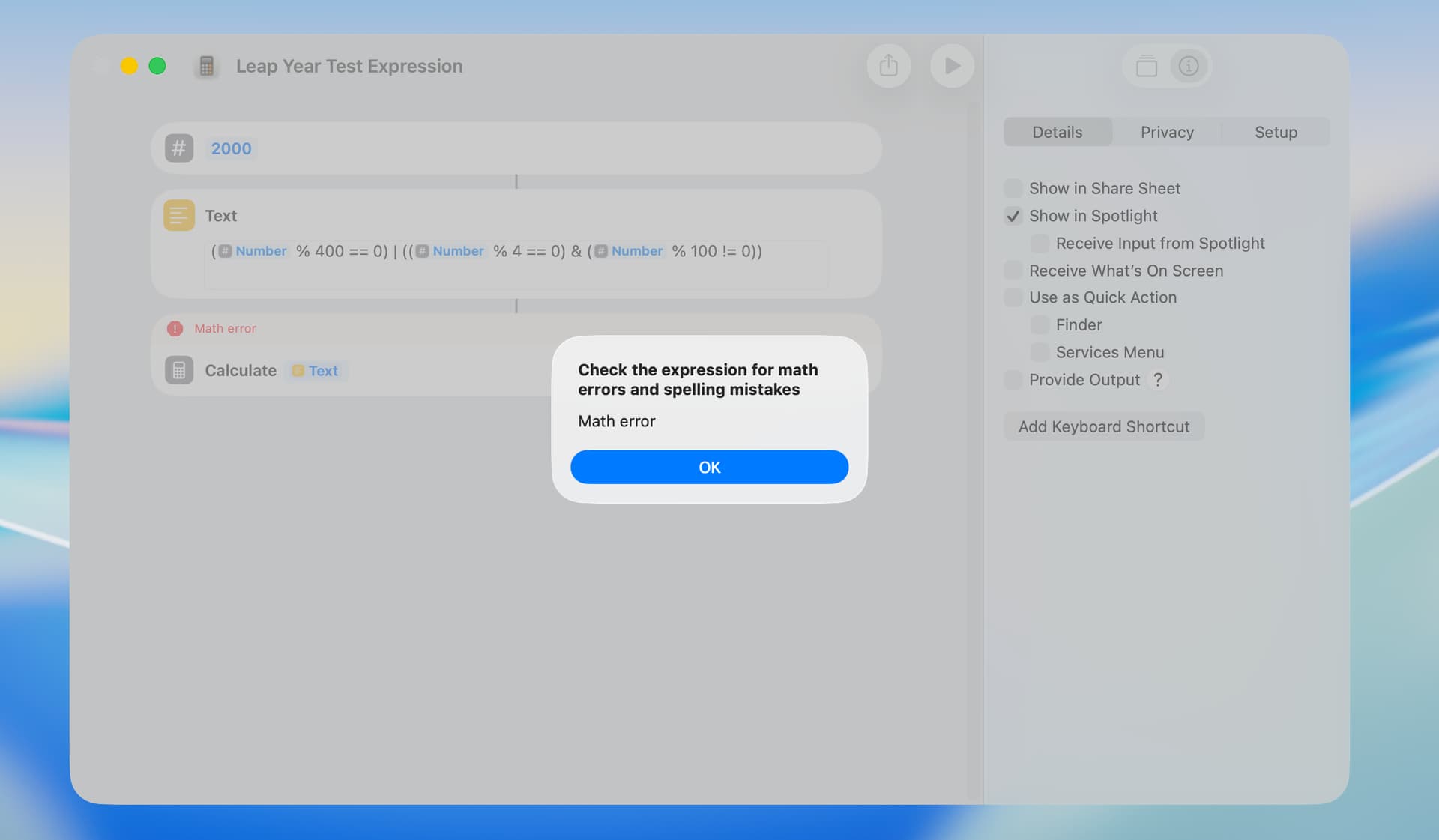
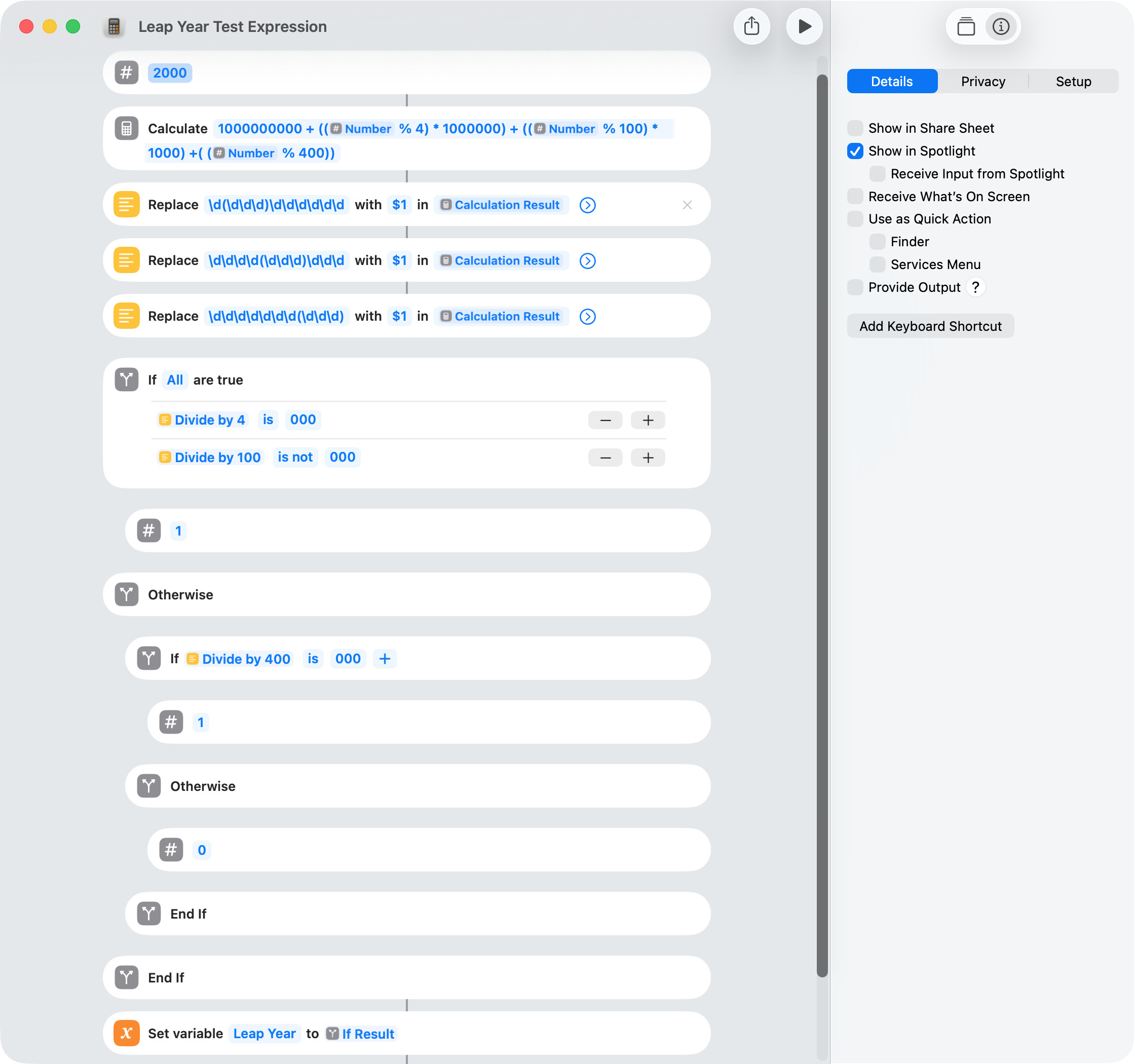
The Calculate Expression action doesn’t appear to support conditional math expressions. As an alternative, I edited the expression to create a composite number, which worked, although it was actually a bit slower than the other alternatives.
This thread caught my attention, (and with help from ChatGPT) here’s an applescript that produces a dialog box that lists all the leap years in the 2000’s, which is easily changeable in the script.
use AppleScript version "2.4" -- Yosemite (10.10) or later
use scripting additions

set leapYears to {}

-- Loop through the 2000s (2000–2099)
repeat with y from 2000 to 2099
	if (y mod 400 = 0) or ((y mod 4 = 0) and (y mod 100 ≠ 0)) then
		set end of leapYears to y
	end if
end repeat

-- Build a nicely wrapped string, 10 years per line
set leapYearsString to ""
set countPerLine to 10
repeat with i from 1 to count of leapYears
	set leapYearsString to leapYearsString & item i of leapYears
	if i ≠ (count of leapYears) then
		set leapYearsString to leapYearsString & ", "
	end if
	if i mod countPerLine = 0 then
		set leapYearsString to leapYearsString & return
	end if
end repeat

-- Display the result in a dialog box
display dialog "Leap years in the 2000s are:" & return & leapYearsString buttons {"OK"} default button "OK"
Thanks Homer712 for the script suggestion, which works well.
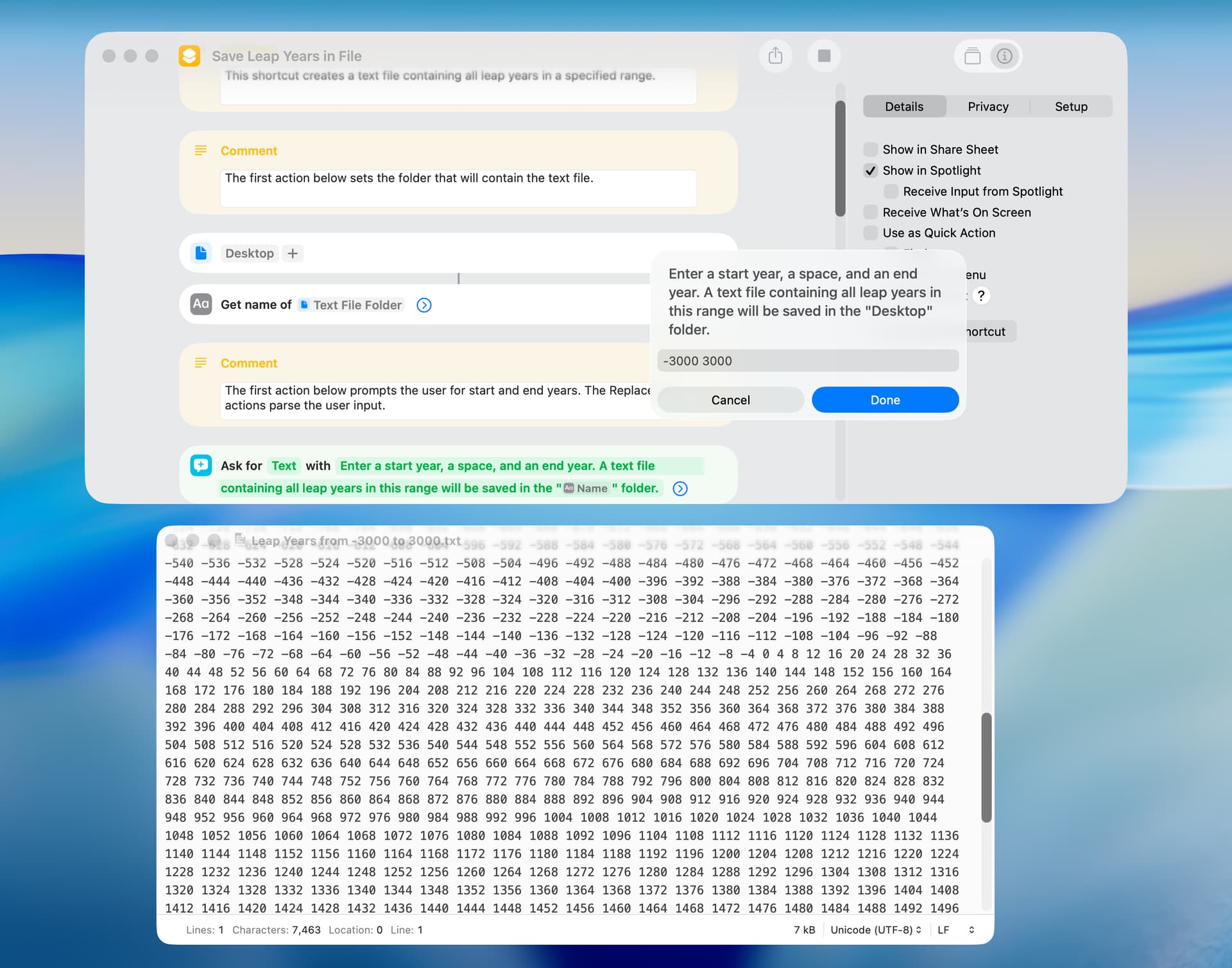
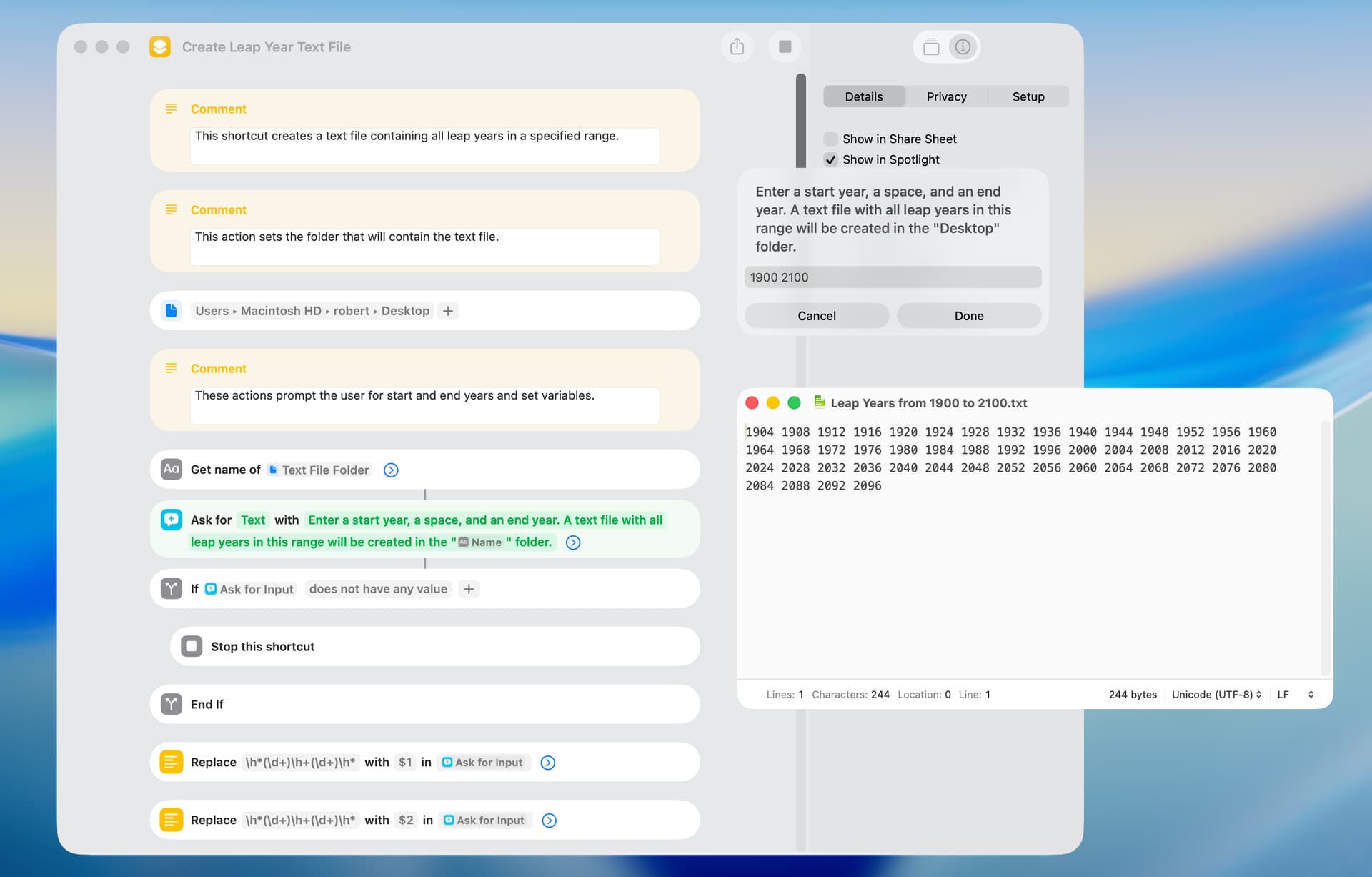
FWIW, I created a somewhat-similar shortcut that gets all leap years in a specified range and saves the leap years in a text file. If run by Spotlight, the timing result with a year range of two centuries is 1.5 seconds. If run by the Shortcuts editor, the shortcut beachballs for five seconds or more when run. I’m not sure of the reason for this.
BTW, a significantly faster approach might be to: 1) get the first leap year in the range; 2) add every fourth year afterwards; and 3) remove all years that end with 2 but not 3 zeros. I’ll work on that.
use AppleScript version "2.5"
use framework "Foundation"
use scripting additions

set startYear to 2000
set endYear to 2200

set cal to my NSCalendar's currentCalendar()
set dateComponents to my NSDateComponents's new()
set |month| of dateComponents to 2

set leapYears to {}
repeat with i from startYear to endYear
	set |year| of dateComponents to i
	set theDate to (cal's dateFromComponents:dateComponents)
	set theRange to (cal's rangeOfUnit:(my NSCalendarUnitDay) inUnit:(my NSCalendarUnitMonth) forDate:theDate)
	if theRange's |length| as integer is 29 then
		set end of leapYears to (i as text)
	end if
end repeat
set {saveTID, text item delimiters} to {text item delimiters, {", "}}
set theResult to leapYears as text
set AppleScript's text item delimiters to saveTID
display dialog theResult buttons {"Cancel", "OK"} default button "OK"
Update: The script can be sped up even further by ensuring that the starting year is divisible by 4, using this loop.
set startYear to 1998
set endYear to 2507

set leapYears to {}
repeat with y from ((startYear + 3) div 4 * 4) to endYear by 4
	if ((y mod 100 > 0) or (y mod 400 = 0)) then set leapYears's end to y
end repeat

set output to {"Leap years between " & startYear & " and " & endYear & ":", ""}
set leapYearCount to (count leapYears)
repeat with i from 1 to leapYearCount by 8
	set j to i + 7
	if (j > leapYearCount) then set j to leapYearCount
	set output's end to join(leapYears's items i thru j, space)
end repeat
set output to join(output, linefeed)
display dialog output

on join(lst, delim)
	set astid to AppleScript's text item delimiters
	set AppleScript's text item delimiters to delim
	set txt to lst as text
	set AppleScript's text item delimiters to astid
	return txt
end join
But of course it only works properly for AD years in the Proleptic Gregorian Calendar. It needs a couple of minor adjustments to handle BC years (if these are treated as negatives) and to omit the non-existent year 0.
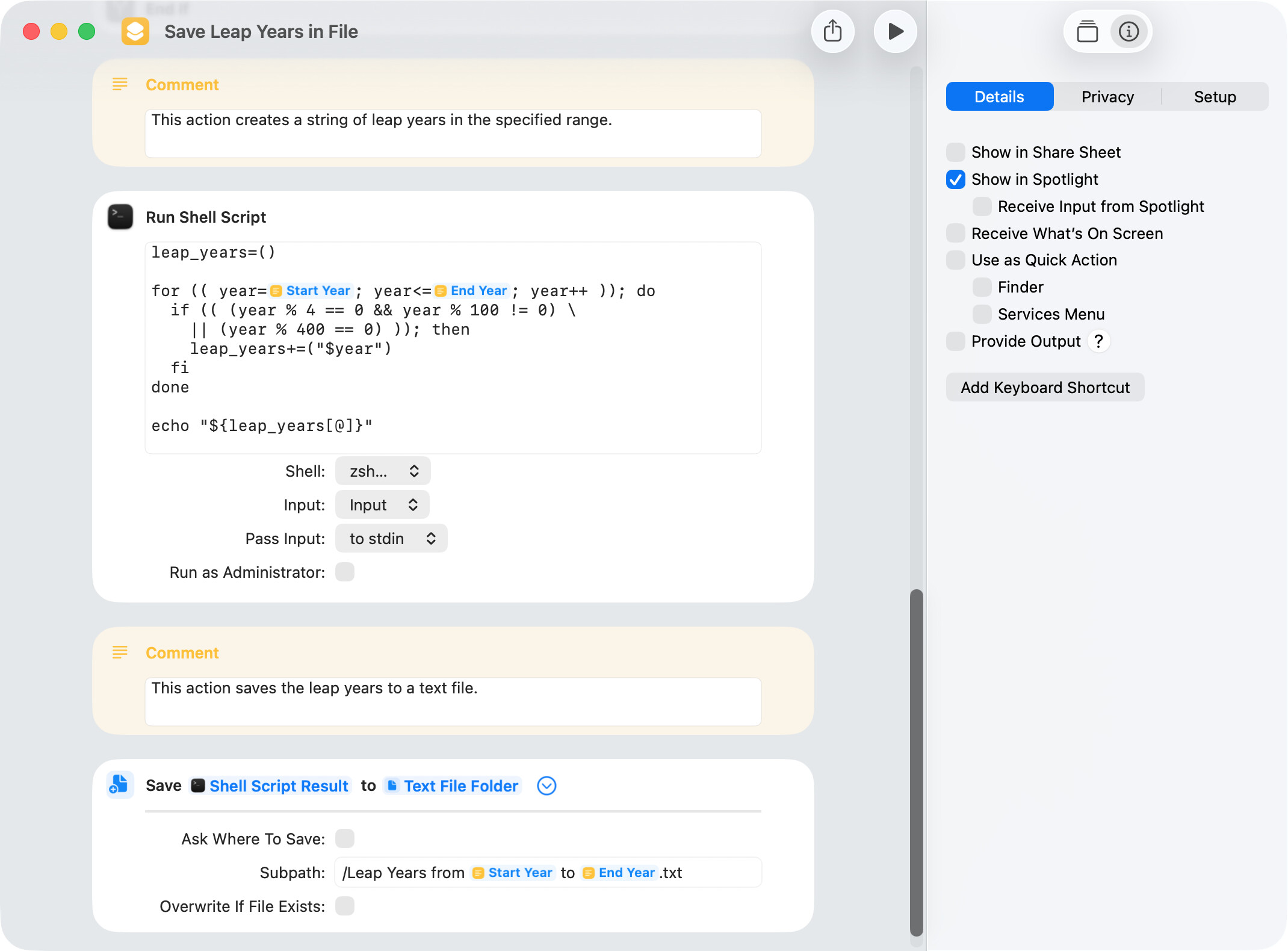
The approach mentioned above didn’t work, so I used the shell to get leap years. The timing result was 120 milliseconds with the Run Shell Script action not in memory and 60 milliseconds with the Run Shell Script action in memory. This is for the period from 1 to 5000 AD and includes writing the leap years to a text file. The screenshot below is of the shell script.
Having opened my big mouth, I thought I’d better have a go at this. BC year numbers are notated and handled as negatives.
set startYear to -401
set endYear to 401

set leapYears to {}
-- The assumption here is that the 400-year cycles continue unbroken back into the BC era
-- despite there being no year 0 in the proleptic Gregorian calendar. In this scenario,
-- BC leap year numbers are 1 less than they'd have been otherwise. For convenience,
-- the numbers tested are all multiples of 4 and successful results below 1 are decremented.

-- Get the first multiple of 4 after or including startYear.
-- If startYear's 1 or higher, round up by adding 3 and truncating the result: (startYear + 3) div 4 * 4.
-- But if startYear's < 1, add 1 to align with AD, then round up by simply truncating: (startYear + 1) div 4 * 4.
set firstCandidate to (startYear + 3 - 2 * ((startYear < 1) as integer)) div 4 * 4
-- Test successive multiples of 4.
repeat with y from firstCandidate to endYear by 4
	if ((y mod 100 ≠ 0) or (y mod 400 = 0)) then
		if (y < 1) then set y to y - 1 -- Subtract 1 from successful numbers < 1.
		set leapYears's end to y
	end if
end repeat

set output to {"Leap years between " & startYear & " and " & endYear & ":", ""}
set leapYearCount to (count leapYears)
repeat with i from 1 to leapYearCount by 8
	set j to i + 7
	if (j > leapYearCount) then set j to leapYearCount
	set output's end to join(leapYears's items i thru j, space)
end repeat
set output to join(output, linefeed)
display dialog output

on join(lst, delim)
	set astid to AppleScript's text item delimiters
	set AppleScript's text item delimiters to delim
	set txt to lst as text
	set AppleScript's text item delimiters to astid
	return txt
end join
Nigel. Thanks for the script. I don’t know much about the different calendars but read a Wikipedia article.
Your script treats negative calendar years as BC calendar years. FWIW, I made a minor edit to my earlier shortcut to treat negative calendar years as negative calendar years using what is generally referred to as astronomical year numbering. Just as a point of information, the first part of your script calculates this same information, and the shell script in my shortcut could easily be modified to return BC leap years.
Just in case anyone wonders what the proleptic Gregorian calendar is, I’ve included below an edited quote from Wikipedia.
The proleptic Gregorian calendar extends the Gregorian Calendar backwards proleptically creating a consistent dating system across history. For this calendar, one can distinguish two systems of numbering years BC. Bede and later historians did not enumerate any year as zero; therefore the year preceding AD 1 is 1 BC. In this system, the year 1 BC is a leap year. Mathematically, it is more convenient to include a year 0 and represent earlier years as negative numbers for the specific purpose of facilitating the calculation of the number of years between a negative (BC) year and a positive (AD) year. This is the convention in astronomical year numbering and the international standard date system, ISO 8601. In these systems, the year 0 is a leap year.
My shortcut uses astronomical year numbering and Nigel’s AppleScript does not. However, a simple edit will make the shortcut and AppleScript work with the other year numbering system.


 !!
!!