Hi all,
New to the community—I’m an IT geek and photographer but fairly new to Apple scripting technologies. I’m comfortable with programming, but my training is ancient, and have only a basic understanding of current languages.
I modified this script to automatically add photos exported from Lightroom into Apple Photos. I’d like to do something similar to import images into a social media client.
- The best client I’ve found for this is Statuz, since most aren’t scriptable or don’t support “open in” with image files from the OS.
- Statuz supports open single files rather than a list of files as in the Photos script.
- My script to works if I prompt for a folder as input, then loop through the contained files.
- My script fails with a folder action as input, both treating the input as a folder and as a list of files.
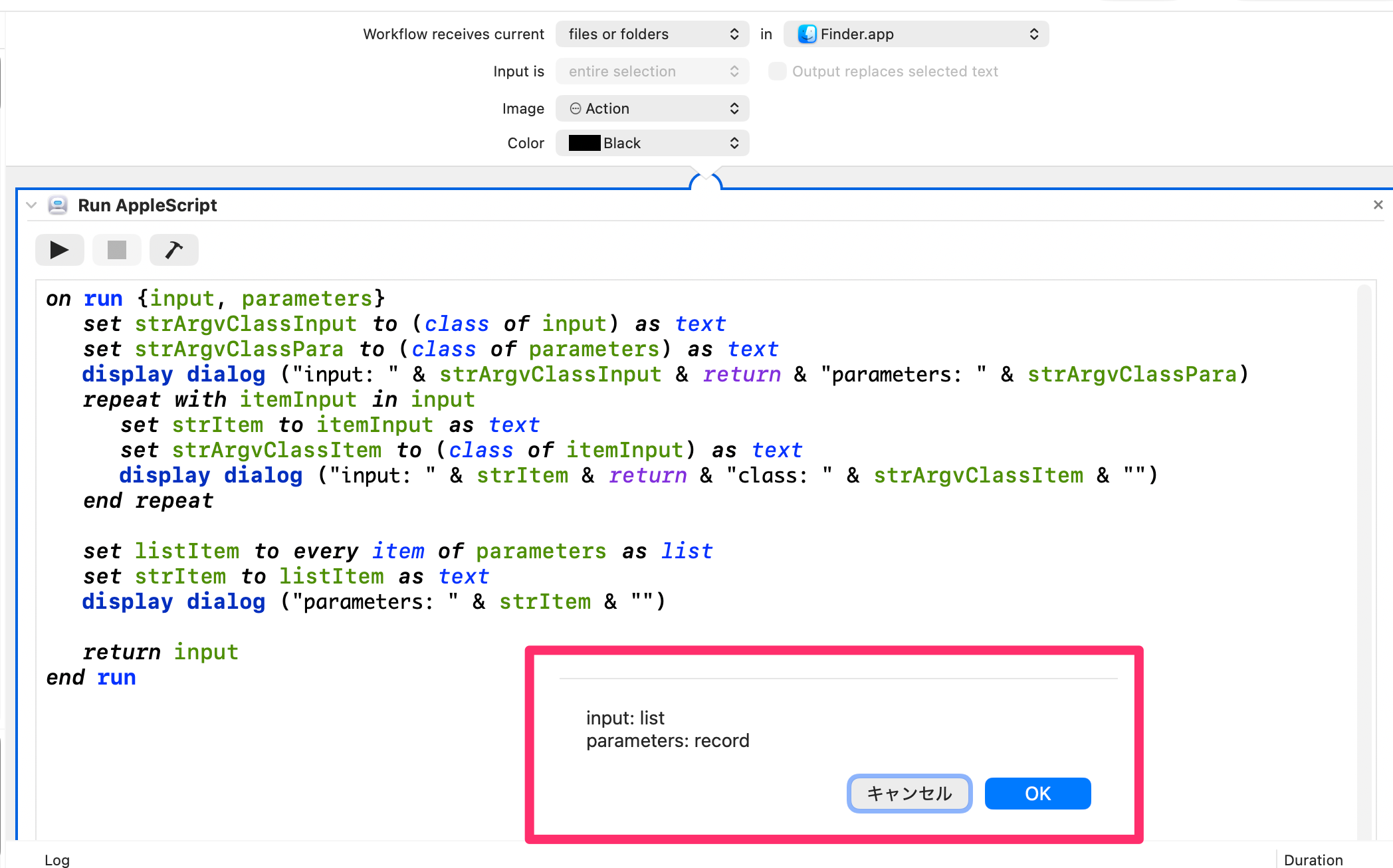
My script seems to be failing because receiving input from a folder action creates a different data type than prompting for a folder. Is there a way in Automator or Script Editor that I can view the types and contents of variables as I step through a script?
For reference, this is the AppleScript portion of my working Automator script:
on run {input, parameters}
	tell application id "com.apple.photos"
		set thisAlbum to album "Lightroom imports" of folder "Social media"
		try
			if input is not {} then
				import input into thisAlbum with skip check duplicates
			end if
		on error errorMessage
			display alert "IMPORT ERROR" message errorMessage
		end try
	end tell
	return input
end run
This script to select a folder and open images in Statuz works as is but not if I take out the folder prompt and use the input from the folder action.
on run {input, parameters}
	set input to choose folder with prompt "Please select folder"
	tell application "Finder"
		set filesToOpen to the files of input
		repeat with currentFile in filesToOpen
			tell application "Statuz"
				open currentFile
			end tell
		end repeat
	end tell
	return input
end run
This script treating input from a folder action as a list never runs the repeat loop. (Dialog steps added for debugging.)
on run {input, parameters}
	display dialog "script 1" & return
	tell application "Finder"
		set filesToOpen to input
		display dialog "script 2" & return
		repeat with currentFile in input
			display dialog "File: " & currentFile & return
			tell application "Statuz"
				open currentFile
			end tell
		end repeat
	end tell
	return filesToOpen
end run
2 Likes
The term file is a class - you are given a clue from its formatting in the editor (usually a different color). This is probably why your second script is failing - the input list doesn’t have any file properties, it has items that happen to be files (welcome to AppleScript). You can check out the basic classes and their properties in the AppleScript Language Guide’s Class Reference, or what an application provides by looking at its scripting dictionary in the editor.
A folder action receives a list of aliases. Most commands and applications know how to use an alias, so you should be able to just use the items of the input list directly instead of getting the Finder involved. If not, you can try the POSIX path of the alias or coerce it to text.
1 Like
Happy New Year, everyone!
Since my primary language is not English
I apologize if I have misunderstood your intent.
If you are asking about identifying the class?
you mean something like this.
I may be misunderstanding, but I thought you might be trying to do something like this — would that be correct?
#!/usr/bin/env osascript
#coding: utf-8
use AppleScript version "2.8"
use scripting additions

###RUN
##FOR Automator file or folder
# on run {listAliasFilePath}

##FOR TEST OR DROPLET
on run
	set aliasInputDirPath to (choose folder) as alias
	set listAliasFilePath to {aliasInputDirPath} as list

	##MAIN SCRIPT
	set boolDone to (open listAliasFilePath) as boolean
	return boolDone
end run


###OPEN OR DROPLET
on open listAliasFilePath

	tell application "Finder"
		set listAliasFilePath to listAliasFilePath as alias list
	end tell

	repeat with itemAliasFilePath in listAliasFilePath
		set recordInfoFor to (info for itemAliasFilePath) as record
		if (folder of recordInfoFor) is true then
			set aliasItemDirPath to itemAliasFilePath as alias
			tell application "Finder"
				set listContentsAliasFilePath to (every file of (entire contents of aliasItemDirPath)) as alias list
			end tell
			repeat with itemContentAliasFilePath in listContentsAliasFilePath
				set aliasItemContentFilePath to itemContentAliasFilePath as alias
				log (POSIX path of aliasItemContentFilePath) as text
				##DO SOME
			end repeat
		end if
	end repeat

	return true
end open
I hope this is helpful, and I also hope I have not misunderstood the intent of your question.
OK—that makes sense. When I pass the folder (list of aliases) to Apple Photos, it just imports them normally. However, when I pass it to Statuz, it wants to open only one image at a time and chokes on the list.
I think I may be able to take @IceFole’s script and use it to open one alias at a time in Statuz—in my tests, that has added multiple images to a single post, which is what I want to happen if I export more than one image.
Thanks both—I’ll work on this a bit more and report back.
hey @tryonkus
Statuz creator here.
I’m glad you’re finding Statuz useful. After a quick look, I see Statuz should already support your use case, but our docs are messed up. Working on that and will report back 
So after giving a closer look, I see you are trying to:
repeat with currentFile in filesToOpen
    tell application "Statuz"
        open currentFile
    end tell
end repeat
this is essentially wrong, as each open call triggers the single-file handler, creating separate posts.
the solution is to use URL scheme with comma-separated paths:
on run {input, parameters}
    -- Build list of file:// URLs
    set filePaths to {}
    repeat with fileAlias in input
        set posixPath to POSIX path of fileAlias
        set end of filePaths to "file://" & posixPath
    end repeat

    -- Join with commas
    set AppleScript's text item delimiters to ","
    set mediaParam to filePaths as text
    set AppleScript's text item delimiters to ""

    -- Open Statuz with ALL files in one post
    tell application "System Events"
        open location "statuz://compose?media=" & mediaParam
    end tell

    return input
end run
why this should work:
- Statuz’s URL scheme (
statuz://compose) accepts a media= parameter
- Multiple files are comma-separated:
media=file://path1.jpg,file://path2.jpg
- This batches all files into a single composer window
-
open location is the correct way to call URL schemes from AppleScript
I’ve also crafted a simple example here that showcases Lightroom and Statuz auto-attachment when files are dropped into a folder.
Hope this helps! Let me know if you have any questions. And thanks for choosing Statuz for your workflow - I’d love to hear how it goes!
@stewones Thanks so much for popping in and for looking at my issue! It’s trivial to do what I want to (send an image from Lightroom to Openvibe or other Fediverse client) on iOS or Android but not MacOS—Lightroom won’t share to other apps other than by exporting, and Statuz is the only client I’ve found that will accept a file open request from the OS. Several clients I’ve tried will can’t even open an image from a file picker and will only open images from the Apple Photos, although that may be because they are iOS apps running in emulation.
I’ll take a look at your scripts and see if I can get them to work for my purpose—it looks like you understand what I’m trying to do. FWIW, it did seem that when I sent multiple individual files to the app that they opened in a single message in Composer, but I may have been mistaken—I have a fair bit of experience in scripting but with older languages, and I’m an AppleScript newbie.
1 Like
I noticed the AppleScript documentation is in the Apple archive—is that because AppleScript is considered legacy technology? Is it deprecated or going to be?
I suppose now most folks are scripting apps with Python or Java or even Javascript—I’ve been learning a little JS in Obsidian, and it seems to be pretty ubiquitous for quick and dirty scripts.
Got it to work!
Your script worked as written, but I’d forgotten the “Folder actions setup” step, and my Automator action was deleting the files before they could be imported (just had to add a pause before the delete). I also learned I could send URI commands from AppleScript, which opens a whole new world of app integrations . . . .
My completed script should be available here.
The one issue I haven’t yet resolved is forcing the script to pause until Lightroom has finished exporting images. With just a few files, I can add a ten-second pause, but if I’m exporting more images to, say Apple photos, I may need to pause for 20-30 seconds. Lightroom is a scriptable application, but I don’t see an export or process status variable in its scripting dictionary. Any ideas?
Thanks all for your assistance!
Oddly enough, as I was trying to share that script using iCloud, I noticed there was an Openvibe sharing extension I hadn’t notice before. I still can’t share from Lightroom, so I don’t know if that will be a help. 
1 Like
I’m curious why you would need to wait for Lightroom to export? Statuz should handle this gracefully; media is appended to the Compser rather than replaced.
that’s amazing 
I downloaded and tried your script, and it works really well for me, both manually pasting and via Lightroom export. Can you check if you are on the latest Statuz version?
The issue was only with Apple Photos. If the import script (see link above) runs again while a batch of photos is still importing, Photos throws an error. If Statuz handles that condition gracefully, then I don’t need to worry. 
Apparently there used to be an “Importing” Boolean you could check in iPhoto, but that is long gone.
oof got it. so yeah, Statuz should handle async/batch calls gracefully and stack the media as soon as they arrive. If you can reproduce the issue and share the script, I can look into it and see how we can improve.
Thanks for sharing your experience. I completely missed out on the automator/workflow opportunity here. I’m gonna improve our content around it
Glad I could help—I was just trying to post pretty pictures without jumping through so many hoops, and I didn’t figure it would have much application elsewhere because I’m not your target audience. However, I can see where your target audience would really appreciate the ability to automate their workflows. I’ve spent most of my working life in IT and related jobs, but I worked in advertising and graphic design for about ten years in the 90s (I was the geek in the studio) and spent a lot of time streamlining production workflows.
FWIW, this is my Apple Photos script, based on the www.macosxautomation.com script I posted above. That’s what got me started on my AppleScript adventure and why I found Statuz in the first place. I’ve done a little bit of Javascript in Obsidian templates using Templater, and Obsidian (and its ecosystem) has a pretty robust URI protocol. That’s where my questions about AppleScript being depreciated come from—it seems like other scripting languages have taken over, and AS is mostly a legacy technology. I see now that Automator also supports Javascript and shell scripts—that’s probably my answer.
1 Like
I’ve been using the Automator folder action, and there are a few quirks I’ve found—if you have a support forum, I can post these there instead.
- I am exporting PNG images using the Small preset (2,048 pixels on the long edge).
- Exporting one image at a time works fine.
- When I export two images at a time, only one shows up in Composer.
- If drag one image to the watched folder, wait, then drag a second, the first image is replaced by the second rather than both being added to the post.
- If I drag two images to watch folder simultaneously, both are added to the post as desired.
- One time, what appeared to be a blank or possibly flat grey image was added to the post. I’ve only seen this once and don’t know what triggered it.
One related issue is that when I try to enable the sharing extension in Setting by category, Statuz isn’t listed. If I look by name, I can choose Statuz and enable the sharing extension, but the Statuz app settings still show the sharing extension as disabled.
Update: I got the empty image again and tried posting it. Composer went through the upload and posting process but didn’t actually post a message. It allowed me to remove the media when I right clicked on it.
kt
hmm interesting!
we don’t have a forum yet, this is probably time to set it up. I’ll go through your list first and report back here.
hey @tryonkus
I ended up setting up a community for us here
statuz.app/forum
mind reposting? I’ll follow up from there.
Thank you.