Hi,
I’m trying to understand how Numbers’ AppleScript sort command works
Given a simple, headerless table containing only integers:
This works as expected and sorts the table by column A:
tell table 1
However, limiting the sort to a subset of rows;
consistently produces: error -1728: Can’t get column 1 of table 1
Getting column 1 of table 1 wasnt a problem when sorting the full table, so I am wondering what the problem might be, when sorting only parts of it.
Thx in advance
peavine
December 28, 2025, 3:17pm
#2
parrotbird:
I’m trying to understand how Numbers’ AppleScript sort command works
Given a simple, headerless table containing only integers:
This works as expected and sorts the table by column A:
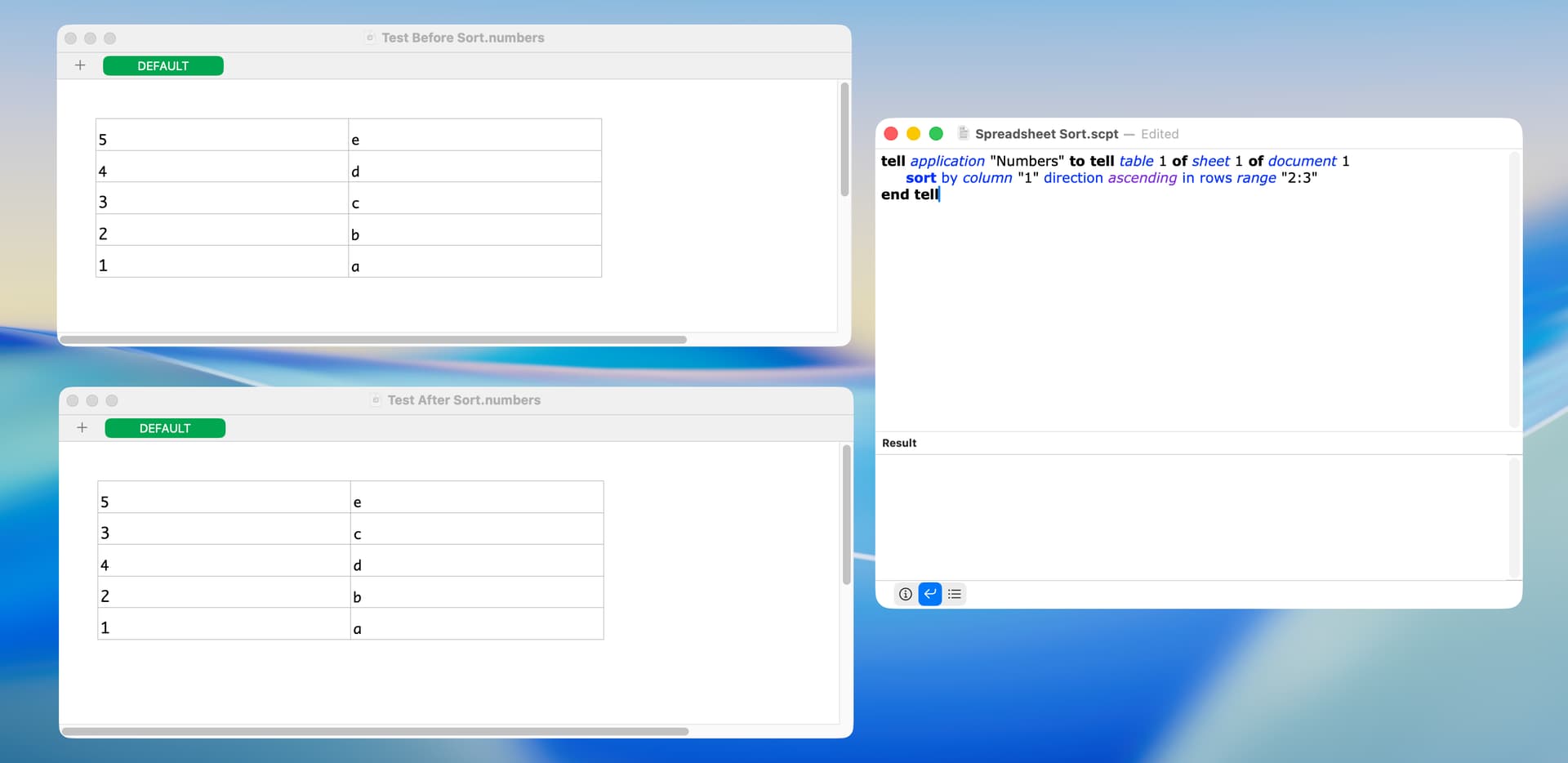
parrotbird. The following worked on my Tahoe computer.
tell application "Numbers" to tell table 1 of sheet 1 of document 1
	sort by column "1" direction ascending in rows range "2:3"
end tell
Just to clarify what this does, the following are spreadsheets before and after the sort:
BTW, the Numbers AppleScript dictionary states that the sort command sorts the rows of a table. I was curious if it’s possible to sort a range of cells of a table (and only those cells), and I couldn’t find a way to do that.