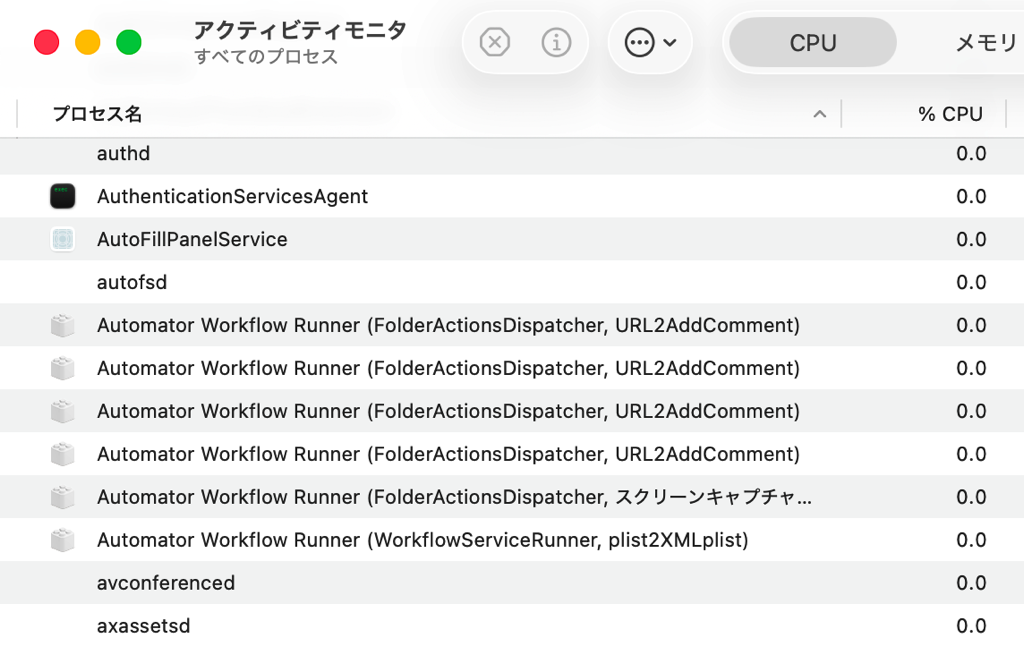
Hi, when I trigger an Automator Quick Action/Service from a keyboard shortcut, it runs, but WorkflowServiceRunner sometimes doesn’t exit and stays in Activity Monitor. After a few uses, I end up with multiple lingering WorkflowServiceRunner processes. Running the same workflow directly from Automator seems fine.
Has anyone hit this? Any reliable workaround to make keyboard-triggered Services exit cleanly every time?
This issue seems to have become much more noticeable since macOS 26 —
the problem where WorkflowServiceRunner and FolderActionsDispatcher don’t terminate properly.
I’ve been running the following script at the end of my Automator workflows.
I’m not completely sure if this is the “correct” way to handle it, but so far I haven’t had any problems.
So please take it only as a reference.
use AppleScript version "2.8"
use framework "Foundation"
use framework "AppKit"
use scripting additions
property refMe : a reference to current application

log doQuitAutomatorRunner()


##################################
#com.apple.automator.xpc.runnerの終了
to doQuitAutomatorRunner()
	#terminateAutomaticallyTerminableApplications 自動終了
	#	refMe's NSRunningApplication's terminateAutomaticallyTerminableApplications()
	#
	set listBundleID to {"com.apple.automator.xpc.runner", "com.apple.automator.xpc.workflowServiceRunner", "com.apple.Automator", "com.apple.appkit.xpc.openAndSavePanelService", "com.apple.quicklook.QuickLookUIService"} as list
	#terminate 通常終了
	repeat with itemBundleID in listBundleID
		set ocidAppArray to (refMe's NSRunningApplication's runningApplicationsWithBundleIdentifier:(itemBundleID))
		repeat with itemApp in ocidAppArray
			itemApp's terminate()
		end repeat
	end repeat

	#forceTerminate 強制終了
	#	repeat with itemBundleID in listBundleID
	#		set ocidAppArray to (refMe's NSRunningApplication's runningApplicationsWithBundleIdentifier:(itemBundleID))
	#		repeat with itemApp in ocidAppArray
	#			itemApp's forceTerminate()
	#		end repeat
	#	end repeat
	try
		tell application "System Events" to quit
	end try
	#terminateAutomaticallyTerminableApplications 自動終了
	refMe's NSRunningApplication's terminateAutomaticallyTerminableApplications()
end doQuitAutomatorRunner
System Events also tends to remain in memory without being GC’d…
And the AppNap issues are tough too.
macOS 26 is really challenging in many ways.
I forgot to mention one thing:
since this approach forces the process to terminate itself,
the Automation workflow will end with an error.