First off, if any of you know me, I’m not a fan of UI scripting, but I recognize there are valid use cases (as a last resort, when all else has failed and hell has frozen over )
One thing that comes up is sending keystrokes to non-frontmost applications. I know historically this has been a no-no in AppleScript - keystrokes always go to the frontmost app, which leads to shenanigans around context switching, etc., e.g.
tell application "Safari" to activate
tell application "System Events"
	keystroke "a"
end tell
which gets into a whole mess of restoring the previous frontmost app, etc.
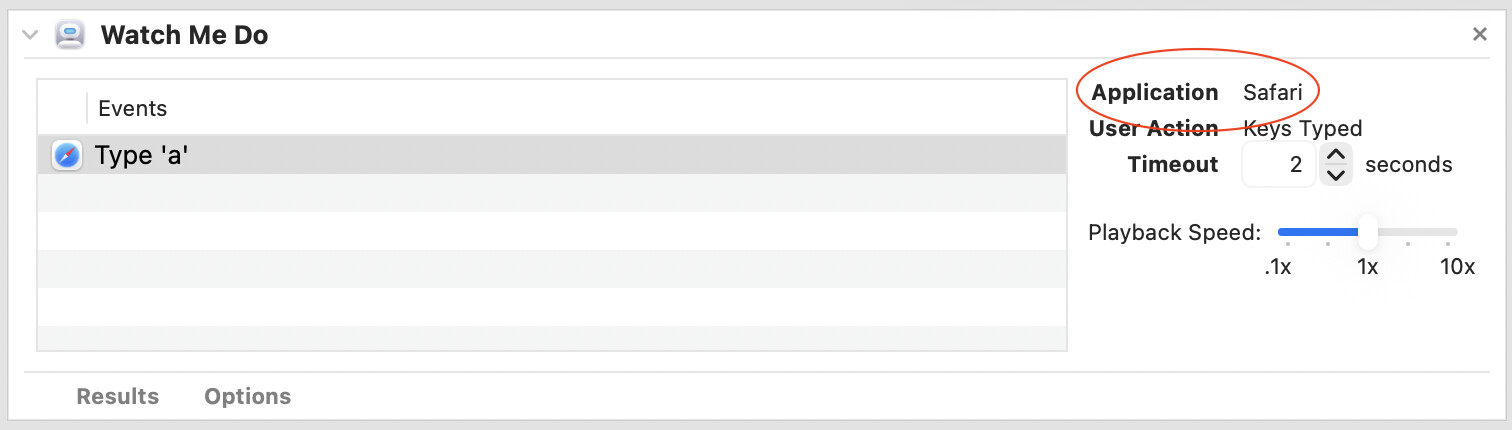
However, If you use Automator’s Watch Me Do action to record keystrokes, it includes an application target:
This target is tracked and honored, such that on playback, keystrokes go to the target application, ignoring the frontmost application, and avoiding the context switch of activating/restoring the target app.
In fact, this is so ingrained I can’t see any way to change it to a different app (or even frontmost), even if I wanted to.
So my question is this:
Was this level of application targeting added to AppleScript, and I’m just not aware of it?
Is Automator doing all the work under the hood?
Why can’t we do this in AppleScript? [rhetorical question ]
It looks like Watch Me Do uses a private UIRecording framework, which seems to hide most everything about itself. Since the user-facing event script doesn’t have the target in it, it must get the context from elsewhere, such as the workflow document. That has a tantalizing entry for userEvents, but it is also obfuscated pretty well, so I think “under the hood” or “behind the scenes” definitely covers it.
The action is surprisingly useful for getting UI object references, though.
If you have a reference to the property of any
UI element of any application.
You can just tell system events
then Perform the click action on the UIElement property reference
Or set its focus to true.
Then click at point x,y
… then Perform the click action on the UIElement property reference
Right, but that’s not what I was aiming for. I was trying to understand (exploit?) the mechanism that Automator uses to be able to target keystrokes to the non-frontmost application.
There are too many variables to be able to target specific UI elements in an arbitrary app when all I want to do it send a keystroke to the app and let it work out what to do with it. If Automator can do it, why not AppleScript?
If you have a reference to that you can do it in AppleScript.
I disagree.
at least, having ‘a reference to’ the app is not sufficient and does not replicate Automator’s action.
I know my application. I can determine the front most window in that application. I can even parse that window to find active elements, or I can change that window. It doesn’t help.
Because, what I can NOT do with AppleScript, even if I know every intimate detail of that application, is send that application a keystroke without activating the app first.
This is the contrast I’m trying to bridge.
Automator will send a keystroke to a specific app, regardless of whether that app is frontmost/active, and without any regard as to its state.
AppleScript will send a keystroke to the frontmost application only.
I am out on a knowledge ledge here but I was wondering if an NSSharingService/Picker could be used to communicate between frontmost and non-frontmost applications.
Take a look at the XAppProcess Library from Kurita Tetsuro. Using this Library you’ll be able to send Keyboard Shortcuts to background Applications with plain Vanilla AppleScript.
He has written a lot of great AppleScript Tools which are all available as Open Source on Github, too.
To be fair, it did sometimes initiate a new window in TextEdit, but not consistently, and since it crashed my Script Debugger the rest of the script was moot.
Why not just use TextEdits AppleScript function make new document
My question isn’t about creating a new document. This is about how to send a keystroke to the non-frontmost application. Doesn’t matter whether that is a simple string “Hello World”, or a key command (Command-N). The command-N was just the simplest example.
AppleScript’s keystroke always goes to the frontmost app.
Automator can send keystrokes to a specific app, whether that’s frontmost or not.
That’s the bridge I’m trying to cross. Clearly a mechanism exists within the OS to allow keystrokes to non-foremost applications, so how can I do it in AppleScript.
Then create a KeyDown and KeyUp CGEventRef for each character you want to type.
And then post to the app.
And this does not guarantee that the keystrokes you send will make it anywhere unless you have a specific element in focus. This will send it to the app which will then send it to its main window.
Check out this repository and install it,
it simplifies it all and you’ll just have to call it via a do shell script
(assuming Notes is already running)
the specified application will not be activated before sending commands.
and types Hello (followed by a 1 second pause) and world, and then selects the word world and changes the font to italics with command + i.
If you have access to the UIElements that have text values that are editable, rather than sending keystrokes you can set the value of the UIElement to “my string”.
@technomorph thanks, but you’re still missing the spirit of my question.
I’m not trying to do a specific thing in any application. For now, it doesn’t matter if I’m trying to trigger a menu, fill out a form, or type my PhD thesis. I’m trying to bridge the gap between:
AppleScript will only send a keystroke to the frontmost application
and
Automator can send a keystroke to any specific application, regardless of what’s frontmost
In all cases, what happens to that keystroke is entirely, 100%, absolutely dependent on the state of that application at that time, but I don’t care (at least yet) whether they keystroke does anything worthwhile, it’s the frontmost vs. not-frontmost that I’m trying to bridge.
And I’ve provided you solutions as you can do it in any basic AppleScript
The sendkeys tool you linked to does come closest - it has the ability to send keystrokes to a targeted, non-frontmost application, as well as support for mouse actions, rudimentary timing controls, and more, so that’s kind of neat.
As a shell command, it still, to my mind, lacks a pure AppleScript solution, and it requires third-party software installed, but it’s the closest I’ve seen so far to Automator’s functionality.
Looks like both of the posted projects get NSRunningApplication instances and post keyboard events using CoreGraphics. The XAppProcess project uses JXA for the CoreGraphics stuff since AppleScriptObjC isn’t up for the task, and jumps around quite a bit, but everything is in a single script.
I’m by far no expert here … especially since I am still learning all this stuff that’s using the ScriptingBridge and Objective-C.
I think might be based on the problem that CoreGraphics is addressing some old C pointers of which JXA is the only language (of Apple‘s Languages) that is capable of besides Objective-C and Swift.
If I’m wrong, then feel free to tell me. I’m still learning this stuff. I might be totally wrong.
On my todo list is a project that contains about finding out these APIs and building a framework that can help porting them into AppleScriptObjC. Maybe someone else with more experience can also think about this idea.
 )
)