use AppleScript version "2.4" -- Yosemite (10.10) or later
use scripting additions

(*
###################################################################
# Author :Simon Knight
# Purpose : Parse delimited text file - plot a graph, dates on x axis
# Dated : 2026-01-19
# Last Update : 2026-01-19
# Version : '1.0'
# Build no : 1
###################################################################

License : free to use - The author accepts no risk for any damage
file corruption injury or costs incurred by you the end user
by using this software you the end user accept all risks.
*)

######### READ IN THE CSV Data file  #########

set thefile to POSIX path of (choose file with prompt "Please choose a file:" of type {"public.text"})

--set theFile to "/Users/al/Projects/Scala/Sarah/scripts/thank_you.data"
set fileHandle to open for access thefile
set tFile to read fileHandle
close access fileHandle
set tData to text 1 thru -1 of tFile -- comma - newline delimited list of values.  may try tabs

######### Parse the Data creating a list of lists  #########
--display dialog "The contents " & tData as text
set tid to AppleScript's text item delimiters
set AppleScript's text item delimiters to tab
--set text item delimiters to {","}
set tDataSet to {}


set tMaxValue to 0
repeat with anItem in paragraphs of tData -- paragraph is delimited by newline characters
	if contents of anItem is not "" then set tChar to item 1 of anItem

	if contents of anItem is not "" and tChar is not "#" and tChar is not tab then -- this skips blank lines, comments and lines starting with tab
		set tColour to {}
		set tDate to text item 1 of anItem -- note use of 'text item' rather than just item which returns single characters
		set tValue to text item 2 of anItem as real
		set tRGBStr to text item 3 of anItem as string
		set tColour to ColourLst(tRGBStr)
		set tLabel to text item 4 of anItem as string
		--copy BuildLable(tLabel) to tLabel
		set tLabel to BuildLabel(tLabel)
		--replace("\\n", linefeed, tLabel) --> linefeeds are escaped in input text with \n

		set tSetID to text item 5 of anItem as string
		set tType to text item 6 of anItem as string

		if tValue > tMaxValue then set tMaxValue to tValue -- used to scale the values below
		set PointRec to {SqlDate:tDate, aValue:tValue, ColourLst:tColour, aLabel:tLabel, SetID:tSetID, PlotType:tType}
		set end of tDataSet to PointRec
	end if
end repeat
## --> tDataSet is now a list of lists.  Each inner list comprises two strings SQLdate and a Number value. {SqlDate string, Value as string}

--log "First Plot is on date : " & the SqlDate of item 1 of tDataSetNew

######### Sort the Data oldest to newest based on SQL date  #########
-- Old list of lists set tDataSet to SortList(tDataSet) -- note relies on the date being in SQL format yyyy-mm-dd

set tDataSet to SortList(tDataSet) -- note relies on the date being in SQL format yyyy-mm-dd


########  populate the list with the julian day of year, #########
repeat with i from 1 to (count of tDataSet)
	set tSqlDate to the SqlDate of item i of tDataSet
	set tJulianDay to JulianDate(tSqlDate)
	set tYear to theYear(tSqlDate)
	set item i of tDataSet to item i of tDataSet & {JulianDay:tJulianDay, theYear:tYear}
end repeat
##  Dataset is a list of lists
### Each inner list is now in form {JulianDay as int, Year as int,  Original X value as a SqlDate as string,  Original Y Value from file as string}

######## Now calculate the day difference from 1st Jan of year of first entry ########
## read the start year which is stored in item 1 of the list
set tStartYear to theYear of item 1 of tDataSet
set tDaysElasped to 0 -- initialy calculated from the years that have elapsed

## each inner list is in form {JulianDay as int, Year as int,  Original X value as a SqlDate as string,  Original Y Value from file as string}
repeat with i from 1 to (count of tDataSet)
	set tYearDataPoint to the theYear of item i of tDataSet -- read the year stored as integer
	set tDaysElapsed to ElapsedDays(tStartYear, tYearDataPoint)
	set tDaysElapsed to tDaysElapsed + (the JulianDay of item i of tDataSet)
	set item i of tDataSet to item i of tDataSet & {DaysElapsed:tDaysElapsed}
end repeat
## each inner list is in form {Number of Days Elapsed,JulianDay,Year,Original X value as a SqlDate,Original Y Value from file}
## where the days elasped is counted from the 1st Jan of the first year.
## Now in a position to scale the X and Y data values stored in item 1 and last item respectivily
###! Days elapsed is counted from 1st Jan of earliest year.

########  OmniGraffle Notes ########
# OG plots the location of objects from the top left of the screen which is at X=0, Y=0
# Previous scripts plot the position in points which are 1/72nd of an inch
# The present X Y values have to be scaled to fit on the A3 page
# The first try will be with a graph area of 1077pts by 683 starting at graph origin of 60,60
# To plot graph data points the Y posn has to be inverted to plot down the page

## Use an A3 Landscape size canvas, allows user edits and then it can be copied as PDF and resized as necessary
set thePageWidth to 1155
set thePageHeight to 784

## Define the size of the graph area on page in points or 1/72nd of an inch.
## These are used to scale the datapoints in the data set
set graphTop to 25
set graphBtm to 740
set graphLeft to 77
set graphRight to 1100

## graph will scale to include complete years.
## Calculate the number of days including leap years to use as a scaling factor
set tTotalDaysElapsed to ElapsedDays(tStartYear, ((the theYear of the last item of tDataSet) + 1))
## Now set the maximum value to be plotted
set tMaxY to ((tMaxValue * 1.05) div 1) + 1 -- ensure a little headroom

# set a value governs the ticks and labels on Y axis, see below
if tMaxY > 80 then
	set tModFactor to 10
else if tMaxY > 20 then
	set tModFactor to 5
else
	set tModFactor to 2
end if

## A date is plotted at a number of points from the left margin of the graph
## It is calculated by dividing the graph X axis in points by the total number of days to be represented
## multiplied by the plots elapsed days value

set graphXaxis to (graphRight - graphLeft)
set graphXScaleFactor to (graphXaxis / tTotalDaysElapsed)

set graphYaxis to graphBtm - graphTop
set graphYScaleFactor to graphYaxis / tMaxY
## the complication is that OmniGraffle plots from top left of screen
repeat with i from 1 to (count of tDataSet)
	set tDaysElapsed to the DaysElapsed of item i of tDataSet
	set tXpoints to tDaysElapsed * graphXScaleFactor

	set tValue to (the aValue of item i of tDataSet)
	set tYpoints to tValue * graphYScaleFactor

	## tXpoint and tYpoints are from the origin of graph
	## and have to be converted to fit the graph co-ordinates
	set tXpoints to tXpoints + graphLeft
	set tYpoints to graphBtm - tYpoints
	set item i of tDataSet to item i of tDataSet & {XPoints:tXpoints, Ypoints:tYpoints}
end repeat


## Dataset should now be ready to be plotted


set myDocumentName to "DatePlot"


tell document 1 of application "OmniGraffle"

	set page breaks visible to false
	set myCanvas to the first canvas of document 1 of application "OmniGraffle"

	set thePageSize to {thePageWidth, thePageHeight}
	tell myCanvas
		set adjusts pages to true
		set canvas size is measured in pages to false
		set canvasSize to thePageSize

		-- Draw the X and Y axis - L shape
		make new line at end of graphics with properties {point list:{{graphLeft, graphTop}, {graphLeft, graphBtm}, {graphRight, graphBtm}}, draws shadow:false}

		set tPlotSize to 10
		set tCoOrds to {} -- in future make this a list of lists depending oi data set number
		## loop the dataset plotting points

		repeat with i from 1 to (count of tDataSet)
			set tX to the XPoints of item i of tDataSet
			set tY to (the Ypoints of item i of tDataSet) - (tPlotSize / 2)

			set tValue to the aValue of item i of tDataSet as string
			set tDate to the SqlDate of item i of tDataSet
			set tNote to tDate & " PSA " & tValue & linefeed & aLabel of item i of tDataSet

			if the PlotType of item i of tDataSet is "Plot" then

				## store a list of points
				--set end of tDataSet to PointRec
				set tPoint to {tX + (tPlotSize / 2), tY + (tPlotSize / 2)}
				set end of tCoOrds to tPoint


				## plot a test point
				make new shape at end of graphics with properties {name:"Circle", textSize:{0.8, 0.7}, draws shadow:false, locked:true, size:{tPlotSize, tPlotSize}, origin:{tX, tY}, textPosition:{0.1, 0.15}, stroke color:{0.5, 0.5, 0.5}, fill color:the ColourLst of item i of tDataSet}
				set the notes of the last shape to tNote
				## plot the descrption text
				make new shape at end of graphics with properties {fill:no fill, draws stroke:false, locked:true, draws shadow:false, autosizing:full, size:{45.03418, 26.458008}, text:{size:14, color:the ColourLst of item i of tDataSet, font:"ArialMT", text:aLabel of item i of tDataSet}, allows connections:false, origin:{tX - 17, tY - tPlotSize * 2}, thickness:2}

			end if -- select on plots

			# draw a vertical line down graph
			if the PlotType of item i of tDataSet is "vLine" then
				make new line at end of graphics with properties {point list:{{tX, graphBtm}, {tX, graphTop}}, draws shadow:false, stroke color:{0.499988, 0.5, 0.5}}
			end if

			# draw text on a stick
			if the PlotType of item i of tDataSet is "flag" then
				make new line at end of graphics with properties {point list:{{tX, graphBtm}, {tX, tY}}, draws shadow:false, stroke color:the ColourLst of item i of tDataSet, head type:"FilledBall", tail type:"FilledArrow"}
				--make new shape at end of graphics with properties {fill:no fill, draws stroke:false, locked:true, draws shadow:false, autosizing:full, size:{45.03418, 26.458008}, text:{size:14, color:the ColourLst of item i of tDataSet, font:"ArialMT", text:aLabel of item i of tDataSet}, allows connections:false, origin:{tX - 17, tY - tPlotSize * 2}, thickness:2}
				make new shape at end of graphics with properties {corner radius:4, draws stroke:true, locked:true, draws shadow:false, autosizing:full, size:{45.03418, 26.458008}, text:{size:14, alignment:center, color:the ColourLst of item i of tDataSet, font:"ArialMT", text:aLabel of item i of tDataSet}, allows connections:false, origin:{tX - 22, tY - 28}, thickness:2, stroke color:the ColourLst of item i of tDataSet}
			end if
		end repeat

		# draw a line between plots  -- future allow multiple data sets
		if the length of tCoOrds > 0 then
			# draw the line that links the plots
			make new line at end of graphics with properties {point list:tCoOrds, draws shadow:false, stroke color:{0.499988, 0.5, 0.5}}
		end if


		## Add the Y axis values
		## Create a list of Y axis adornments
		repeat with i from 1 to tMaxY
			set tY to i * graphYScaleFactor
			set tY to graphBtm - tY -- invert cords to fit graph origine
			set tText to i as string
			if i mod tModFactor is 0 then
				# text label
				make new shape at end of graphics with properties {fill:no fill, draws stroke:false, draws shadow:false, autosizing:full, size:{25.572266, 26.458008}, text:{size:14, color:{0.69412, 0.0, 0.1098}, font:"ArialMT", text:tText}, allows connections:false, origin:{graphLeft - 45, tY - 14}, thickness:2}
				# Long Tick on Y axis
				make new line at end of graphics with properties {point list:{{graphLeft - 20, tY}, {graphLeft, tY}}, draws shadow:false, stroke color:{0.499988, 0.5, 0.5}}
			else
				# Tick on Y axis
				make new line at end of graphics with properties {point list:{{graphLeft - 10, tY}, {graphLeft, tY}}, draws shadow:false, stroke color:{0.499988, 0.5, 0.5}}
			end if

		end repeat

		## Add the Y axis values
		set tStartYear to the theYear of item 1 of tDataSet
		set tEndYear to the theYear of the last item of tDataSet

		set xTick to 0
		set xLabel to 0
		repeat with i from tStartYear to tEndYear
			if my IsLeapYear(i) then
				set tDaysInYear to 366
			else
				set tDaysInYear to 365
			end if

			set xTick to xTick + (tDaysInYear * graphXScaleFactor)
			set xLabel to xTick - (tDaysInYear * graphXScaleFactor / 2) - 8

			# draw tick on axis
			make new line at end of graphics with properties {point list:{{xTick + graphLeft, graphBtm}, {xTick + graphLeft, graphBtm + 10}}, draws shadow:false, stroke color:{0.499988, 0.5, 0.5}}
			# add text lable (year)
			make new shape at end of graphics with properties {fill:no fill, draws stroke:false, draws shadow:false, autosizing:full, size:{25.572266, 26.458008}, text:{size:14, color:{0.69412, 0.0, 0.1098}, font:"ArialMT", text:i as text}, allows connections:false, origin:{xLabel + graphLeft, graphBtm + 0}, thickness:2}
		end repeat


	end tell


end tell


--set AppleScript's text item delimiters to tid
--set AppleScript's text item delimiters to tid

############ END OF MAIN PROGRAM BODY ############

on ColourLst(pRGBStr)
	# passed a string of three comma numbers each in range 0-255
	# Returns a list of colour codes that OmniGraffle can process
	local tRed
	set tid to AppleScript's text item delimiters
	set AppleScript's text item delimiters to ","
	set ColourList to {}
	set tRed to (text item 1 of pRGBStr as integer) / 255
	set tGreen to (text item 2 of pRGBStr as integer) / 255
	set tBlue to (text item 3 of pRGBStr as integer) / 255

	set end of ColourList to tRed
	set end of ColourList to tGreen
	set end of ColourList to tBlue

	set AppleScript's text item delimiters to tid
	return ColourList

end ColourLst

on BuildLabel(pLabel)
	local tCount, tText
	set tid to AppleScript's text item delimiters
	set AppleScript's text item delimiters to "/n"
	set tText to ""
	set tCount to the number of text items in pLabel
	repeat with i from 1 to tCount
		if tText is "" then
			set tText to text item i of pLabel
		else
			set tText to tText & linefeed & the text item i of pLabel
		end if
	end repeat

	set AppleScript's text item delimiters to tid
	return tText
end BuildLabel


on ElapsedDays(pFirstYear, pYearDataPoint)
	-- passed by ref two integers which represent years e.g. 2015
	-- calculated the number of days beteen Jan 1st of the first year
	-- and 31st Dec of the previous year i.e. 2014
	set tDayCount to 0
	if pYearDataPoint = pFirstYear then
		return tDayCount -- the juliandays value is what will be worked with
	else
		set tLastFullYear to pYearDataPoint - 1
		set tDeltaYears to tLastFullYear - pFirstYear

		repeat with i from 0 to tDeltaYears -- if tDeltaYears is 1 it should run once
			set tYear to pFirstYear + i
			if IsLeapYear(tYear) then
				set tDayCount to tDayCount + 366
			else
				set tDayCount to tDayCount + 365
			end if
		end repeat
		return tDayCount
	end if
end ElapsedDays


on theYear(pSqlDate)
	set tid to AppleScript's text item delimiters
	set AppleScript's text item delimiters to "-"
	set tYear to text item 1 of pSqlDate as integer
	set AppleScript's text item delimiters to tid
	return tYear
end theYear

--on NumDaysInYear(pSqlDate)
--	set tid to AppleScript's text item delimiters
--	set AppleScript's text item delimiters to "-"
--	set tYear to text item 1 of pSqlDate as integer
--	set AppleScript's text item delimiters to tid
--
--	if IsLeapYear(tYear) then
--		return 366
--	else
--		return 365
--	end if
--end NumDaysInYear
on SortList(pList)
	-- This is a bubble sort that conducts a sort based on the text values SqlDate
	-- of each of the records in the list.  This is expected to be a SQL date yyyy-mm-dd
	-- It does not work correctly with string copies of numbers

	repeat with i from 1 to (count of pList) - 1
		repeat with j from i + 1 to count of pList
			if the SqlDate of item j of pList < the SqlDate of item i of pList then
				set temp to item i of pList
				set item i of pList to item j of pList
				set item j of pList to temp
			end if
			log pList
		end repeat
	end repeat
	return pList
end SortList

--on SortList(pList)
--	-- This is a bubble sort that conducts a sort based on the text values in item 1
--	-- of each of the sub lists.  This is expected to be a SQL date yyyy-mm-dd
--	-- It does not work correctly with string copies of numbers
--
--	repeat with i from 1 to (count of pList) - 1
--		repeat with j from i + 1 to count of pList
--			if item 1 of item j of pList < item 1 of item i of pList then
--				set temp to item i of pList
--				set item i of pList to item j of pList
--				set item j of pList to temp
--			end if
--			log pList
--		end repeat
--	end repeat
--	return pList
--end SortList

on JulianDate(pSqlDate)
	local tYear
	local tDays, tmonth, tDay
	set YearDaysbyMonth to {31, 28, 31, 30, 31, 30, 31, 31, 30, 31, 30, 31}
	set LeapYearDaysbyMonth to {31, 29, 31, 30, 31, 30, 31, 31, 30, 31, 30, 31}
	set tid to AppleScript's text item delimiters
	set AppleScript's text item delimiters to "-"
	set tYear to text item 1 of pSqlDate as integer
	set tmonth to text item 2 of pSqlDate as integer
	set tDay to text item 3 of pSqlDate as integer

	set tDays to 0
	if (IsLeapYear(tYear) = false) and tmonth > 1 then
		repeat with i from 1 to (tmonth - 1)
			set tDays to tDays + (item i of LeapYearDaysbyMonth) as integer
		end repeat
	else
		repeat with i from 1 to (tmonth - 1)
			set tDays to tDays + (item i of YearDaysbyMonth) as integer
		end repeat
	end if
	set tDays to tDays + tDay
	set AppleScript's text item delimiters to tid
	return tDays
end JulianDate


on IsLeapYear(pYear)
	--check for Leap Years
	set LeapYear to false
	if pYear mod 4 = 0 and pYear mod 100 ≠ 0 then --is a leap year
		set LeapYear to true
	end if

	if pYear mod 100 = 0 and pYear mod 400 = 0 then -- is a leapyear
		set LeapYear to true
	end if
	return LeapYear
end IsLeapYear


on replace(A, B, theText)
	set L to length of A
	set K to L - 1
	set P to offset of A in theText

	repeat until P = 0
		if P = 1 then
			set theText to B & text (L + 1) through -1 of theText
		else if P = (length of theText) - K then
			set theText to text 1 through -(L + 1) of theText & B
		else
			set theText to text 1 through (P - 1) of theText & B & text (P + L) through -1 of theText
		end if
		set P to offset of A in theText
	end repeat

	return theText
end replace
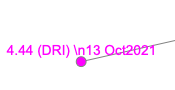
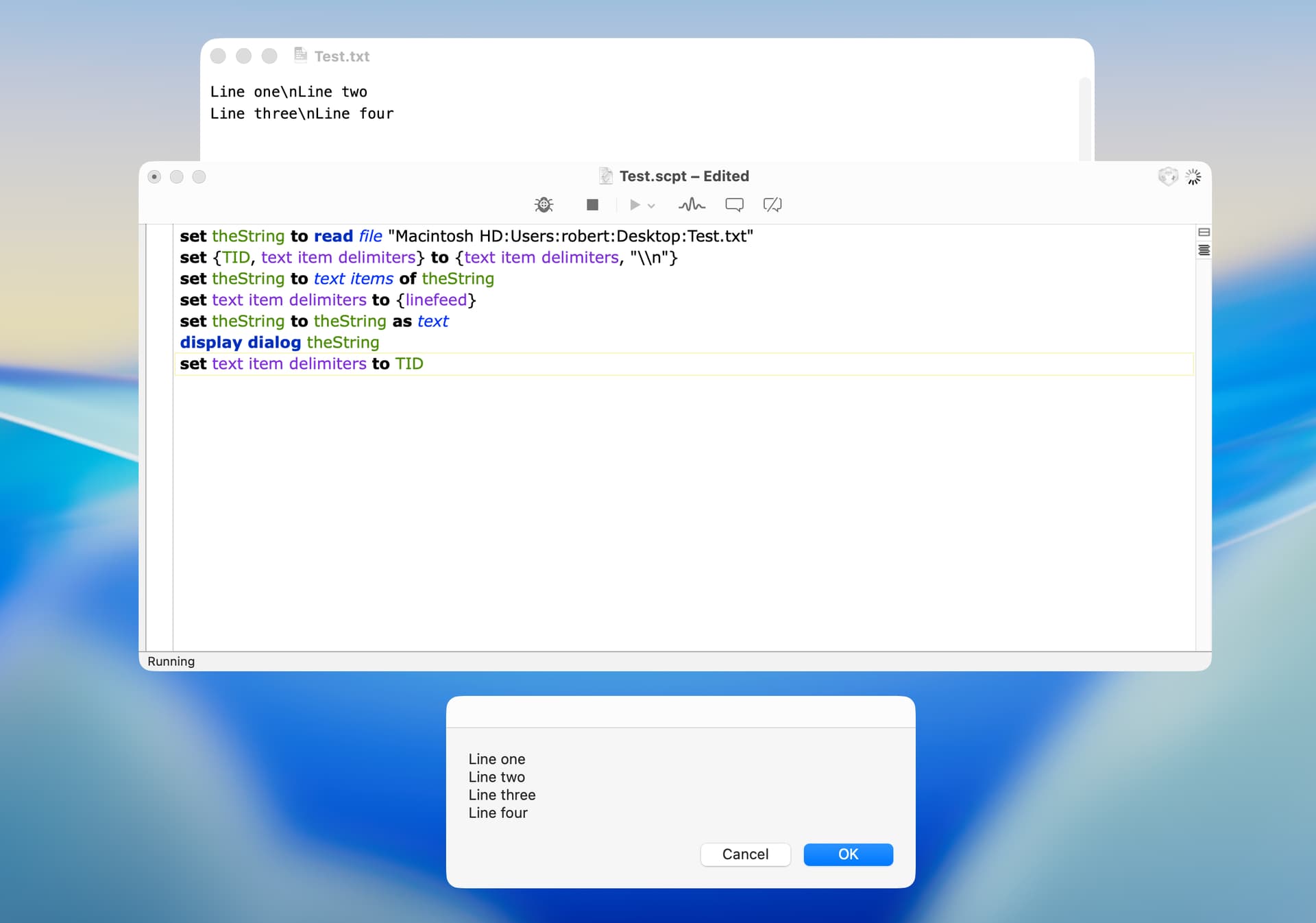
This script is a work in progress and basically works. At the moment I am adding the ability to add multi line comments / labels via the TSV file and the use of the \n string. This version uses /n because I struggled with \n.