Scan for broken aliases?

I have a nice script for creating disk images. The applescript has a nice gui, and it uses the hdiutil command utility to create the script, after prompting the user for all important info.

Well today I found out that if there is a broken alias anywhere in the source folder, hdiutil just… fails. Complete abort!

Pure madness. Is there any way I can pre-scan a folder, and all sub-folders, to check for broken aliases? That way I could do that before trying to actual create the disk image, so I can have a software failure instead of a hard failure?

Two questions:

First, is your disk indexed? You could use spotlight to find files that are aliases. You can also include that in your applescript. This would be the easiest way to find any alias files. You could put this in a do shell script command. Applescript can then find which files lack an ‘original item’.

mdfind "kMDItemFSTypeCode == 'alis'"

Second, what would you want the script to do with them? There are some threads here that discuss finding and repairing broken aliases.

Also, please provide the error message that you get.

1008com. I assume you’re referring to broken alias files, which are often simply referred to as aliases. With that caveat, I’ve included below an ASObjC script that will do what you want and that worked without issue on my Tahoe computer. It’s a minor rewrite of a script by Nigel (here). My script may be overkill for your purposes, and, if so, the linked thread also contains a Finder script that can be edited to do what you want.

use framework "Foundation"
use scripting additions

--prompt for and get contents of source folder
set theFolder to current application's |NSURL|'s fileURLWithPath:(POSIX path of (choose folder))
set fileManager to current application's NSFileManager's defaultManager()
set folderContents to (fileManager's enumeratorAtURL:theFolder includingPropertiesForKeys:{} options:6 errorHandler:(missing value))'s allObjects() --option 6 skips package contents and hidden files

--find broken alias files and add to an array
set brokenAliasArray to current application's NSMutableArray's new()
set aliasKey to current application's NSURLIsAliasFileKey
set booleanTrue to current application's NSNumber's numberWithBool:true --an optimization
repeat with anItem in folderContents
	set {theResult, anAlias} to (anItem's getResourceValue:(reference) forKey:(aliasKey) |error|:(missing value))
	if anAlias is booleanTrue then
		set aURL to (current application's NSURL's URLByResolvingAliasFileAtURL:(anItem) options:0 |error|:(missing value)) -- change option 0 to 768 to prevent UI feedback and volume mounting when aliases are resolved
		if aURL is (missing value) then (brokenAliasArray's addObject:anItem)
	end if
end repeat

--make array into string and display dialog
set brokenAliasString to ((brokenAliasArray's valueForKeyPath:"path")'s componentsJoinedByString:linefeed) as text
if brokenAliasString is "" then set brokenAliasString to "None found"
display dialog "Broken Alias files in the selected folder are listed below. Do you want to move them to the Trash?" & linefeed & linefeed & brokenAliasString default button 1

--move broken alias files to the Trash
repeat with aURL in brokenAliasArray
	(fileManager's trashItemAtURL:(aURL) resultingItemURL:(missing value) |error|:(missing value))
end repeat

BTW, I created a disk image of a folder with broken alias files using the hdiutil utility, and the disk image was created without issue. I wonder why we’re seeing different results.

The following script uses Finder to get and trash broken alias files. It works fine if the number of files in the source folder are small but otherwise is too slow. This script was tested without issue on my Tahoe computer.

--prompt for the source folder
set theFolder to choose folder with prompt "Select a folder that will be searched for broken alias files"

--get and make a string and list of all broken alias files in the source folder
set brokenAliasString to ""
set brokenAliasList to {}
tell application "Finder"
	try
		set aliasFiles to every alias file of the entire contents of theFolder --can be a list or file specifier
	on error
		display dialog "No alias files were found in the selected folder or its subfolders" buttons {"OK"} cancel button 1 default button 1
	end try
	if class of aliasFiles is alias file then set aliasFiles to {aliasFiles} --a file specifier returned above
	
	repeat with aFile in aliasFiles
		set aFile to aFile as alias
		if not (exists original item of aFile) then
			set brokenAliasString to brokenAliasString & (POSIX path of aFile) & linefeed
			set end of brokenAliasList to aFile
		end if
	end repeat
end tell

--display a dialog with the broken alias files
if brokenAliasString = "" then set brokenAliasString to "None Found"
display dialog "Broken Alias files in the selected folder are listed below. Do you want to move them to the Trash?" & linefeed & linefeed & brokenAliasString default button 1

--move broken alias files to the Trash
tell application "Finder" to delete brokenAliasList

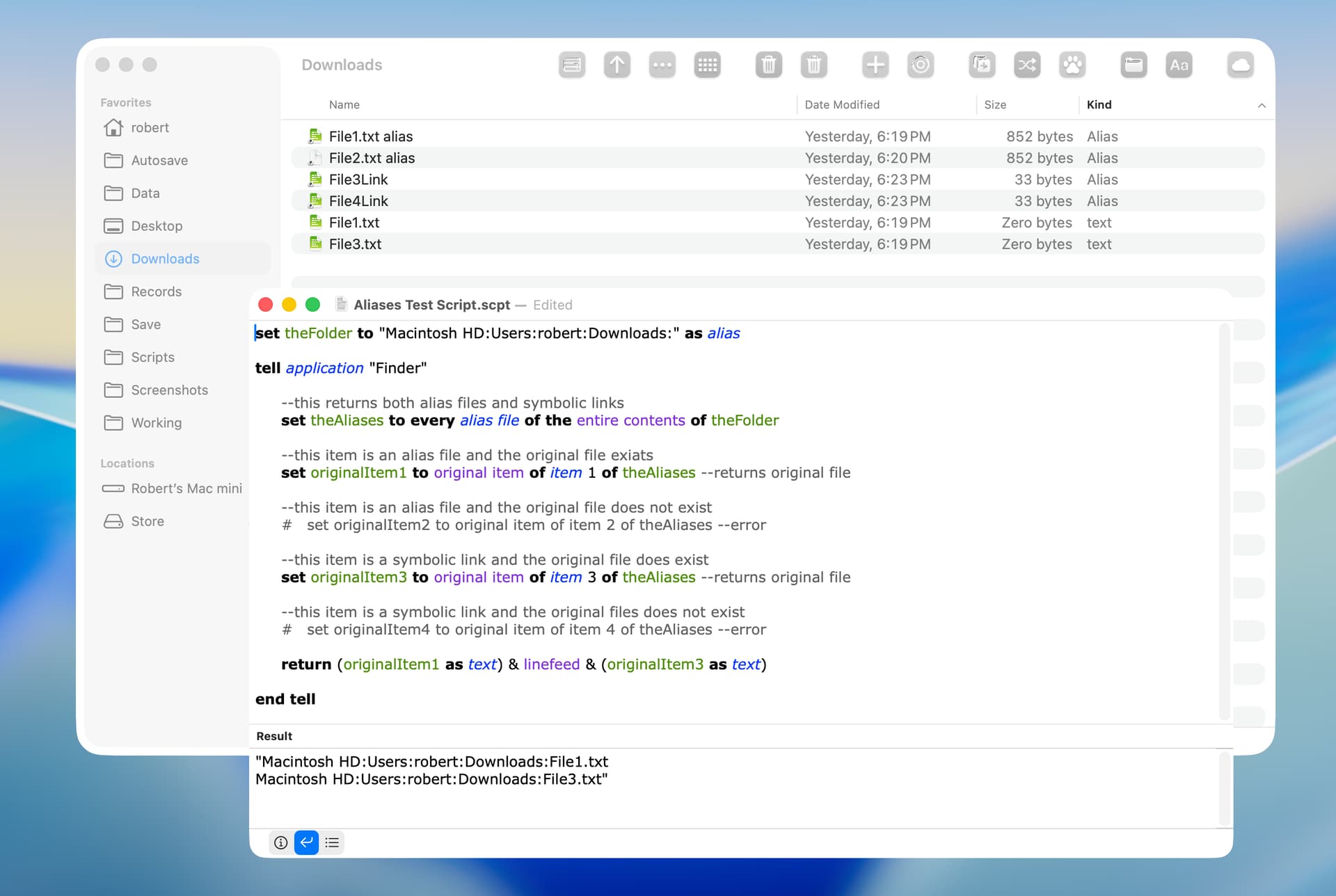
The scripts posted and referenced so far don’t work very well (or at all) with symbolic links. Symbolic links can also be broken, and while most people probably don’t think too much about them, Apple does use them quite a bit. The Finder also tries to be helpful by resolving symbolic links, which can have unexpected results.

In the previous script for example, the Finder gets alias files, but the symbolic links are resolved to their target. For some reason this results in an error when coercing the reference to an alias, but even after fixing that (by getting the Finder references as an alias list instead of the coercion), since symbolic links don’t have an original item property, they get treated as a broken alias.

Over the years I’ve cobbled together a file information application (not using AppleScript, but parts can be converted) that, among other things, shows the original file of an alias or symbolic link and if it is broken. Apple does all kinds of weird things with system files, frameworks, library folders, etc, including broken symlinks, so I found that those make decent tests for stuff like this. My particular use case only involves a few files at a time, but I found it interesting that system files could simulate a lot of the same strange stuff that people try to do.

What I’ve done is get bookmarkDataWithContentsOfURL: and then use resourceValuesForKeys:fromBookmarkData:, or URLByResolvingAliasFileAtURL:options:error: if the bookmark data is missing (a symbolic link). An example showing the difference would be something like the following. For individual or a small group of files it is reasonably quick, but it does add some processing time for things like a user’s ~/Library folder, which has quite a few symbolic links (over 2000 in mine).

use framework "Foundation"
use scripting additions

on run -- example
   set skipSymLinks to true -- set to false to include symbolic links
   set {results, dialogList} to {{}, current application's NSMutableArray's new()}
   repeat with anAlias in (getAliasFiles from (choose folder))
      set {prefix, symbol, originalPath} to {"", " --> ", (resolveAlias for anAlias given symbolicLink:(not skipSymLinks))}
      if (originalPath is not in {missing value, "skipped symbolic link"}) and (not (current application's NSFileManager's defaultManager's fileExistsAtPath:originalPath) as boolean) then
         set {prefix, symbol} to {"Broken alias:  ", " ⊗--> "}
         set end of results to {aliasPath:(contents of anAlias), brokenAlias:originalPath}
         (dialogList's addObject:((contents of anAlias) & symbol & originalPath))
      end if
      # log prefix & anAlias & symbol & originalPath
   end repeat
   set itemCount to (dialogList's |count|()) as integer
   if itemCount < 1 then
      set dialogText to "None found."
   else if itemCount > 7 then
      set dialogText to "Too many entries for the standard dialog (" & itemCount & ") - see the script return results."
   else
      set dialogText to (dialogList's componentsJoinedByString:(return & return)) as text
   end if
   set dialogTitle to "Broken alias files" & item ((skipSymLinks as integer) + 1) of {" and symbolic links", ""}
   display dialog dialogText with title dialogTitle buttons {"OK"} default button 1
   return results
end run

# Get a list of alias files from a folder, with option to not descend into subdirectories.
to getAliasFiles from folderPath given descent:(descent as boolean) : true
   set folderURL to current application's NSURL's fileURLWithPath:(POSIX path of folderPath)
   set options to (current application's NSDirectoryEnumerationSkipsHiddenFiles as integer) + (current application's NSDirectoryEnumerationSkipsPackageDescendants as integer) + (((not descent) as integer) * (current application's NSDirectoryEnumerationSkipsSubdirectoryDescendants as integer))
   set enumerator to current application's NSFileManager's defaultManager's enumeratorAtURL:folderURL includingPropertiesForKeys:{current application's NSURLIsAliasFileKey} options:options errorHandler:(missing value)
   set results to {}
   repeat with fileURL in (allObjects() of enumerator)
      set {success, isAlias} to (fileURL's getResourceValue:(reference) forKey:(current application's NSURLIsAliasFileKey) |error|:(missing value))
      if success and (isAlias as boolean) then set end of results to fileURL's |path|() as text
   end repeat
   return results
end getAliasFiles

# Resolves the path for an alias file, with options to mount a volume and skip a symbolic link.
# Returns the original path, "skipped symbolic link", or missing value if an error or not found.
to resolveAlias for aliasPath given mounting:(mounting as boolean) : false, symbolicLink:(symbolicLink as boolean) : true
   set aliasURL to current application's NSURL's fileURLWithPath:(POSIX path of aliasPath)
   set bookmarkData to current application's NSURL's bookmarkDataWithContentsOfURL:aliasURL |error|:(missing value)
   if (bookmarkData is missing value) then -- non-file object (symbolic link, etc)
      if not symbolicLink then return "skipped symbolic link"
      set options to (current application's NSURLBookmarkResolutionWithoutUI as integer) + (((not mounting) as integer) * (current application's NSURLBookmarkResolutionWithoutMounting as integer))
      set originalURL to current application's NSURL's URLByResolvingAliasFileAtURL:aliasURL options:options |error|:(missing value)
      if originalURL is not missing value then return originalURL's |path| as text
   else -- alias file
      set originalPath to missing value
      set resourceValues to current application's NSURL's resourceValuesForKeys:{current application's NSURLPathKey} fromBookmarkData:bookmarkData
      if resourceValues is not missing value then set originalPath to resourceValues's objectForKey:(current application's NSURLPathKey)
      if originalPath is not missing value then return originalPath as text
   end if
   return missing value
end resolveAlias

Edited to clean up the run handler and add some error protection.

1 Like

Thanks red_menace for the script, which works well.

I know nothing about scripting symbolic links, and this seemed a good opportunity to learn something on that topic. I rewrote my ASObjC script to include symbolic links, and it worked reliably on my Tahoe computer.

use framework "Foundation"
use scripting additions

--Prompt for and get contents of source folder and its subfolders
set sourceFolder to current application's |NSURL|'s fileURLWithPath:(POSIX path of (choose folder))
set fileManager to current application's NSFileManager's defaultManager()
set folderContents to (fileManager's enumeratorAtURL:sourceFolder includingPropertiesForKeys:{} options:6 errorHandler:(missing value))'s allObjects() --Option 6 skips package contents and hidden files

--Find broken alias files and symbolic links and add to arrays
set brokenAliasFileArray to current application's NSMutableArray's new()
set brokenSymbolicLinkArray to current application's NSMutableArray's new()
set aliasFileKey to current application's NSURLIsAliasFileKey
set symbolicLinkKey to current application's NSURLIsSymbolicLinkKey
set booleanTrue to current application's NSNumber's numberWithBool:true --Optimizes repeat loop
repeat with anItem in folderContents
	set {theResult, anAlias} to (anItem's getResourceValue:(reference) forKey:(aliasFileKey) |error|:(missing value))
	if anAlias is booleanTrue then --Returns both alias files and symbolic links
		set {theResult, aSymbolicLink} to (anItem's getResourceValue:(reference) forKey:(symbolicLinkKey) |error|:(missing value))
		if aSymbolicLink is booleanTrue then --A symbolic link
			set aPath to (fileManager's destinationOfSymbolicLinkAtPath:(anItem's |path|()) |error|:(missing value))
			set itemExists to (fileManager's fileExistsAtPath:aPath)
			if itemExists is false then (brokenSymbolicLinkArray's addObject:anItem)
		else --An alias file
			set aURL to (current application's NSURL's URLByResolvingAliasFileAtURL:(anItem) options:0 |error|:(missing value)) -- Change option 0 to 768 to prevent UI feedback and volume mounting when aliases are resolved
			if aURL is (missing value) then (brokenAliasFileArray's addObject:anItem)
		end if
	end if
end repeat

--Make arrays into string and display dialog
set brokenAliasFileString to ((brokenAliasFileArray's valueForKeyPath:"path")'s componentsJoinedByString:linefeed) as text
if brokenAliasFileString is "" then set brokenAliasFileString to "No broken alias files were found"
set brokenSymbolicLinkString to ((brokenSymbolicLinkArray's valueForKeyPath:"path")'s componentsJoinedByString:linefeed) as text
if brokenSymbolicLinkString is "" then set brokenSymbolicLinkString to "No broken symbolic links were found"
display dialog "Broken alias files in the selected folder and its subfolders are:" & linefeed & linefeed & brokenAliasFileString & linefeed & linefeed & "Broken symbolic links are:" & linefeed & linefeed & brokenSymbolicLinkString buttons {"OK"} default button 1

I’m generally happy with my revised script with one exception. Red_menace’s script returns the path to the original folder or file and mine doesn’t.

My script already gets the path to original folder or file from a symbolic link. So, this only requires a change to the section of the script that displays the data.

However, my script does not get the original folder or file from a broken alias file and instead simply returns missing value. I couldn’t find anything that does that directly, so I simply copied the approach used by red_menace, which is to get the original folder or file from the bookmark data.

Just as a matter of personal preference, the dialog lists the path to the alias file or symbolic link, followed by the path to the original folder or file, followed by a blank line. The timing result run on my smallish Home folder was 40 milliseconds.

use framework "Foundation"
use scripting additions

--Prompt for and get contents of source folder and its subfolders
set sourceFolder to POSIX path of (choose folder with prompt "Select a folder to recursively  search for broken alias files and symbolic links")
set sourceFolder to current application's |NSURL|'s fileURLWithPath:sourceFolder
set fileManager to current application's NSFileManager's defaultManager()
set folderContents to (fileManager's enumeratorAtURL:sourceFolder includingPropertiesForKeys:{} options:6 errorHandler:(missing value))'s allObjects() --Option 6 skips package contents and hidden files

--Find broken alias files and symbolic links and their original folder or file and add to arrays
set brokenAliasFileArray to current application's NSMutableArray's new()
set brokenSymbolicLinkArray to current application's NSMutableArray's new()
set aliasFileKey to current application's NSURLIsAliasFileKey
set symbolicLinkKey to current application's NSURLIsSymbolicLinkKey
set booleanTrue to current application's NSNumber's numberWithBool:true --Optimizes repeat loop
repeat with anItem in folderContents
	set {theResult, anAlias} to (anItem's getResourceValue:(reference) forKey:(aliasFileKey) |error|:(missing value))
	if anAlias is booleanTrue then --Returns both alias files and symbolic links
		set {theResult, aSymbolicLink} to (anItem's getResourceValue:(reference) forKey:(symbolicLinkKey) |error|:(missing value))
		if aSymbolicLink is booleanTrue then --A symbolic link
			set originalItem to (fileManager's destinationOfSymbolicLinkAtPath:(anItem's |path|()) |error|:(missing value))
			set itemExists to (fileManager's fileExistsAtPath:originalItem)
			if itemExists is false then
				(brokenSymbolicLinkArray's addObject:(anItem's |path|()))
				(brokenSymbolicLinkArray's addObject:originalItem)
				(brokenSymbolicLinkArray's addObject:"")
			end if
		else --An alias file
			set bookmarkData to (current application's NSURL's bookmarkDataWithContentsOfURL:anItem |error|:(missing value))
			set originalItem to ((current application's NSURL's resourceValuesForKeys:{current application's NSURLPathKey} fromBookmarkData:bookmarkData)'s objectForKey:(current application's NSURLPathKey))
			set itemExists to (fileManager's fileExistsAtPath:originalItem)
			if itemExists is false then
				(brokenAliasFileArray's addObject:(anItem's |path|()))
				(brokenAliasFileArray's addObject:originalItem)
				(brokenAliasFileArray's addObject:"")
			end if
		end if
	end if
end repeat

--Make arrays into string and display dialog
set brokenAliasFileString to (brokenAliasFileArray's componentsJoinedByString:linefeed) as text
if brokenAliasFileString is "" then set brokenAliasFileString to "No broken alias files were found" & linefeed
set brokenSymbolicLinkString to (brokenSymbolicLinkArray's componentsJoinedByString:linefeed) as text
if brokenSymbolicLinkString is "" then set brokenSymbolicLinkString to "No broken symbolic links were found"
display dialog "Broken alias files and their original folder or file are:" & linefeed & linefeed & brokenAliasFileString & linefeed & "Broken symbolic links and their original folder or file are:" & linefeed & linefeed & brokenSymbolicLinkString buttons {"OK"} default button 1

From the documentation, bookmarkDataWithContentsOfURL: works with more than alias files, but if the file item doesn’t contain bookmark data or is a non-file object (such as a symlink) then it returns missing value. Since aliases are what is being used at this point, that is a handy switch for using the different approaches to get the original. The other answers and links just use URLByResolvingAliasFileAtURL:options:error:, which also works with bookmark data, but I don’t get the same results for some reason.

There is also a difference in your script results that you might want to take look at. On my (Tahoe) system using ~/Library/Daemon Containers as a source, my example returns 88 broken links from 726 alias/symlink items, while yours returns 726 broken links (you determine the alias/symlinks when iterating through the entire folder contents). The results were the same when using URLByResolvingAliasFileAtURL:options:error: instead of destinationOfSymbolicLinkAtPath:error:, which wouldn’t match a relative path if that is what the symlink uses (which it does in this case).

display dialog really doesn’t like any of that, which is why I also used logs and a returned value. NSAlert with a scrolling text view is also a possibility for those big lists.

Thanks red_menace for testing my script.

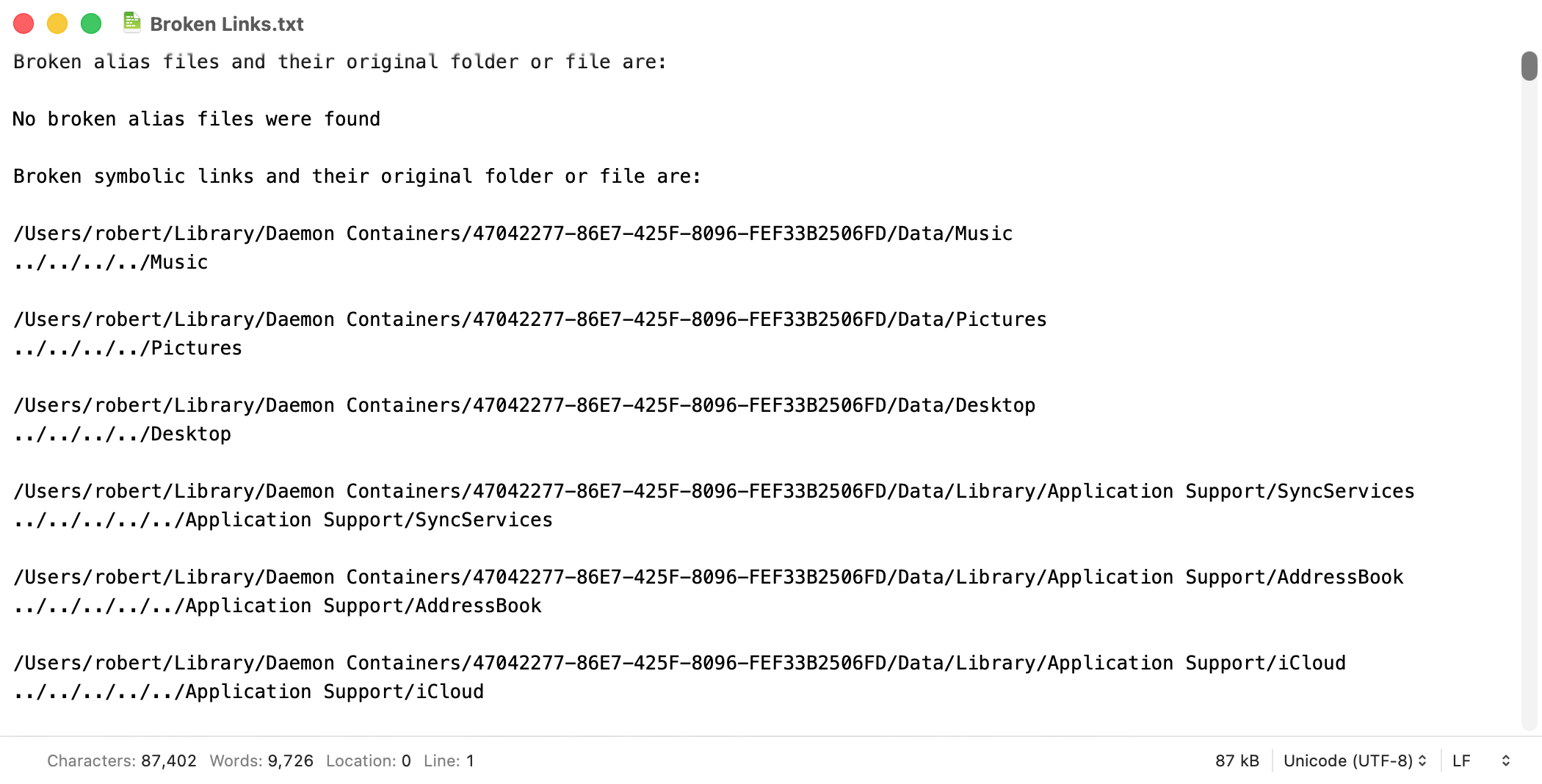
I rewrote my script to output the data to a text file rather than a dialog, but made no other changes, and the following is a screenshot of the first portion of the text file. This is with the folder you mention. I didn’t know that symbolic links could use relative paths and that certainly complicates matters. I’ll work on this.

red_menace. I did some additional research and thought I’d pass along my findings.

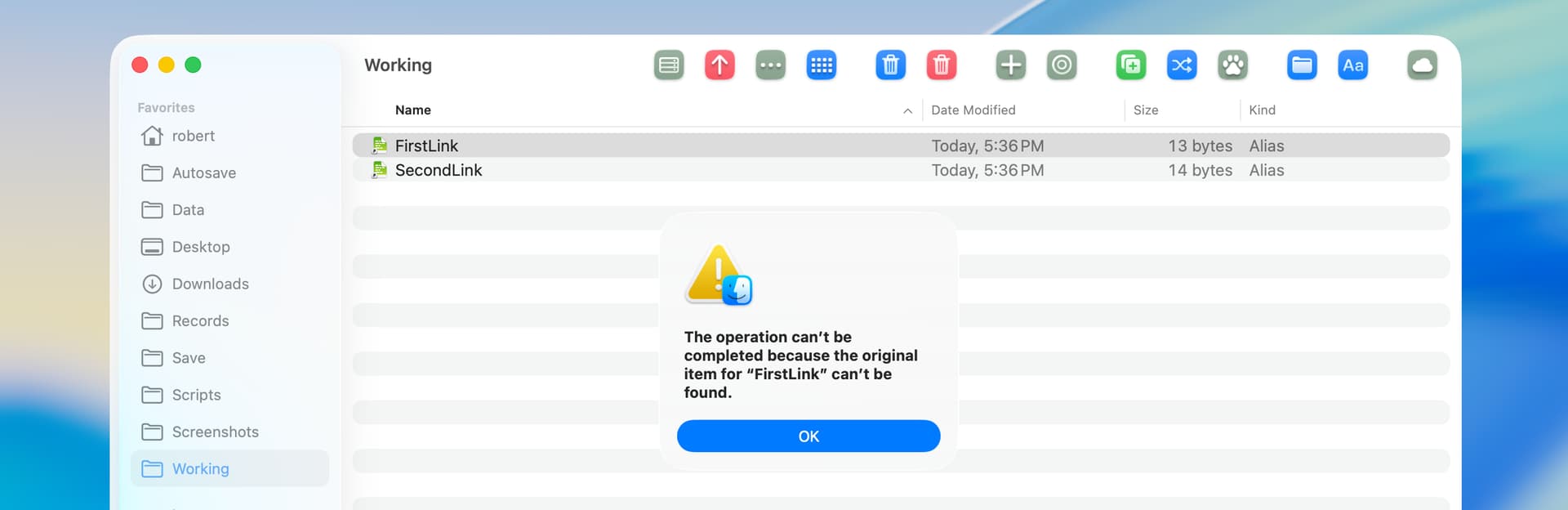
I started by creating what is hopefully a reliable test. I first made two text files named FirstTest.txt and SecondTest.txt in my ~/Working folder. I then created symbolic links with relative path to these files by:

  1. Open a Terminal window.
  2. Change to the ~/Working folder.
  3. Run this command: ln -s FirstFile.txt FirstLink.

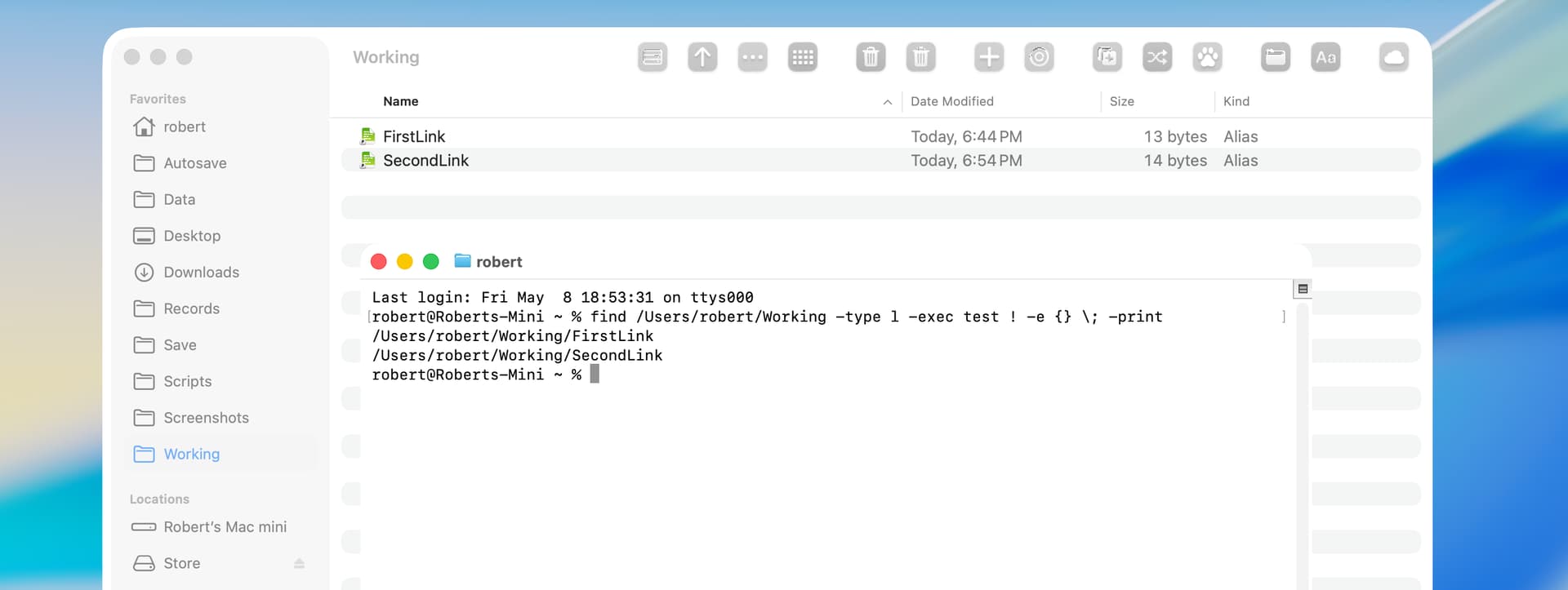
I confirmed that the links were functional and then deleted the two text files. I then confirmed that the links were broken:

Finally, I tested all of the scripts in this thread, and none of them worked correctly. My last script happened to show the links were broken, but these scripts also showed the links as broken when that wasn’t the case.

One option is to take the relative path and to make it into an absolute path, and then to test if the file at the absolute path exists. I’m not sure how to do that, though, because the relative paths are not consistent in their format.

Another option might be to force an error by attempting to open the broken link, but that would be slow and kludgey even if it is, in fact, feasible.

I belatedly consulted Google AI which suggested the following. This did return accurate results with the links in my `~/Working folder (both with broken and not-broken links). However, this solution also returns an extremely large number of links in the Daemon Containers folder as broken, and I don’t know if this is actually the case. I’ll do a little more research on this tomorrow.

I also get quite a few broken aliases in the Daemon Containers folder (88 out of 726), I think they are all just set up ahead of time and go away when whatever uses them does their thing and creates the items in the folder. NSURL’s URLByResolvingAliasFileAtURL:options:error: seems to resolve the relative paths, and I also check if the target path exists by using NSFileManager’s fileExistsAtPath:.

These extra steps do slow things down a bit when using large folders, since my script builds a list of records for the entire list of aliases. I do have a scrolling NSTextView in a NSAlert now that so I can show a lot more than display dialog, but the script editors really slow down when processing large return items. For example, with Script Debugger it took almost 10 minutes to process 2,090 broken aliases/symLinks out of 23,115 items for my home folder, and a few minutes more to return the master list. Script Editor was a bit slower at around 13 minutes, with the return value a couple more. Script Geek and a script application were a little faster at around 8 minutes, but they don’t return anything. There isn’t much beach balling, mostly during the directory enumeration and processing the return value, the rest was just the script chugging away, but for an app you should probably put up something with a progress indicator. I’m just glad that my file info app doesn’t need to do a lot of this stuff.

1 Like

I edited my script to correctly return broken symbolic links with both absolute and relative paths. A few comments:

  • The script now saves the data to a text file on the current user’s Desktop.

  • I tested the script on alias files and symbolic links that I created in my Home folder, and everything worked fine.

  • I tested the script on the Daemon Containers folder, and the script returned 239 broken symbolic links. I manually tested a small number of the symbolic links (both broken and not broken), and the result returned by my script was correct in every case.

  • The timing result on my smallish Home folder with a relatively small number of alias files and symbolic links was 45 milliseconds. The timing result with the Daemon Containers folder was 138 milliseconds.

use framework "Foundation"
use scripting additions

--Prompt for and get contents of source folder and its subfolders
set sourceFolder to POSIX path of (choose folder with prompt "Select a folder to recursively  search for broken alias files and symbolic links")
set sourceFolder to current application's |NSURL|'s fileURLWithPath:sourceFolder
set fileManager to current application's NSFileManager's defaultManager()
set folderContents to (fileManager's enumeratorAtURL:sourceFolder includingPropertiesForKeys:{} options:6 errorHandler:(missing value))'s allObjects() --Option 6 skips package contents and hidden files

--Enable the following to sort by path then name
# set pathDescriptor to current application's NSSortDescriptor's sortDescriptorWithKey:"path.stringByDeletingLastPathComponent" ascending:true selector:"localizedStandardCompare:"
# set nameDescriptor to current application's NSSortDescriptor's sortDescriptorWithKey:"lastPathComponent" ascending:true selector:"localizedStandardCompare:"
# set folderContents to folderContents's sortedArrayUsingDescriptors:{pathDescriptor, nameDescriptor}

--Find broken alias files and symbolic links and add to arrays
set brokenAliasFileArray to current application's NSMutableArray's new()
set brokenSymbolicLinkArray to current application's NSMutableArray's new()
set aliasFileKey to current application's NSURLIsAliasFileKey
set symbolicLinkKey to current application's NSURLIsSymbolicLinkKey
set booleanTrue to current application's NSNumber's numberWithBool:true --optimizes repeat loop
repeat with anItem in folderContents
	set {theResult, anAlias} to (anItem's getResourceValue:(reference) forKey:(aliasFileKey) |error|:(missing value))
	if anAlias is booleanTrue then --returns both alias files and symbolic links
		set {theResult, aSymbolicLink} to (anItem's getResourceValue:(reference) forKey:(symbolicLinkKey) |error|:(missing value))
		if aSymbolicLink is booleanTrue then --a symbolic link
			set originalItem to (current application's NSURL's URLByResolvingAliasFileAtURL:anItem options:0 |error|:(missing value))
			set itemExists to (fileManager's fileExistsAtPath:((originalItem)'s |path|()))
			if itemExists is false then
				(brokenSymbolicLinkArray's addObject:(anItem's |path|()))
				(brokenSymbolicLinkArray's addObject:(originalItem's |path|()))
				(brokenSymbolicLinkArray's addObject:"") --add blank line
			end if
		else --An alias file
			set bookmarkData to (current application's NSURL's bookmarkDataWithContentsOfURL:anItem |error|:(missing value))
			set originalItem to ((current application's NSURL's resourceValuesForKeys:{current application's NSURLPathKey} fromBookmarkData:bookmarkData)'s objectForKey:(current application's NSURLPathKey))
			set itemExists to (fileManager's fileExistsAtPath:originalItem)
			if itemExists is false then
				(brokenAliasFileArray's addObject:(anItem's |path|()))
				(brokenAliasFileArray's addObject:originalItem)
				(brokenAliasFileArray's addObject:"")
			end if
		end if
	end if
end repeat

--Make arrays into string and print to text file on Desktop
set aliasFileHeader to "*** Broken Alias Files and Their Original Folder or File ***" & linefeed & linefeed
set aliasFileString to (brokenAliasFileArray's componentsJoinedByString:linefeed)
if aliasFileString as text is "" then set aliasFileString to "No broken alias files were found." & linefeed
set symbolicLinkHeader to linefeed & "*** Broken Symbolic Links and Their Original Folder or File ***" & linefeed & linefeed
set symbolicLinkString to (brokenSymbolicLinkArray's componentsJoinedByString:linefeed)
if symbolicLinkString as text is "" then set symbolicLinkString to "No broken symbolic links were found."
set theString to current application's NSString's stringWithFormat_("%@%@%@%@", aliasFileHeader, aliasFileString, symbolicLinkHeader, symbolicLinkString)
set theFile to (current application's NSHomeDirectory()'s stringByAppendingPathComponent:"Desktop")'s stringByAppendingPathComponent:"Broken Aliases and Symlinks.txt"
theString's writeToFile:theFile atomically:true encoding:(current application's NSUTF8StringEncoding) |error|:(missing value)

My script uses a handler that I adapted from an app that gets file information. It started out as an AppleScript back in Tiger/Leopard and its functionality has been improved over the years, mostly by doing weird stuff and looking at system files to see what breaks. I use it quite a bit these days and haven’t come across any aliases that don’t get resolved, but if you come across something specific that doesn’t work (maybe in the /System/Library folder since that should be consistent), let me know so that I can test.

In the current version of my example, I just create a master list/array of records/dictionaries that have keys for all the various bits of information for each file such as the alias type, if the target is broken, etc, and filter the results for whatever information I want to show in the alert dialog. With my Tahoe system, there are 726 alias/symlink files out of a total of 1,588 items (including hidden and dot files) in the Daemon Containers folder.

use framework "Foundation"
use scripting additions

# Outlets
property alert : missing value
property textView : missing value
property scrollView : missing value

# Alert response values - performSelectorOnMainThread doesn't return anything
property alertReply : missing value -- the button 
property failure : missing value -- error record with keys {errorMessage, errorNumber}


on run -- get an array of information dictionaries for alias files in the specified folder and its subdirectories
   try
      set symbolicLinks to true -- include symbolic links?
      set brokenOnly to false -- only show broken aliases?
      set theFolder to (choose folder with prompt "Choose a folder to get alias files from:")
      tell application "System Events" to set folderName to name of disk item (theFolder as text)
      set aliasInfo to (infoForAliases from theFolder given symbolicLinks:symbolicLinks)
      set pathDescriptor to current application's NSSortDescriptor's sortDescriptorWithKey:"aliasPath" ascending:true selector:"localizedStandardCompare:"
      set aliasInfo to aliasInfo's sortedArrayUsingDescriptors:{pathDescriptor}
      
      # filter the alias information as desired
      set filteredResult to current application's NSMutableArray's new()
      set what to "Alias File" -- default for no items
      repeat with theItem in aliasInfo
         if brokenOnly then
            set what to "Broken Alias File"
            tell theItem to if (its valueForKey:"isBroken") as boolean then (filteredResult's addObject:(its valueForKey:"summaryText"))
         else
            (filteredResult's addObject:(theItem's valueForKey:"summaryText"))
         end if
      end repeat
      
      # display the filtered information as desired
      set itemCount to (filteredResult's |count|()) as integer
      set dialogText to (filteredResult's componentsJoinedByString:linefeed) as text
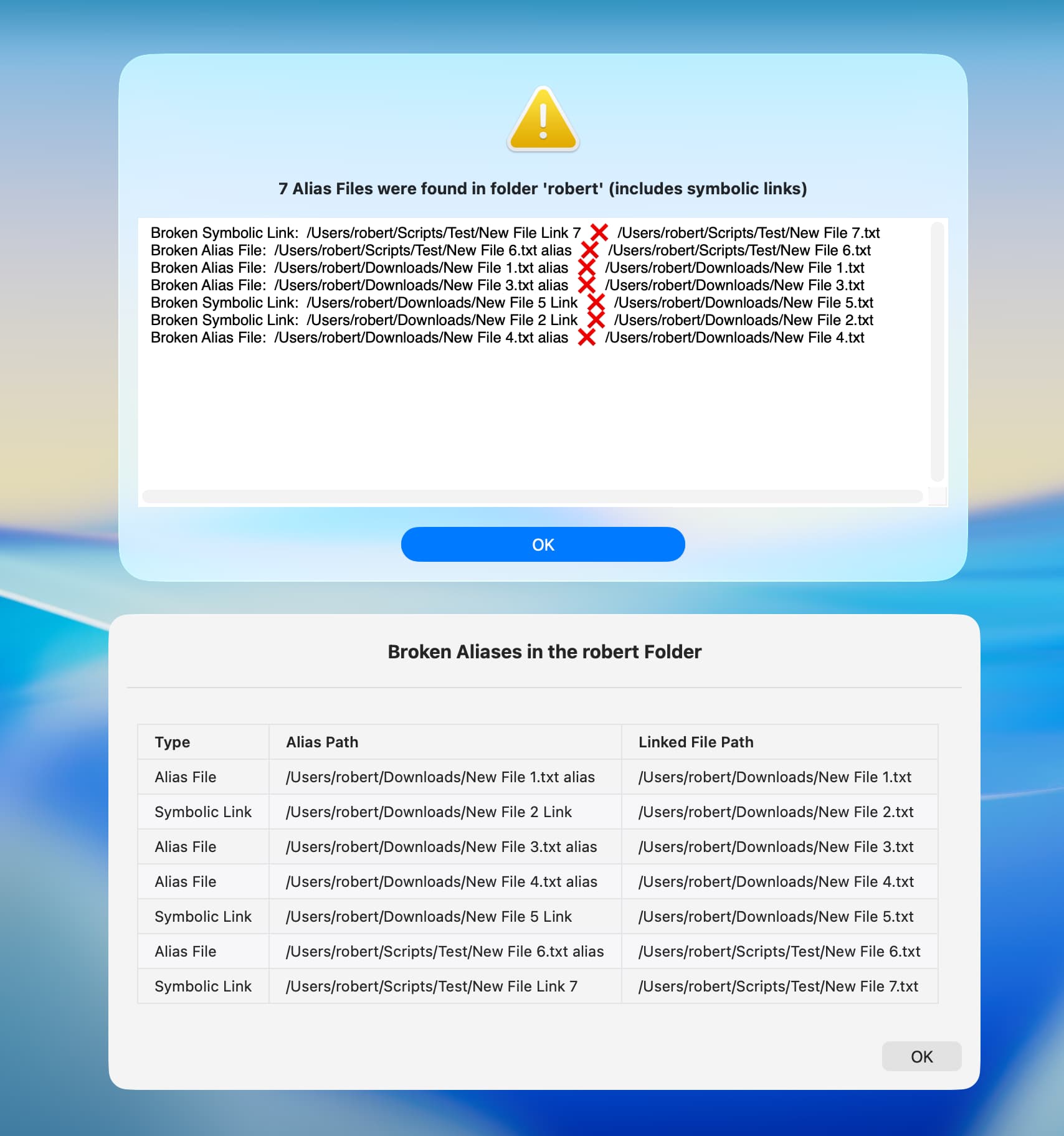
      set dialogTitle to what & item (((itemCount is 1) as integer) + 1) of {"s were", " was"} & " found in folder " & quoted form of folderName & " (" & item ((symbolicLinks as integer) + 1) of {"does not include", "includes"} & " symbolic links)"
      set dialogTitle to "" & item (((itemCount is 0) as integer) + 1) of {itemCount, "No"} & " " & dialogTitle
      
      showAlert(dialogTitle, dialogText)
      return aliasInfo as list -- the complete list
      if failure is not missing value then error
   on error errmess number errnum
      if failure is missing value then -- use passed arguments
         display alert "Script Error " & errnum message errmess
      else -- use keys from the failure record
         display alert "Script Error " & failure's errorNumber message failure's errorMessage
      end if
   end try
end run


########################################
-->> Alias Handlers
########################################

# Get information about alias files in the specified folder and its subdirectories.
# Returns an array of dictionaries with `aliasType`, `aliasPath`, `targetPath`, `isBroken`, and `summaryText` keys
on infoForAliases from folderPath given symbolicLinks:(symbolicLinks as boolean) : true
   set aliasDictionaries to current application's NSMutableArray's new()
   repeat with anAlias in (getAliasFiles from folderPath)
      set originalPath to (resolveAlias for anAlias given symbolicLink:symbolicLinks)
      if originalPath is not in {missing value, "skipped symbolic link"} then
         set {prefix, joiner} to {"", "  🢜🠞  "}
         set theString to (current application's NSString's stringWithString:originalPath)
         set {aliasType, targetPath} to (theString's componentsSeparatedByString:":  ") as list
         if (not (current application's NSFileManager's defaultManager's fileExistsAtPath:targetPath) as boolean) then
            set {prefix, joiner} to {"Broken ", "  ❌  "}
         end if
         (aliasDictionaries's addObject:{aliasType:aliasType, aliasPath:(contents of anAlias), targetPath:targetPath, isBroken:(prefix is not ""), summaryText:(prefix & aliasType & ":  " & anAlias & joiner & targetPath)})
      end if
   end repeat
   return aliasDictionaries
end infoForAliases

# Get a list of alias files from a folder, with option to not descend into subdirectories.
to getAliasFiles from folderPath given descent:(descent as boolean) : true
   set folderURL to current application's NSURL's fileURLWithPath:(POSIX path of folderPath)
   set options to (current application's NSDirectoryEnumerationSkipsHiddenFiles as integer) + (current application's NSDirectoryEnumerationSkipsPackageDescendants as integer) + (((not descent) as integer) * (current application's NSDirectoryEnumerationSkipsSubdirectoryDescendants as integer))
   set enumerator to current application's NSFileManager's defaultManager's enumeratorAtURL:folderURL includingPropertiesForKeys:{current application's NSURLIsAliasFileKey} options:options errorHandler:(missing value)
   set aliasFiles to {}
   repeat with fileURL in (allObjects() of enumerator)
      set {success, isAlias} to (fileURL's getResourceValue:(reference) forKey:(current application's NSURLIsAliasFileKey) |error|:(missing value))
      if success and (isAlias as boolean) then set end of aliasFiles to fileURL's |path|() as text
   end repeat
   return aliasFiles
end getAliasFiles

# Resolves the path for an alias file, with options to mount a volume and to skip a symbolic link.
# Returns the original path with a type prefix, "skipped symbolic link", or missing value if an error or not found.
to resolveAlias for aliasPath given mounting:(mounting as boolean) : false, symbolicLink:(symbolicLink as boolean) : true
   set aliasURL to current application's NSURL's fileURLWithPath:(POSIX path of aliasPath)
   set bookmarkData to current application's NSURL's bookmarkDataWithContentsOfURL:aliasURL |error|:(missing value)
   if (bookmarkData is missing value) then -- non-file object (symbolic link, etc)
      if not symbolicLink then return "skipped symbolic link"
      set options to (current application's NSURLBookmarkResolutionWithoutUI as integer) + (((not mounting) as integer) * (current application's NSURLBookmarkResolutionWithoutMounting as integer))
      set originalURL to current application's NSURL's URLByResolvingAliasFileAtURL:aliasURL options:options |error|:(missing value)
      if originalURL is not missing value then return "Symbolic Link:  " & originalURL's |path| -- as text
   else -- alias file
      set originalPath to missing value
      set resourceValues to current application's NSURL's resourceValuesForKeys:{current application's NSURLPathKey} fromBookmarkData:bookmarkData
      if resourceValues is not missing value then set originalPath to resourceValues's objectForKey:(current application's NSURLPathKey)
      if originalPath is not missing value then return "Alias File:  " & originalPath -- as text
   end if
   log "Unable to resolve alias file " & quoted form of aliasPath
   return missing value
end resolveAlias


########################################
-->> NSAlert Handlers
########################################

to showAlert(dialogTitle, dialogText)
   set my textView to (makeTextView at {} given dimensions:{650, 232}, textString:dialogText)
   set my scrollView to (makeScrollView for textView without wrapping) -- embed textView into scrollView
   if current application's NSThread's isMainThread() as boolean then
      my performAlertOnMainThread:{dialogTitle, scrollView}
   else
      my performSelectorOnMainThread:"performAlertOnMainThread:" withObject:{dialogTitle, scrollView} waitUntilDone:true
   end if
end showAlert

to performAlertOnMainThread:arguments
   try
      set {dialogTitle, scrollView} to arguments as list
      set my alert to (makeAlert for dialogTitle given icon:"caution", accessory:scrollView)
      set my alertReply to (alert's runModal()) as integer -- the button result (starts at 1000)
   on error errmess number errnum
      set my failure to {errorMessage:errmess, errorNumber:errnum}
   end try
end performAlertOnMainThread:

# Make and return a NSAlert.
to makeAlert for (messageText as text) : "" given infoText:(infoText as text) : "", buttons:(buttons as list) : {"OK"}, icon:(icon as text) : "", accessory:accessory : missing value
   tell current application's NSAlert's alloc()'s init()
      its setMessageText:messageText
      its setInformativeText:infoText
      repeat with aButton in buttons
         set theButton to (its addButtonWithTitle:aButton)
      end repeat
      if icon is not "" then
         set candidate to current application's NSImage's alloc()'s initByReferencingFile:icon
         if (candidate's isValid as boolean) then -- file
            its setIcon:candidate
         else if icon is "caution" then -- system caution image
            its setIcon:(current application's NSImage's imageNamed:(current application's NSImageNameCaution))
         else if icon is "critical" then -- critical style, otherwise informational
            its setAlertStyle:(current application's NSCriticalAlertStyle)
         end if
      end if
      if accessory is not missing value then its setAccessoryView:accessory
      return it
   end tell
end makeAlert


########################################
-->> UI Handlers
########################################

# Make and return a NSTextView.
to makeTextView at (origin as list) given dimensions:(dimensions as list) : {200, 28}, textString:(textString as text) : "Testing", textFont:textFont : missing value, textColor:textColor : missing value, backgroundColor:backgroundColor : missing value, drawsBackground:(drawsBackground as boolean) : true, editable:(editable as boolean) : false, selectable:(selectable as boolean) : true
   if origin is {} then set origin to {0, 0}
   tell (current application's NSTextView's alloc's initWithFrame:{origin, dimensions})
      its setHorizontallyResizable:true
      its setTextContainerInset:{5, 5}
      if textFont is not missing value then its setFont:textFont
      if textColor is not missing value then its setTextColor:textColor
      if backgroundColor is not missing value then its setBackgroundColor:backgroundColor
      its setDrawsBackground:drawsBackground
      its setEditable:editable
      its setSelectable:selectable
      its setString:textString
      return it
   end tell
end makeTextView

# Make and return a NSScrollView and set the wrapping mode for the given textView.
to makeScrollView for textView given borderType:(borderType as integer) : 0, verticalScroller:(verticalScroller as boolean) : true, wrapping:(wrapping as boolean) : true
   tell (current application's NSScrollView's alloc's initWithFrame:(textView's frame))
      its setBorderType:borderType
      its setHasVerticalScroller:verticalScroller
      its setDocumentView:textView
      set layoutSize to current application's NSMakeSize(1.0E+5, 1.0E+5) -- no wrapping
      textView's setMaxSize:layoutSize
      textView's enclosingScrollView's setHasHorizontalScroller:true
      textView's textContainer's setWidthTracksTextView:false
      textView's textContainer's setContainerSize:layoutSize
      textView's enclosingScrollView's setNeedsDisplay:true
      return it
   end tell
end makeScrollView

Edited to add sorting.
1 Like

red_menace. I tested your script and it works great The dialog is very attractive.

I tried to create something similar with a markdown table in the swiftDialog utility, but swiftDialog was unable to create a markdown table with a large number of files. Just to compare results, I ran both of our scripts on my smallish Home folder.

I was wrong about this. There was an error in my script.

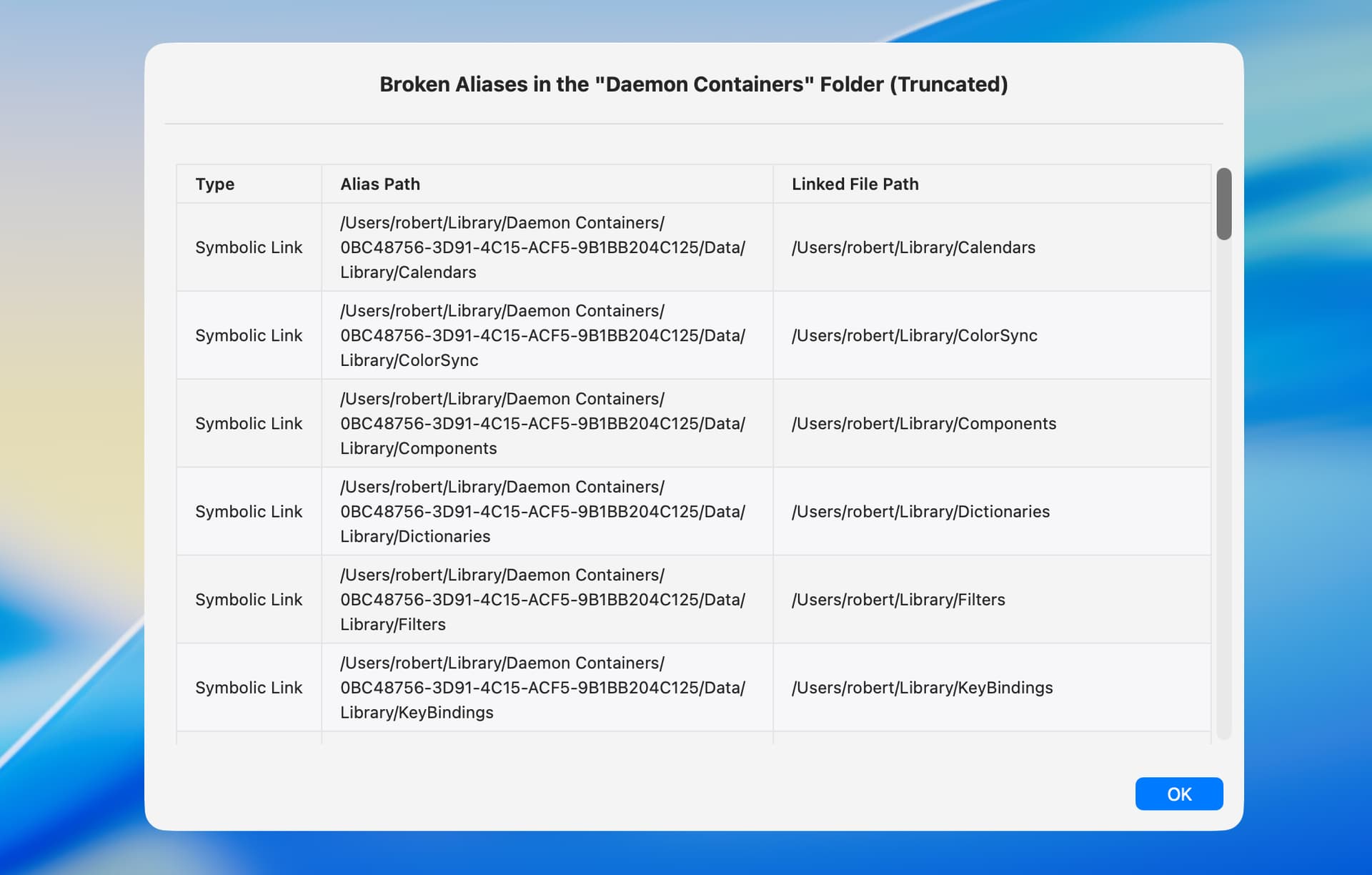
The script included below works on the Daemon Containers folder and shows all broken aliases (currently 239 on my computer). However, scrolling through that many items in a swiftDialog markdown table is slow. So, I included code that limits the number of returned items. I also included code that sorts the alises by path and file name.

--This script requires the open source swiftDialog utility
--https://github.com/swiftDialog/swiftDialog

use framework "Foundation"
use scripting additions

--Stop script and display results when the specified number of broken aliases are found
set truncate to 10

--Prompt for and get contents of source folder and its subfolders
set sourceFolder to POSIX path of (choose folder with prompt "Select a folder to recursively search for broken alias files and symbolic links")
set sourceFolder to current application's |NSURL|'s fileURLWithPath:sourceFolder
set sourceFolderName to sourceFolder's lastPathComponent() as text --used later in dialogs
set fileManager to current application's NSFileManager's defaultManager()
set folderContents to (fileManager's enumeratorAtURL:sourceFolder includingPropertiesForKeys:{} options:6 errorHandler:(missing value))'s allObjects() --Option 6 skips package contents and hidden files
set processingCompleted to true --used in repeat loop

--Sort by parent path then file name
set pathDescriptor to current application's NSSortDescriptor's sortDescriptorWithKey:"path.stringByDeletingLastPathComponent" ascending:true selector:"localizedStandardCompare:"
set nameDescriptor to current application's NSSortDescriptor's sortDescriptorWithKey:"lastPathComponent" ascending:true selector:"localizedStandardCompare:"
set folderContents to folderContents's sortedArrayUsingDescriptors:{pathDescriptor, nameDescriptor}

--Find broken alias files and symbolic links and add to arrays
set brokenAliasArray to current application's NSMutableArray's new()
set aliasFileKey to current application's NSURLIsAliasFileKey
set symbolicLinkKey to current application's NSURLIsSymbolicLinkKey
set booleanTrue to current application's NSNumber's numberWithBool:true --optimizes repeat loop
set theCount to 0
repeat with anItem in folderContents
	set {theResult, anAlias} to (anItem's getResourceValue:(reference) forKey:(aliasFileKey) |error|:(missing value))
	if anAlias is booleanTrue then --returns both alias files and symbolic links
		set {theResult, aSymbolicLink} to (anItem's getResourceValue:(reference) forKey:(symbolicLinkKey) |error|:(missing value))
		if aSymbolicLink is booleanTrue then --a symbolic link
			set originalItem to (current application's NSURL's URLByResolvingAliasFileAtURL:anItem options:0 |error|:(missing value))
			set itemExists to (fileManager's fileExistsAtPath:((originalItem)'s |path|()))
			if itemExists is false then
				set anItemPath to anItem's |path|()
				set originalItemPath to originalItem's |path|()
				set aTableRow to current application's NSString's stringWithFormat_("| Symbolic Link | %@ | %@ |", anItemPath, originalItemPath)
				(brokenAliasArray's addObject:aTableRow)
				set theCount to theCount + 1
			end if
		else --An alias file
			set bookmarkData to (current application's NSURL's bookmarkDataWithContentsOfURL:anItem |error|:(missing value))
			set originalItem to ((current application's NSURL's resourceValuesForKeys:{current application's NSURLPathKey} fromBookmarkData:bookmarkData)'s objectForKey:(current application's NSURLPathKey))
			set itemExists to (fileManager's fileExistsAtPath:originalItem)
			if itemExists is false then
				set anItemPath to anItem's |path|()
				set aTableRow to current application's NSString's stringWithFormat_("| Alias File | %@ | %@ |", anItemPath, originalItem)
				(brokenAliasArray's addObject:aTableRow)
				set theCount to theCount + 1
			end if
		end if
	end if
	if theCount is truncate then --stop when specified number of broken aliases found
		set processingCompleted to false
		exit repeat
	end if
end repeat

--Display dialog and stop if no broken aliases found
if brokenAliasArray's |count|() is 0 then display dialog "No broken aliases were found in the \"" & sourceFolderName & "\" folder and its subfolders." buttons {"OK"} cancel button 1 default button 1

--Create markdown table from array and display in dialog
if processingCompleted then
	set dialogTitle to "Broken Aliases in the \"" & sourceFolderName & "\" Folder"
else
	set dialogTitle to "Broken Aliases in the \"" & sourceFolderName & "\" Folder (Truncated)"
end if
set tableHeader to "| Type | Alias Path | Linked File Path |" & linefeed & "| :--- | :--- | :--- |"
set brokenAliasString to (brokenAliasArray's componentsJoinedByString:linefeed) as text
set dialogMessage to tableHeader & linefeed & brokenAliasString & linefeed
do shell script "/usr/local/bin/dialog --title " & quoted form of dialogTitle & " --titlefont 'size=15' --message " & quoted form of dialogMessage & " --messagefont 'size=12' --messagealignment left --messageposition top --width 700 --height 500 --hideicon --resizable; exit 0"

My script is a little more general-purpose (and a bit slower), but the swiftDialog equivalent would be to change the run handler to the following (the NSAlert and UI handlers could also be removed) :

on run -- get an array of information dictionaries for alias files in the specified folder and its subdirectories
   try
      set symbolicLinks to true -- include symbolic links?
      set brokenOnly to true -- only show broken aliases?
      
      set theFolder to (choose folder with prompt "Choose a folder to get alias files from:")
      tell application "System Events" to set folderName to name of disk item (theFolder as text)
      set aliasInfo to (infoForAliases from theFolder given symbolicLinks:symbolicLinks)
      set pathDescriptor to current application's NSSortDescriptor's sortDescriptorWithKey:"aliasPath" ascending:true selector:"localizedStandardCompare:"
      set aliasInfo to aliasInfo's sortedArrayUsingDescriptors:{pathDescriptor}
      
      # filter the alias information as desired
      set filteredResult to current application's NSMutableArray's new()
      repeat with theItem in aliasInfo
         tell theItem to set tableRow to current application's NSString's stringWithFormat_("| %@ | %@ | %@ |", its valueForKey:"aliasType", its valueForKey:"aliasPath", its valueForKey:"targetPath")
         if brokenOnly then
            if (theItem's valueForKey:"isBroken") as boolean then (filteredResult's addObject:tableRow)
         else
            (filteredResult's addObject:tableRow)
         end if
      end repeat
      
      # arrange the filtered information as desired
      set itemCount to (filteredResult's |count|()) as integer
      set truncated to itemCount > 50
      if truncated then set filteredResult to filteredResult's subarrayWithRange:{0, 50} -- limit dialog items
      set dialogText to (filteredResult's componentsJoinedByString:linefeed) as text
      set dialogTitle to item ((brokenOnly as integer) + 1) of {"", "Broken "} & "Alias File" & item (((itemCount is 1) as integer) + 1) of {"s were", " was"} & " found in folder " & quoted form of folderName & item ((truncated as integer) + 1) of {"", " (Truncated)"}
      set dialogTitle to "" & item (((itemCount is 0) as integer) + 1) of {itemCount, "No"} & " " & dialogTitle
      
      set tableHeader to "| Type | Alias Path | Linked File Path |" & linefeed & "| :--- | :--- | :--- |"
      set dialogText to tableHeader & linefeed & dialogText & linefeed
      
      do shell script "/usr/local/bin/dialog --title " & quoted form of dialogTitle & " --titlefont 'size=15' --message " & quoted form of dialogText & " --messagefont 'size=12' --messagealignment left --messageposition top --width 700 --height 500 --hideicon"
      return aliasInfo as list -- return the complete list
      if failure is not missing value then error
   on error errmess number errnum
      if failure is missing value then -- use passed arguments
         display alert "Script Error " & errnum message errmess
      else -- use keys from the failure record
         display alert "Script Error " & failure's errorNumber message failure's errorMessage
      end if
   end try
end run

Sorting by parent path and then name would wind up sorting according to wherever the lastPathComponent would be. Sorting by the alias path would sort according to the whole path. I added the alias path sort to my previous NSAlert example so you can see that result on a single line.

1 Like

red_menace. In my testing, my script does appear to sort by parent path and then file name. I did some additional testing to verify.

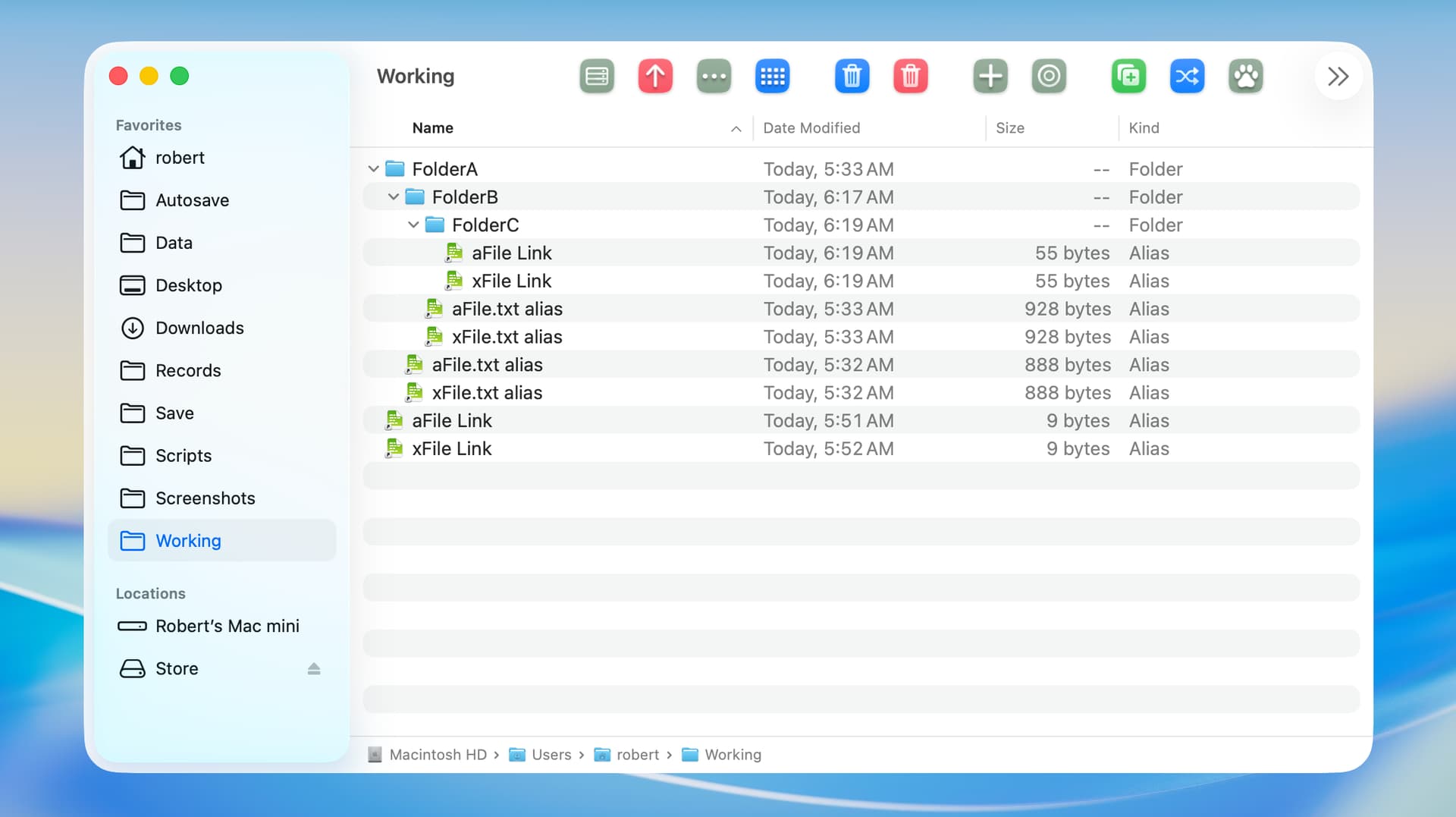
The “Working” folder is the source folder. This folder and three subfolders each contain two alias files or symbolic links whose file names begin with “aFile” or “xFile”.

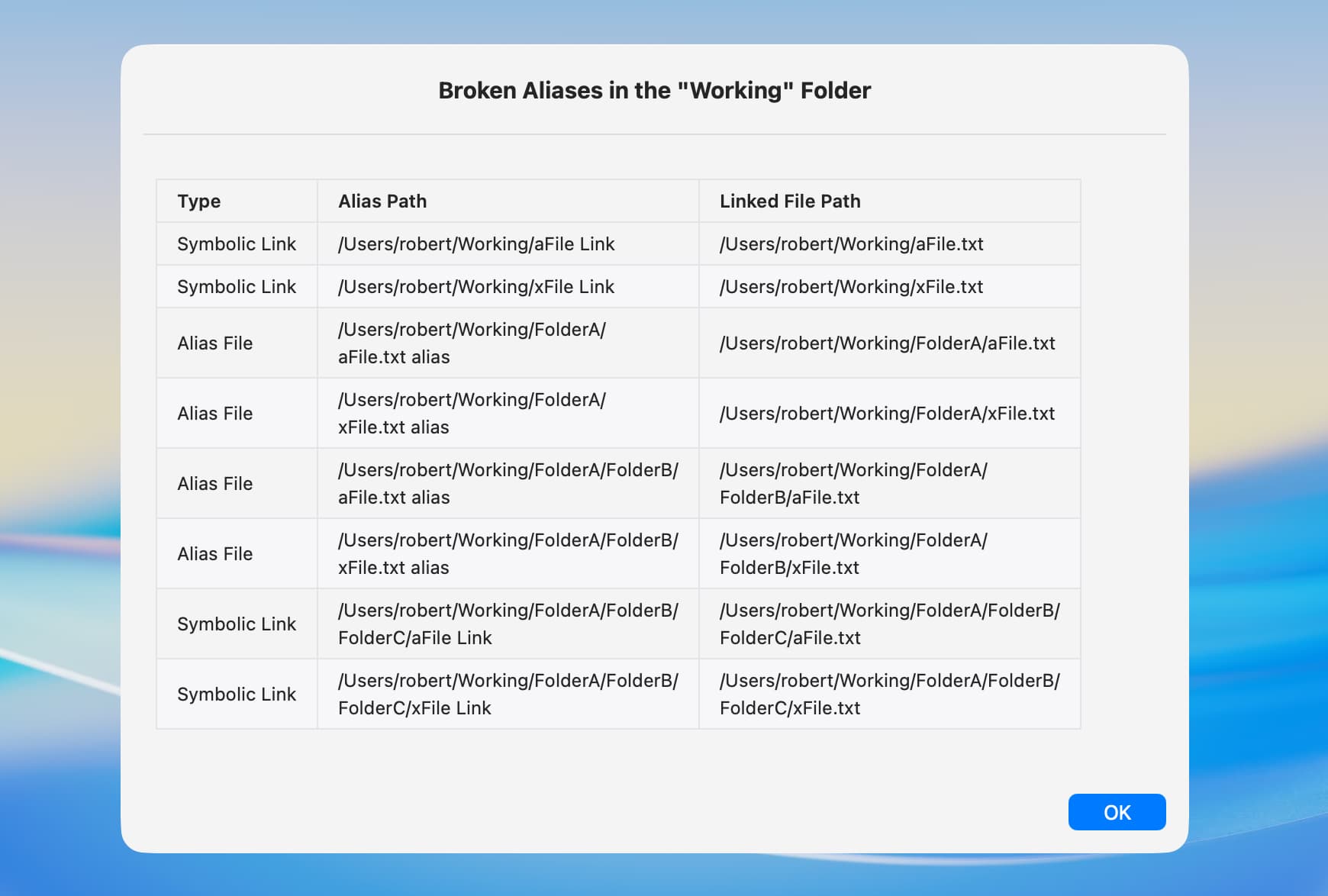
The following is the result of my script, and the broken aliases are sorted as I want.

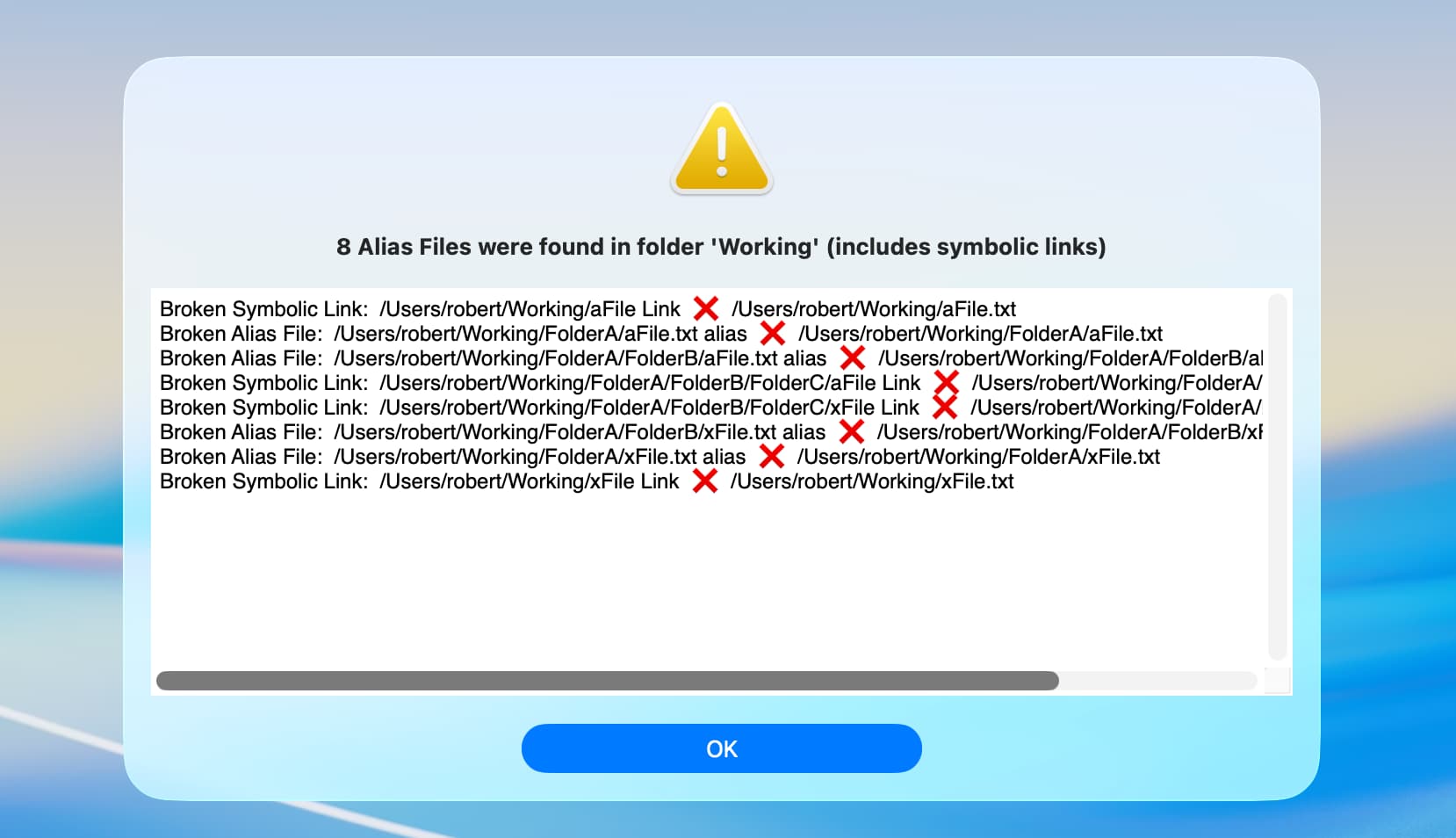
The following is the result of your NSAlert script, which sorts differently. The sort order is a matter of personal preference, and I don’t believe my approach is any better than yours.

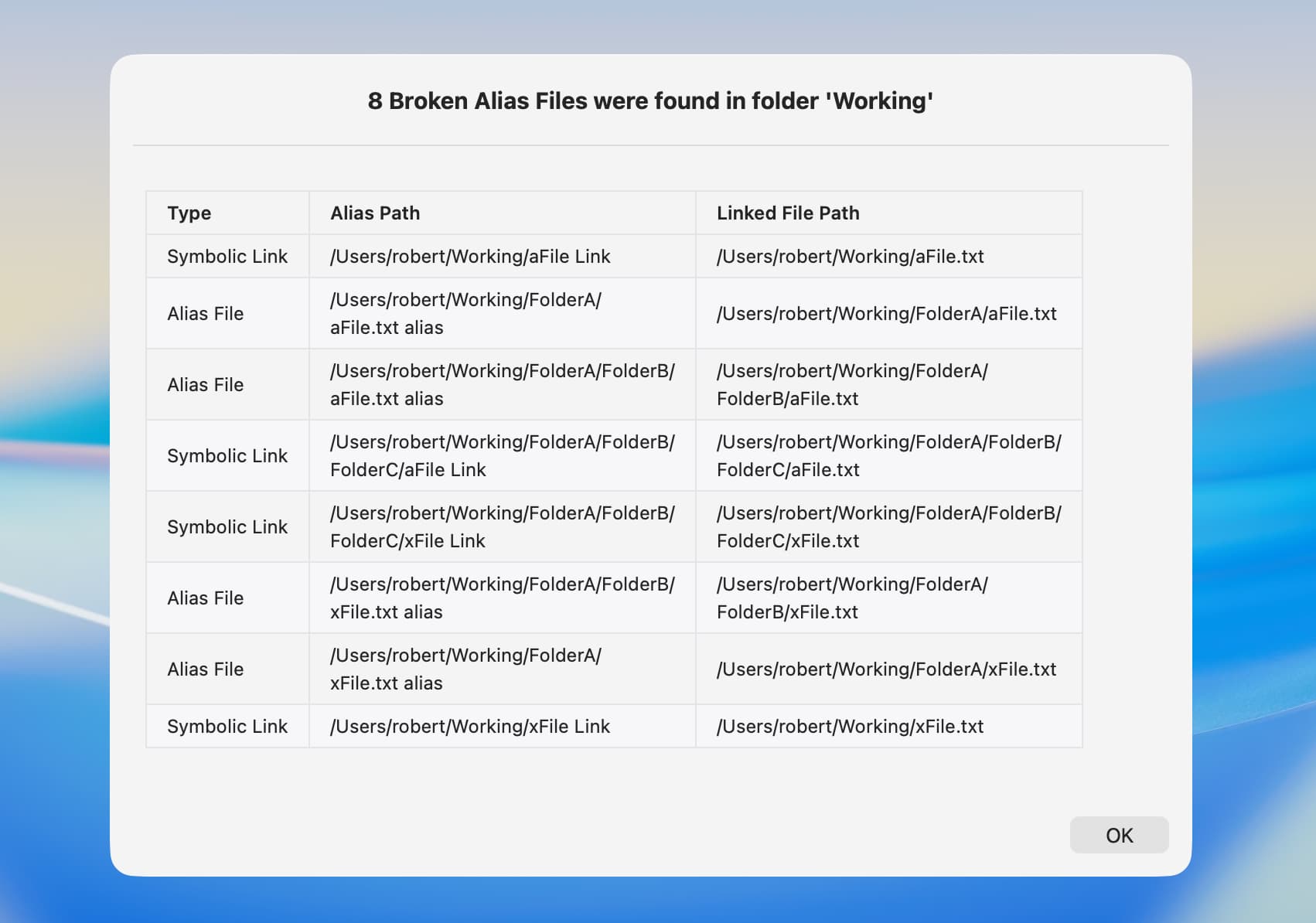
BTW, I reran my tests and edited this post only because I wanted to include symbolic links. Also, I tested your new script that uses swiftDialog, and it worked great.